

Closed for Voting

Tickets marked as spam

Related products:Freshdesk
  • May 1, 2020
  • 4 replies
  • 156 views

Hi, we started to see some tickets being marked as spam on a regular basis. We see even new tickets by people who have already been in contact with us in past being marked as spam. 


Is there any way to turn off the spam filter and only define our own rules, or define rules for e-mails that should not be marked at spam (e.g. e-mails having a subject with a certain prefix)? That would be very helpful and it would allow us to provide more reliable customer support.

4 replies

  • Community Debut
  • May 25, 2020

We are having this problem as well.  TONS and TONS of emails being sent to the spam folder that are NOT spam.  These are both new inquiries and ones we have responded to before.  I see no support staff has bothered to reply to this response by someone else that was posted 24 days ago.  Why?


This is a core function of a ticketing system and we need to know how to turn OFF the spam filtering.


We didn't even know a spam folder existed and have missed a ton of communications.


  • Community Debut
  • July 28, 2020

We too facing this issue. Lot of not spams being marked spams. Please have a way to turn off the spam filter.


  • Community Debut
  • August 20, 2020

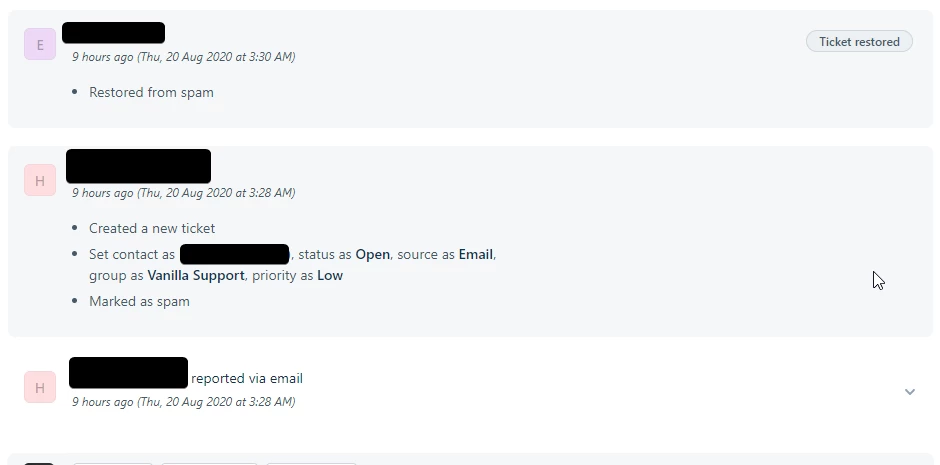
We are also having this issue. See this screenshot below:

image


This functionality needs review right away. 


- This was a critical ticket from an established client

- The activity log does not present any information as to why this was verified as spam

- We don't currently us the client facing portal, and have no reason to send this user a verification email. I have no idea if that would solve the issue, and cant toggle it manually. 


I cannot go into more detail here, but if it were not for a diligent agent, missing this ticket would have had heavy repercussions for the team. This is unworkable for us.  


Hello all,

Apologies for the delay in response.

The tickets land in the Spam folder of Freshdesk due to the following reasons.

- The ticket requestor is a deleted contact in your Freshdesk instance. You can check the same by navigating to Contacts >> Choose the hamburger icon on the top left >> Deleted contacts. If the contact is available there, restore the same to prevent the future tickets raised by this contact from landing in the Spam folder.

- Check if there is a Ticket creation rule (Admin >> Automations) set up to mark the ticket as Spam.

- If the sender spam score is higher than the expected value, Freshdesk would automatically mark the email as spam using our proactive spam filter. If you believe the sender is a genuine user then
please write to support@freshdesk.com along with the email headers of the email that was marked as spam. We shall have this investigated for you.

@Laura- I see that you have already logged a ticket with us. Kindly share the email headers with our agent to help us troubleshoot further.