About IntegrateCloud Freshdesk - Azure DevOps Integration App:
Azure DevOps (VSTS) Integration App by IntegrateCloud, allows the users to create work items inside the Freshdesk form. It also allows you to link Freshdesk tickets to an existing Azure DevOps (VSTS) work item. In addition, it allows Agents to notify the Azure DevOps (VSTS) team, by sending comments inside Freshdesk Support.
You can Collaborate your support team and developers at one place.
We also support customization based on customer request and tailored to your needs! We bring Azure DevOps (VSTS) closer to your business model!
IntegrateCloud Freshdesk - Azure DevOps Integration app usage guide
In order to use the IntegrateCloud app on Freshdesk, User’s required to create API Access token on Freshdesk and personal access token on Azure DevOps.
please follow the below our article to create the Azure DevOps personal access token and Freshdesk API Token
How to create personal access token on Azure DevOps and Freshdesk API Token
please follow the below our support article to install and configure the app from Freshdesk marketplace
How to install and configure IntegrateCloud Freshdesk - Azure DevOps Connector
Follow below steps how to use IntegrateCloud Freshdesk-Azure DevOps Connector
- Login to your Freshdesk account with your login credentials
- Create a new ticket in Freshdesk or go to any existing ticket.
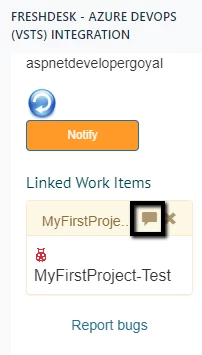
- You will see the Freshdesk - Azure DevOps Integration app on the right side of your ticket.
- In the App we have 3 Options.
- New Work Items which contain Bug, Epic, Feature and Task.
- Link to Work Item.
- Notify.
How to create Bug
- The New Work Item tab, select the type of work item you want to create Bug, Epic, Feature, Task, User Story etc.
- Based on the selection it will load all the Azure DevOps (VSTS) fields.
- The User can make the selection and click on Create button which would create work item in Azure DevOps (VSTS) and then display the corresponding Azure DevOps (VSTS) work item Id in the App.
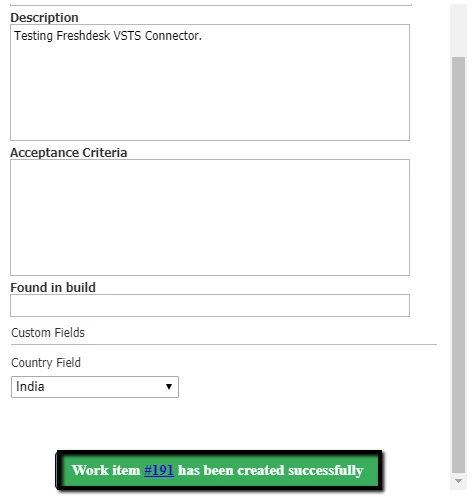
Similarly, user can create Epic, Feature and Task also.
Link existing work item
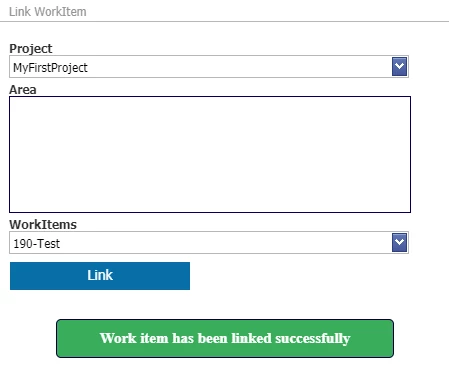
- This tab allows you to link an existing Freshdesk Ticket. It can be linked to one work item in Azure DevOps (VSTS).
- Freshdesk-Azure DevOps app allows the user to create or link multiple work items to one Freshdesk ticket.
- Select Project and Work Items from the drop-down options, then Click on Link.
Notify
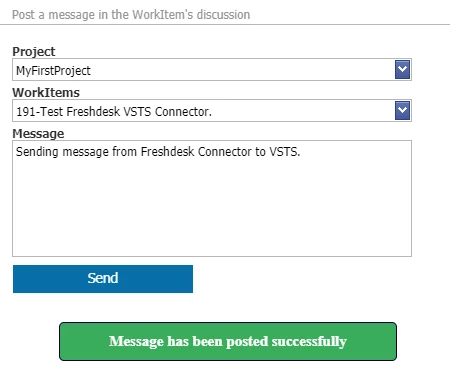
- The Notify button allows the user to send notifications to the Azure DevOps (VSTS) team which would show up as comments in Azure DevOps (VSTS)
- Select Project and Work Items from the dropdown options, Write the message that has to be sent then Click on Send
Show Item Comments:
This tab shows you all the linked Azure DevOps (VSTS) work item comments log to the current Freshdesk ticket.