

New Idea

Document Template Improvements: Silent attachment and Customized filename

Related products:Freshservice
  • March 31, 2026
  • 4 replies
  • 23 views

Medic1334
Top Contributor ⭐
Forum|alt.badge.img+9

We have several processes which involve creating a document that is then printed and sent to a customer (or emailed via PDF). In doing this it emails the requester that the form was created.  We additionally need to move the file out of the ticket and into a third party document storage system (I’ve automated this via Powershell script).

Given this use case, notifying the requester of ticket generation is not needed. Additionally, if it could be attached via Service item attachment instead of as a conversation that would clean up retrieving the file from the 

Additionally, being able to customize the file name on output would be nice. It appears that all templates follow the naming convention below. The ability to specify the name using placeholder values, just as with other items, would be huge.  In my use cases, I’m able to change the file name via an existing powershell script that gets the attachment out of the conversation automatically and moves it to a UNC Path, but it would be one more thing to improve the user experience (Example: Employee verification that uses employee ID instead of name, etc) in other use cases as well.

Current file output naming template:  (Template name)_(Requester first name)_(Requester Last name)_V#.pdf

Thoughts ​@mbutler ​@kenneth.anderson ​@DanielRuff or others?

4 replies

kenneth.anderson
Top Contributor ⭐
Forum|alt.badge.img+4

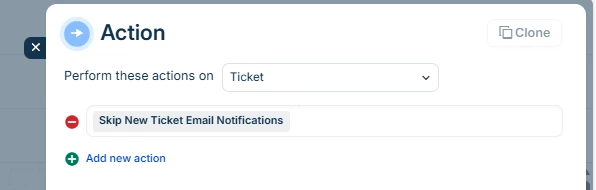
re: the notification part - I am assuming you are using the default, templated, Freshservice notifications? If yes, I believe there is an option in workflows that skips the initial ticket notifications


Does that help at least part of the issue?


Medic1334
Top Contributor ⭐
Forum|alt.badge.img+9
  • Author
  • Top Contributor ⭐
  • April 6, 2026

No functionality on this workflow by doing the skip new ticket email notifications. Good idea, but that only suppresses the “New ticket created” email apparently. I’m generating these documents on resolve since there needs to be an agent assigned (there are manual steps in another system I cant automate). 


kenneth.anderson
Top Contributor ⭐
Forum|alt.badge.img+4

Ah, I see.

So the notification that you want to supress - Is it the generic ‘Your ticket has been resolved’ one you don’t want sent, or another ‘invisible’ document related notification?

If it document related - you may need support or your CSM to get this put forward as a feature request. There shouldn’t be any templates that can’t be edited or turned off.


If it is the ticket resolved email, the way we tackled this many years ago was to turn off the system generated one, and workflow it. Throw in a hidden checkbox field. If it is ticked, workflow doesn’t send any notifications. If not ticked (as in 99.9% of tickets) send the ‘ticket resolved’ email.


Medic1334
Top Contributor ⭐
Forum|alt.badge.img+9
  • Author
  • Top Contributor ⭐
  • April 7, 2026

When a document is generated you can either have it be emailed to the user via the document template settings or via workflow. I have the document template setting unchecked and I'm generating it via workflow. This attaches the document to the ticket as a reply to the user from the system account. The reply text cannot be edited (another nice to have if a group wanted to put custom instructions or similar alongside the attachment) and a file name that also cannot be modified. 

This is a different notification than the ticket resolved default email notification. It does not exist in the email notifications admin panel either.