


Question

AI Agent not displaying knowledgebase info correctly

  • Aug 27, 2026 2:42 PM UTC
  • 1 reply
  • 51 views

Rich Downey
Active Contributor
Forum|alt.badge.img+4

HI,

 Getting some weird results where it is not showing all the info correctly, but close.

in our KB, we have a article explaining how to map a network drive, then another article showing a list of all the standard drive mappings. All the drive mappings start with the 2 slashes (ex \\SERVER\FOLDER).

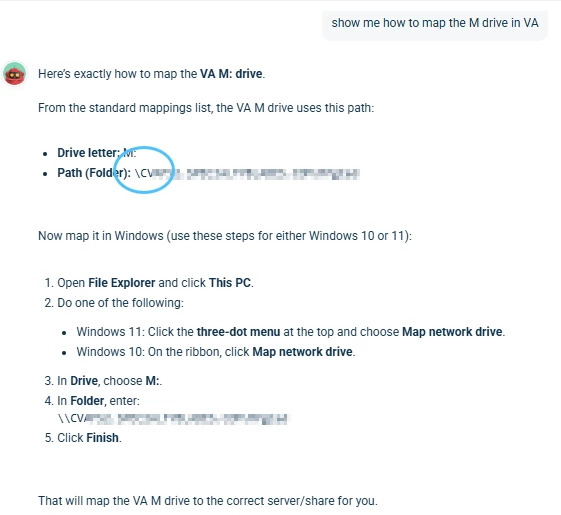
The results show the instructions, with the path, but in some places, it does not show the 2 slashes.

As you can see, the circled area, it only shows a single slash. Thoughts on why this us happening


1 reply

alextaylorone
Community Debut
  • Community Debut
  • Sep 7, 2026 5:02 AM UTC

The fact that the path is correct in the Knowledge Base but loses one of the leading slashes in some parts of the AI response makes me wonder if this is happening during the AI's formatting of the retrieved content rather than in the KB itself.

One practical test would be to create a small test article containing the same network path in a plain text/code-style format, then ask the AI Agent to return that exact path. If \\SERVER\FOLDER is still returned as \SERVER\FOLDER, that would help confirm the issue is happening during the AI response rather than in the original article.

I’d also compare the exact same article in the KB and in the AI response to see whether the missing slash happens consistently in path examples or only in certain parts of the response.

Does it happen with other paths or backslash-heavy examples as well, or only with these network drive mappings?