

Make requester field readOnly on user portal

  • March 9, 2018
  • 4 replies
  • 223 views

 Hi!


Just to make this note here so I can refer to it in the future:


Sometimes it's not desirable to allow the customer to change their own address while opening a new ticket, specially if you restricts those tickets to be opened only by authenticated users.


In this case, don' try to disable the input form since it strips out the value during the submit process. Instead, make the field readonly.


I couldn't do this on the CSS so I had to mangle the portal pages. You can see attached the like required to achieve this.


Hope it helps someone with the same need.


Cheers!
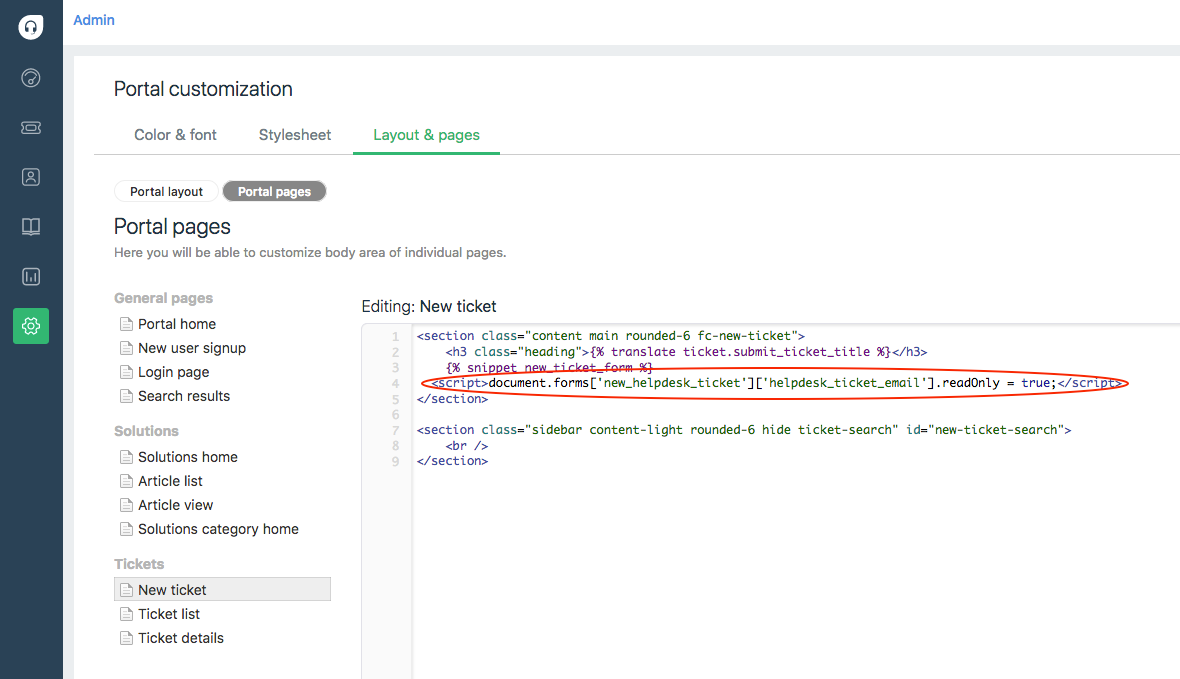


freshdesk-disable-requester_31376.png
This topic has been closed for replies.

4 replies

aravind.sundararajan
Skilled Expert
Forum|alt.badge.img+12

Thanks a lot for sharing the script,Marcos. This one's definitely going to be a great help :)


Cheers!


  • Community Debut
  • March 21, 2018
Should there be an attachment here or am I missing something? I would need to disable the ability to edit the requester field as well.


aravind.sundararajan
Skilled Expert
Forum|alt.badge.img+12

@Kalle : Re-sharing the snippet used by Marcos here.


<script>
document.forms['new_helpdesk_ticket']['helpdesk_ticket_email'].readOnly = true;
</script>


You can paste this snippet under Portal pages -> New ticket page section.


Cheers!


This is amazing!!!! Thank you for sharing



