


Question

Custom ticket status does not appear in Automation rule dropdown

  • April 2, 2026
  • 2 replies
  • 19 views

m.hilser
Apprentice
Forum|alt.badge.img+1

Hello everyone,

I have a question about custom ticket statuses in Freshdesk.

In addition to the standard status values like Open and Closed, I created a individual custom status. The custom status is available in the ticket itself and works there as expected.

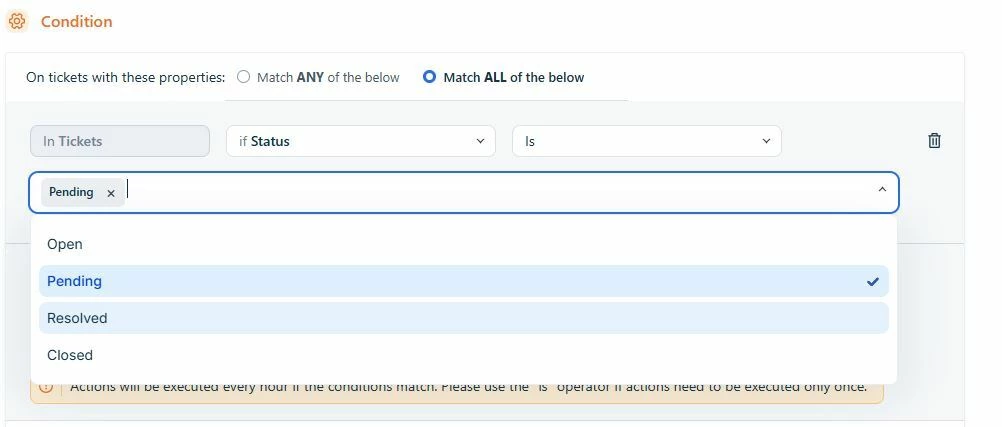
However, when I try to use this status in an Automation rule, I can only see the standard status values in the dropdown. My custom status does not appear there, so I cannot select it.

What I checked so far:

  • The custom status is already created and active
  • It is visible in the ticket status field
  • In Automation, only the default statuses are available in the dropdown

My questions:

  1. Is this a known limitation in Freshdesk Automations?
  2. Do custom statuses need any extra configuration before they can be used in Automation rules?

Has anyone had the same issue or found a solution?

Thank you in advance,

Markus


2 replies

Hi Team,

I have created a ticket to track the query, and I have also sent an email regarding the same.

Regards
SB


JoseRizal
Apprentice
  • Apprentice
  • April 9, 2026

Yeah this can happen in Freshdesk.

Usually custom statuses won’t appear in Automations unless they are properly mapped to a default state (like Open or Closed) in the ticket lifecycle.

Try checking:

  • Admin → Ticket Fields → Status mapping
  • Make sure your custom status is linked correctly
  • Also confirm you’re using the right Automation (Observer/Dispatch’r)

I had similar issue and after fixing the mapping, it started showing.

If still not visible, could be plan limitation or worth contacting support.