


Question

Custom ticket status does not appear in Automation rule dropdown

  • Apr 2, 2026 4:22 PM UTC
  • 3 replies
  • 309 views

m.hilser
Apprentice
Forum|alt.badge.img+1

Hello everyone,

I have a question about custom ticket statuses in Freshdesk.

In addition to the standard status values like Open and Closed, I created a individual custom status. The custom status is available in the ticket itself and works there as expected.

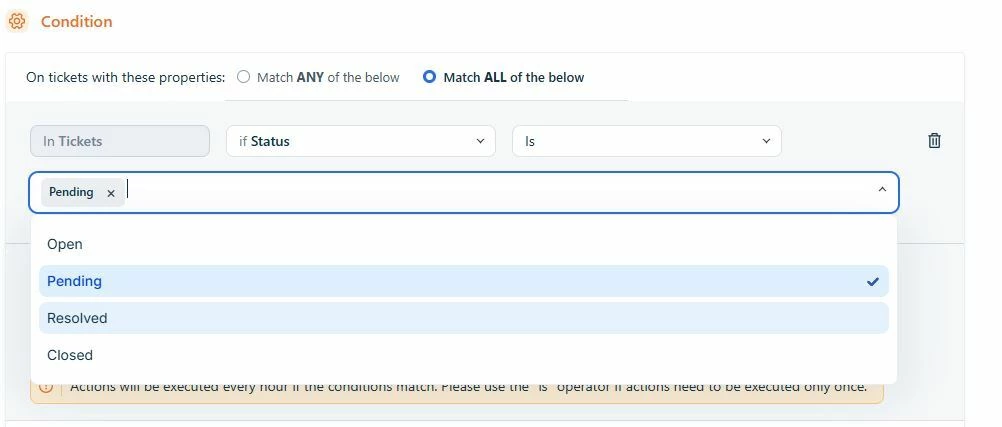
However, when I try to use this status in an Automation rule, I can only see the standard status values in the dropdown. My custom status does not appear there, so I cannot select it.

What I checked so far:

  • The custom status is already created and active
  • It is visible in the ticket status field
  • In Automation, only the default statuses are available in the dropdown

My questions:

  1. Is this a known limitation in Freshdesk Automations?
  2. Do custom statuses need any extra configuration before they can be used in Automation rules?

Has anyone had the same issue or found a solution?

Thank you in advance,

Markus


3 replies

Hi Team,

I have created a ticket to track the query, and I have also sent an email regarding the same.

Regards
SB


JoseRizal
  • Apr 9, 2026 7:23 PM UTC

Yeah this can happen in Freshdesk.

Usually custom statuses won’t appear in Automations unless they are properly mapped to a default state (like Open or Closed) in the ticket lifecycle.

Try checking:

  • Admin → Ticket Fields → Status mapping
  • Make sure your custom status is linked correctly
  • Also confirm you’re using the right Automation (Observer/Dispatch’r)

I had similar issue and after fixing the mapping, it started showing.

If still not visible, could be plan limitation or worth contacting support.


Forum|alt.badge.img+1
  • Contributor
  • Oct 28, 2026 1:56 AM UTC

Hi Markus, this could be related to how Freshdesk handles custom ticket statuses in Automation rules. You can read more about the available automation conditions in Freshdesk's documentation and check whether your custom status is supported. If it still doesn't appear in the dropdown, review your automation settings or contact Freshdesk support to confirm whether this is a current limitation.