Solved

Dropdown Field Not Working As Expected

  • July 31, 2024
  • 6 replies
  • 186 views

Forum|alt.badge.img+11

I am wondering if this is working as expected or whether this is a bug.

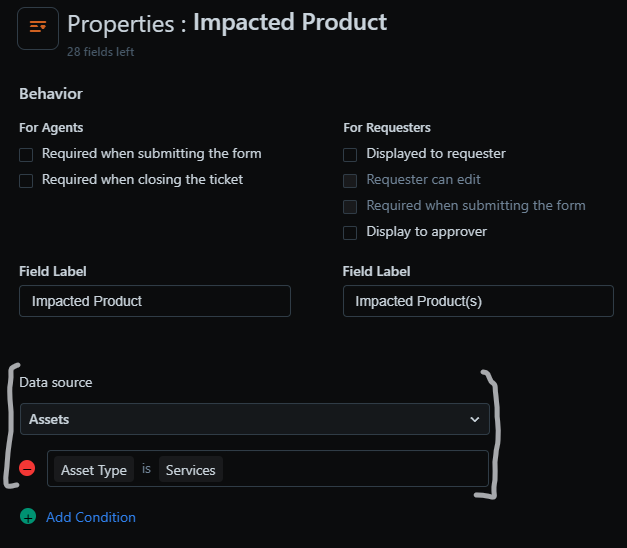
When working with Multi or Single Dropdown fields and selecting the Data Source as ‘Assets’...

Image

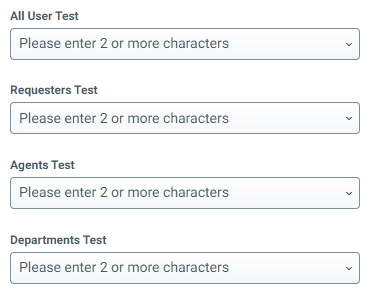
…All Users, Requesters, Agents, Departments but not Locations...


...when a user attempts to use these Dropdown fields in a form from within the Support or Agent Portals they instead work as a Search box:

Image

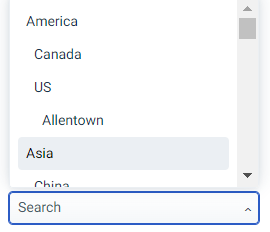
Why is this the case for everything except Locations?  Is there a way to force it to work as a Dropdown instead of a Search box?

Best answer by MDavies

I raised an idea based on this here:


6 replies

Daniel Söderlund
Top Contributor ⭐
Forum|alt.badge.img+14

I am wondering if this is working as expected or whether this is a bug.

When working with Multi or Single Dropdown fields and selecting the Data Source as ‘Assets’...
Image

…All Users, Requesters, Agents, Departments but not Locations...
 

...when a user attempts to use these Dropdown fields in a form from within the Support or Agent Portals they instead work as a Search box:

Image

Why is this the case for everything except Locations?  Is there a way to force it to work as a Dropdown instead of a Search box?

What I have seen it’s based on the amount of data in the list.
Never checked what the max number of items in the dropdown. 


Daniel Söderlund
Top Contributor ⭐
Forum|alt.badge.img+14

@alyssia.correa  need to move this one. 


Forum|alt.badge.img+11
  • Author
  • Skilled Expert
  • July 31, 2024

I was wondering this as well.  I first noticed this when testing it with Assets and filtering only on Services.  At the time of testing there were only two Services in the Inventory which, to me, seems like a low number to force the use of a Search Box instead of a Dropdown List.  Our list of Locations is 43-long yet is not forced to act as a Search Box.  Very odd...


Daniel Söderlund
Top Contributor ⭐
Forum|alt.badge.img+14

I was wondering this as well.  I first noticed this when testing it with Assets and filtering only on Services.  At the time of testing there were only two Services in the Inventory which, to me, seems like a low number to force the use of a Search Box instead of a Dropdown List.

Could be source type as well.  I just seen it with normal drop downs. 


alyssia.correa
Forum|alt.badge.img+8

@alyssia.correa  need to move this one. 

Hello @Daniel Söderlund - I moved it under the Freshservice Integration for Unified CRM or do you recommend under the FS - How do I?


Forum|alt.badge.img+11
  • Author
  • Skilled Expert
  • Answer
  • October 16, 2024

I raised an idea based on this here: