Question

Is there a way to export all attachments on all tickets

  • February 28, 2024
  • 11 replies
  • 237 views

Forum|alt.badge.img

I have gone ahead and did a full data export, is there a way for us to download all the attachments and store them offline? 


I know through the data export in the XML I can see a attachment URL, but i was wondering if there is an easier way to just download all attachments for a certain period. 


thank you! 

11 replies

Forum|alt.badge.img+2
  • Active Contributor
  • March 21, 2024

I have a similar need. I need to be able to export the attachment out of FreshService and send it to Workday. I have been unable to find a way to get the actual attachment out of FreshService?? 


Nittannia
Community Debut
Forum|alt.badge.img+2
  • Community Debut
  • March 31, 2024

Hi @Johnnydoe 

Could you try using the Attachments Viewer app and check if that helps with your use case. Navigate to admin → apps → Attachments Viewer to install the app. 


Forum|alt.badge.img+2
  • Active Contributor
  • April 1, 2024

So I watched the video associated with that app and it looks to be a lot of manual steps. I need a way that I can automate and still have it associated with the ticket. So like a ticket export that includes the attachment. 


Kamakshi V
Community Manager
Forum|alt.badge.img+11
  • Community Manager
  • April 2, 2024

Tagging @Nittannia 


Forum|alt.badge.img
  • Author
  • Apprentice
  • April 3, 2024

I tried the attachment viewer, but same I’ll have to go into each ticket and download the attachments it will take me months to do all the tickets with attachments.  


I need to have all attachments downloaded and sorted through. 


I also tried opening the XML export but when i try and open the XML attachment_url im getting an error.


"This XML file does not appear to have any style information associated with it. The document tree is shown below.

<Error>

<Code>MissingKey</Code>" 


But I'm using the key provided. I did some research on dev community and saw that there is a 5 min expiration for attachments is that accurate? 


@Nittannia @Kamakshi V 


Forum|alt.badge.img
  • Author
  • Apprentice
  • April 4, 2024

@Lucasj1 


i did come across these in the dev community. Basically saying that attachments have an expiry of  5 min.

That could be why you’re running into some issues, hope it was able to help I sent hours trying to figure it out.


https://community.freshworks.dev/t/attachment-url-that-read-from-data-method-from-app-side-shows-access-denied/7864


https://community.freshworks.dev/t/need-clarification-of-conversation-attachments/3783


Forum|alt.badge.img+3
  • Contributor
  • June 18, 2025

@Lucasj1


i did come across these in the dev community. Basically saying that attachments have an expiry of  5 min.

That could be why you’re running into some issues, hope it was able to help I sent hours trying to figure it out.


https://community.freshworks.dev/t/attachment-url-that-read-from-data-method-from-app-side-shows-access-denied/7864


https://community.freshworks.dev/t/need-clarification-of-conversation-attachments/3783

Strange as the documentation from the site says configure BI tool to pull  5-10 minutes after scheduled time. 

Picture from Data Export Setup window.

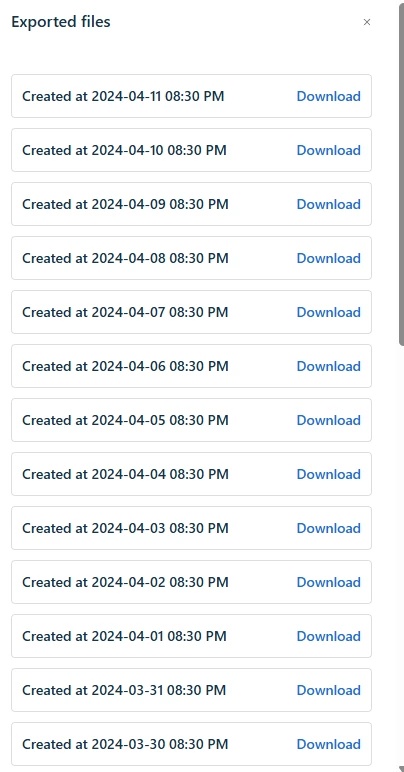
It also saves a link to all the previous exports too when you go to “download the export” Why would it allow it to expire if it gives links to all the previous exported versions? All of the download links below in the picture produce the same error as yours for me. 


I am testing out making a new export and seeing how long the link expires now. I will try to get back with my results. 


Forum|alt.badge.img+3
  • Contributor
  • June 18, 2025

Scheduled for 2:45PM

2:45-2:50PM, was still accessible

3:00 - 3:19PM was still accessible. 

Maybe the limitation was for how analytics used to run?


Kamakshi V
Community Manager
Forum|alt.badge.img+11
  • Community Manager
  • June 19, 2025

@Saptarshi ​@Amrit Mishra Any guidance around this? Does it fall under your scope? 


Amrit Mishra
Community Manager
Forum|alt.badge.img+8
  • Community Manager
  • June 19, 2025

No ​@Kamakshi V, attachments are currently not supported in Analytics. 


Amrit Mishra
Community Manager
Forum|alt.badge.img+8
  • Community Manager
  • June 19, 2025

@rawilkins Data export links in emails are valid for 1 day (24 hours) only. However, the download options from the Data Exports list page are always valid. You may have to refresh the page after an hour of opening it as the link itself is active for only 1 hour on the active tab. On a page/tab refresh, the link is regenerated and rendered active. Hope this clarifies.