Closed for Voting

Ability for agents to add reminders to tickets - similar to an Outlook reminder
Related products:Freshdesk
  • September 25, 2012
  • 45 replies
  • 85 views

Show first post

45 replies

  • Contributor
  • December 10, 2015

We have been using the Due Date within the ticket...

We set to what date we need to be reminded of and then It appears in the Dashboard on that date...


That does what we want as a work around.  At least on the day you get a flag.


@Andrew/ Simon / Philippe / Alessio,

Thanks for your immediate feedback and I see your point in having ticket specific reminders. In fact, we recently introduced date fields for tickets which will help you mark a date on tickets. We will look at the best way to extend the functionality of this field either through automations and / or through UI indications to serve as reminders decoupled from SLAs. Rest assured, I will update this forum first thing after we roll out such a feature.


@Kweeks

Thanks for posting the workaround you use - appreciate it!


  • Apprentice
  • December 21, 2015

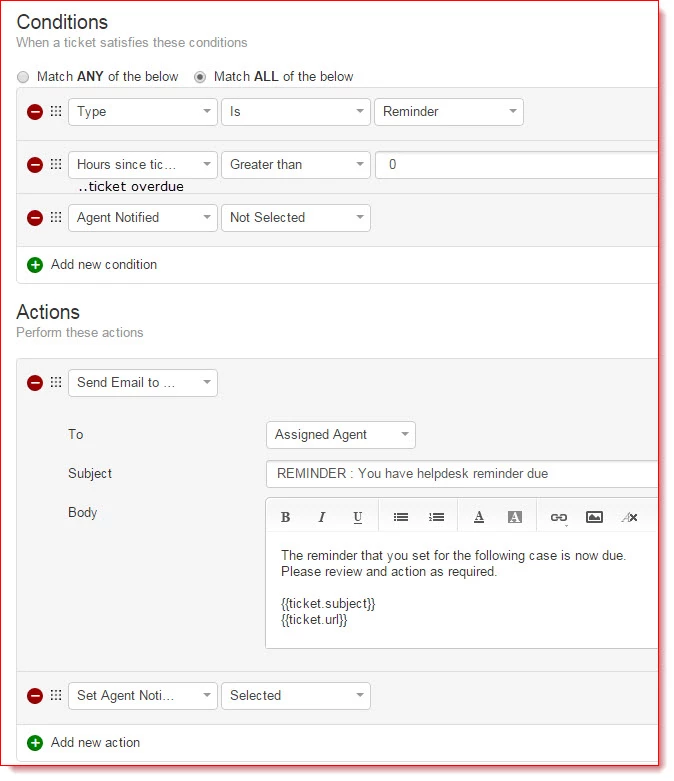
Here's what I do.


  1. Add a new ticket type field called "Reminder"
  2. Add a custom label field called "Agent Notified" (this toggles on or off)
  3. Set up a supervisor rule as follows;


When you require a reminder for a case, we set that case type to "Reminder" and edit the due date to the date and time you want the reminder.
The supervisor rule then sends an email to the agent at the time (well within an hour) of the reminder and sets the "Agent notified" label as "selected". This prevents duplicate emails.

Jason.


  • Community Debut
  • December 21, 2015
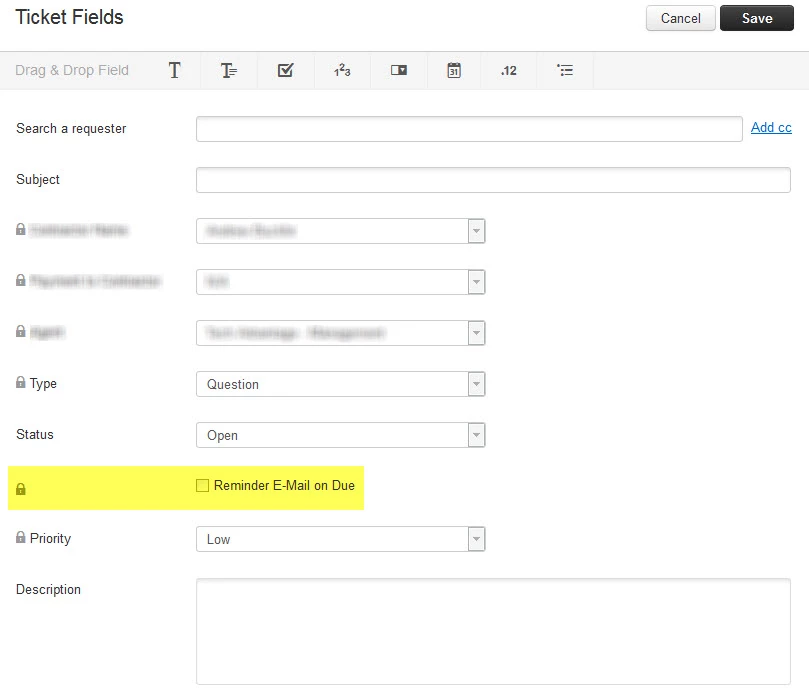
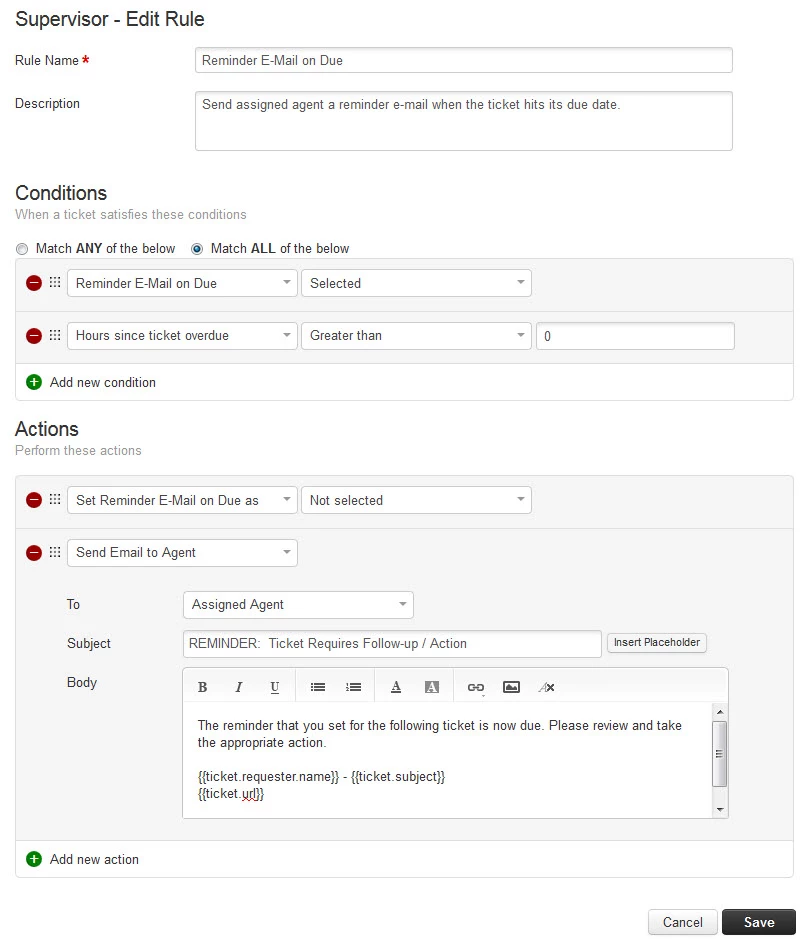
Thanks, Jason! That's a great idea / workaround! I expanded on this and actually consolidated it into just one additional custom field on the ticket (a check box titled "Reminder E-Mail on Due"). Checking this box and setting the due date is all you need to do. The supervisor rule will then send the agent an email at the due date and then uncheck the box (which prevents duplicate emails). Screenshots attached. I haven't tested this yet, but it looks correct. Thanks again for the idea, Jason!


  • Community Debut
  • August 16, 2016

You can edit & change tickets only when the status is OPEN, And that ticket must stay with status open in order for this to function? Because we created other status called "Reminder" and after setting the date we change the status to reminder but then it changed the date it seems. Any thoughts on this?


Please update us on this. 


Hi Alessio,


Unfortunately, we have not been able to further enhance this feature after the last enhancement related to SLA reminders. However, considering that the workarounds posted on this forum (thanks, Jason, Andrew!) have proven to be quite helpful, we are looking at extending the custom date field functionality to be used for reminders instead of the "Due date" field as posted in the workarounds. Will definitely update this forum when we have some concrete news on the approach. 


Thanks,

Arvind.


  • Community Debut
  • June 6, 2017

I've been using the workaround now for a couple of months and while functionally it works and agents are able to set reminders there is a big problem when it comes to reporting. In order to set a Due Date you must use a status that has the SLA Timer = ON. If you turn the SLA Timer off then you can't set a due date. This means the SLA timer is running the entire time a ticket has this status. I have reminders set for 3 weeks from now because that is when we've scheduled some task with the customer. With the timer running that quickly causes problems when looking at first response or resolution times. 


A custom date field is a must to resolve this issue. 


  • Community Debut
  • July 14, 2017

I have to remind someone to do something on a ticket in several months. I want that ticket to go back to Open and send me an email on that distant future date.


Reading through comments I'm getting worried that this is a challenge to do. 

This is not about SLA. The super old version of Kayako can do all sorts of stuff to a ticket on a specified date. Everyone obviously wants this. What is the problem?


  • Community Debut
  • July 17, 2017

We recently starting using Freshservice in our company as well as Freshdesk. Since using Freshservice I've noted there is the ability to add a task to a ticket. This feature is far more advanced than the tasks in Freshdesk as you can actually assign the task to another agent, set a due date and set a time to be notified. These tasks are then available in a calendar view. 


The option to set a task as per what is already available in Freshservice seems to me like it would work for all the use cases outlined in the thread. I suggest you role out this same feature for Freshdesk. 


  • Community Debut
  • August 11, 2017

@Arvind Ganesan : what 's new?


  • Community Debut
  • August 18, 2017

:+1:


  • Contributor
  • August 20, 2017
Where are we on this feature. In a support environment, it is important that commitments are met and adding this feature would help a lot. The Engineer would know when a task is due like calling Customer for follow-up or providing an update to the Customer. SLA's only remind you when they are due, and at times you may have made some committment to the customer already about a task. 5 Years, please provide an update on where this is headed.


  • Community Debut
  • February 6, 2018

+1  

I just searched for about 5 minutes for a "set to do" type of thing since it didn't occur to me that this functionality didn't exist.  I don't really want to mess around with SLA, statuses or due dates, I simply want something I can click and say "remind me to check this next week" or "test this tomorrow and close ticket".  So unfortunately the workarounds are not very helpful.


  • Contributor
  • February 11, 2018

+1 for this, if we could simply have a to do list that we could:

a.) Assign a date to a to-do (each ticket might have 2 or more to-dos, such as "follow up with management", "follow up with the client" would both be on different dates)

b.) Show sorted on the dashboard by date

c.) Send an email reminder the day before the due date, or day of (maybe this could be a supervisor rule that each account could set what date the reminder email goes out and what it says)

d.) Assign the to-do to other agents (this would be helpful, but not totally necessary for the first implementation). 


There are a lot of people interested in this, it's showing as one of the most popular feature requests, but there has been no activity here by FD support to implement this.  That's a shame, it would be a REALLY helpful tool, and allow our team to work mostly from within FD instead of manually using a task-management / calendar app outside of it for these to-do lists. 


aravind.sundararajan
Skilled Expert
Forum|alt.badge.img+12

Hello,


Happy to let you know that we've made some considerable progress in developing this feature.With this, you'd be able to setup reminders on the To-Do list items.


An announcement is on its way soon! Stay tuned!


Cheers!


  • Community Debut
  • March 12, 2018

Great news! Do you know if this new feature is similar to the Tasks functionality in Freshservice? 


aravind.sundararajan
Skilled Expert
Forum|alt.badge.img+12

@Shem: This one's an extension to the To-Do widget available in the Ticket page/Dashboard section. The current To-Do lists get displayed only for the agents who create them and this would serve as a self-reminder.


Cheers!


aravind.sundararajan
Skilled Expert
Forum|alt.badge.img+12

Good news everyone! We've enabled this feature for all new signups and for existing accounts, we're running a batch job - meaning, you'll see this option in your helpdesk soon. 


Here's something that you need to know about the feature : 


1. This is a MINT only feature - To know more about MINT, read : https://support.freshdesk.com/support/solutions/articles/229464-what-s-changed-in-freshdesk-mint


2. This will be available for accounts, with Blossom and above plans, which has the inbuilt smart notifications enabled already. 


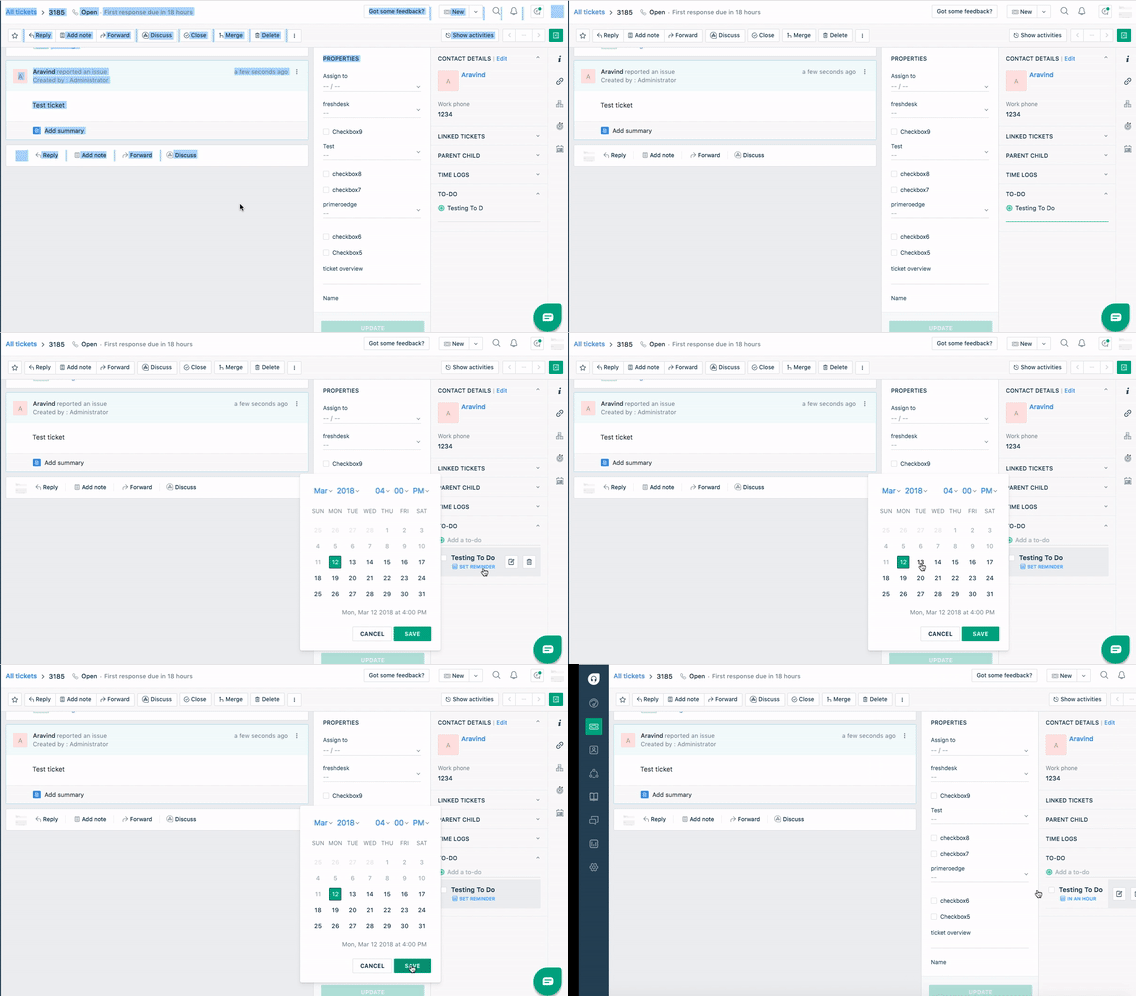
Here's a small glimpse of the reminder functionality :


Cheers!


aravind.sundararajan
Skilled Expert
Forum|alt.badge.img+12

Happy news, Folks. This is now available on all accounts subscribed to Blossom or above plans. Here's the self-help articles about the feature : https://support.freshdesk.com/support/solutions/articles/232272-add-reminders-in-freshdesk


Cheers!