

Closed for Voting

Ability to choose the language on the login page

Related products:Freshdesk
  • January 14, 2016
  • 6 replies
  • 33 views

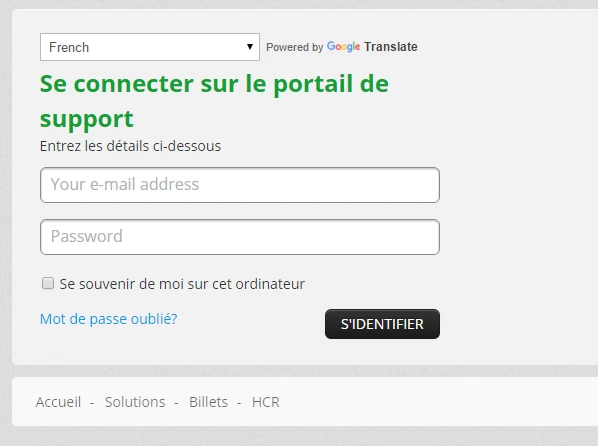
Currently, the login page only appears in the portal's default language. There is no way for a user to choose a language so they can read the login page. The only workarounds are to add the Google Translate widget or to create multiple products for each language. The widget does a poor job of translating and does not translate everything, including the 2 most important fields: email address and password (as shown below), and so it does not look very professional. Creating multiple products for each language also over-complicates things when you only have one product.


Freshdesk already has the proper translations and providing the ability to select a language on the login page would address this usability problem.



6 replies

sajesh.krishnadas
Contributor
Forum|alt.badge.img+6

Hey Kevin, we are indeed working on the Multilingual Support for KBase which in turn will have the language selection on the entire portal along with the login page. The feature is currently in the final phase of development, so we will keep you updated once we roll out the feature. 


sajesh.krishnadas
Contributor
Forum|alt.badge.img+6

Hi Kevin,


The Multilingual Support for Knowledge Base is out! Here’s what the Multilingual KBase can help you with: 

  • Easier collaboration across teams with all languages being available on one portal 
  • Color coded status indicators to enhance agent productivity 
  • Language specific meta tags to improve content discoverability 
  • Automatic language detection to provide seamless support to your customers speaking different languages


To get started with the Multilingual KBase feature, check out these knowledge base articles here. 


Read more about the feature in the blog post here


  • Author
  • Apprentice
  • July 21, 2016

If this is implemented, how do you even make ONE solution in multiple languages? I'm not seeing anything new when writing Solutions.


sajesh.krishnadas
Contributor
Forum|alt.badge.img+6

Kevin, kindly go to Admin->Helpdesk->Click on Setup Multilingual Support. In the Manage Language page, select the correct primary language and add the required supported languages. Once the languages are selected and save, the solutions tab will have the provision to create articles in all the supported languages. 


Note: You cannot change the primary language you set after you enable multilingual support. Also, all the solution articles you have created while using the knowledge base in the past will be mapped to the primary language you now set in the new multilingual knowledge base.


You can also read this article which will help you setup the feature. 


How to set up a multilingual knowledge base


  • Author
  • Apprentice
  • July 22, 2016

Ah, I see. We already had multiple languages setup, but I had to make the secondary language visible on the portal, which is a new option. Now I see the tabs for the languages on Solutions.


Thanks!


sajesh.krishnadas
Contributor
Forum|alt.badge.img+6

That's awesome, happy to know that you got it working. We are looking forward to hear your experience with the new feature. Thanks.