New Idea

Ability to customize fields displayed when viewing all customers of a company

Related products:Freshdesk
  • December 17, 2025
  • 2 replies
  • 36 views

Forum|alt.badge.img+3

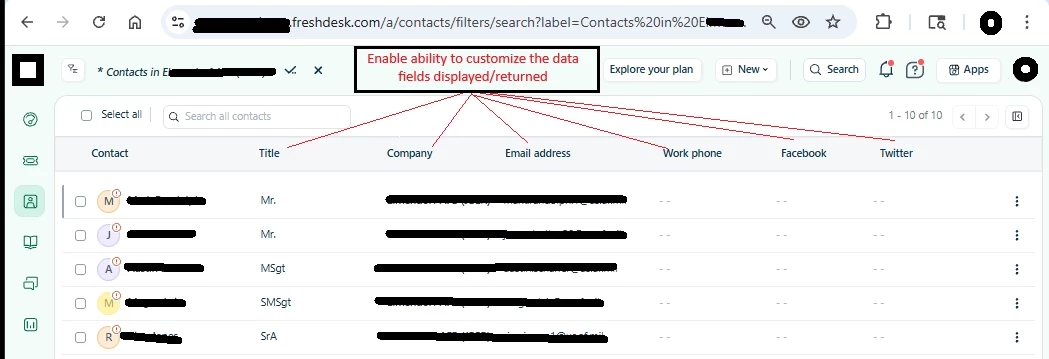
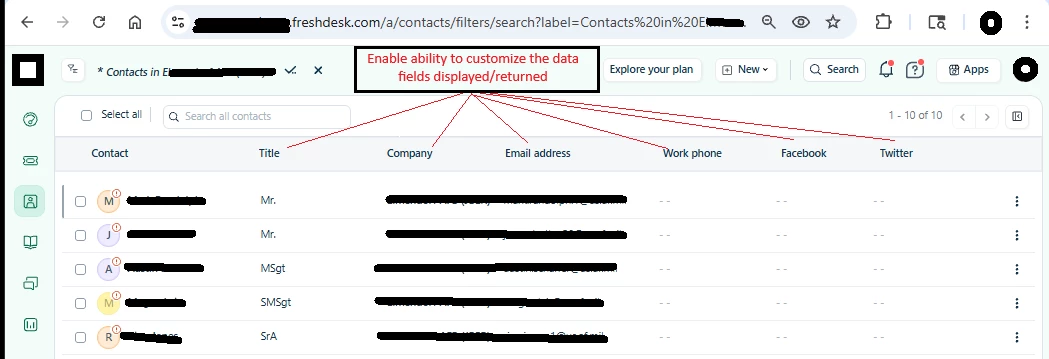
After clicking Companies, clicking to open any company and under contacts, clicking View All to see all contacts, currently the data columns that are returned are fixed and not customizable. 

Recommendation:
Enable us (customers) the ability to modify the data columns returned, including customer-created data columns so that the data returned regarding contacts for a company is useful and presents the data pertinent and important for us, the customers.

i.e.: We have a data fields “Position” an “POC” as well as several other data fields that would be very useful for us when clicking to see all customers.

Fields such as company, facebook, twitter, etc... are not useful... at least not for us anyway.
 

2 replies

Forum|alt.badge.img+3
  • Author
  • Contributor
  • January 6, 2026

If there are questions, or if the request is not clear, post a comment/question for clarity.


Forum|alt.badge.img+3
  • Author
  • Contributor
  • January 7, 2026

For any company, it is possible to see all contacts for the company. To view the contacts for a company,

  • Click to view the company
  • Under the company name, a clickable text link will dispaly the number of contacts for the company
    • click this link

In this view, presently the data columns for the contacts are static and cannot be changed. The columns are

  • Contact
  • Title
  • Company
  • Email Address
  • Work phone
  • Facebook
  • Twitter


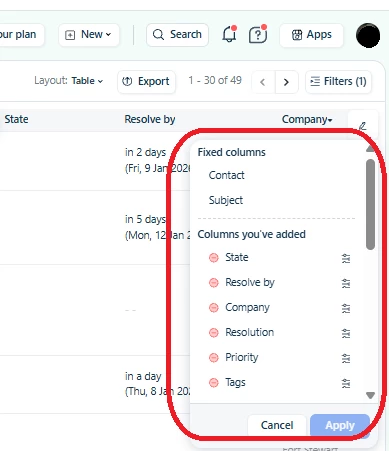
It would be ideal for these data columns to be edited, similar to how the data columns for Ticket view in table mode can be edited. There are data fields associated with contacts that would be more useful in this “All contacts” view than the default columns.


I used the ticket view as reference example for the desired capability in the All Contacts view for a company. Below are the screen shots for the ticket view in table mode and editing the columns therein.


Ticket view, editing the data columns presented:


 The red arrow points to the pencil used to edit the columns displayed.


Clicking the pencil to edit the columns displays all data fields available to display related to a ticket.


Just as in the tickets table, the Contact name would be a fixed / required field. All other fields, including Custom or created fields should be custom selectable to display the customer data that is pertinent to us.


Hopefully this provides more clarity on what is requested.