


New Idea

absolute date notation in Freshdesk Japanese UI

  • October 5, 2021
  • 5 replies
  • 98 views

JunN
Apprentice

In news websites, social media feeds, etc., the date of each article may be expressed in relative notation. However, dates on tickets in business must be handled strictly in absolute notation.

In the current UI of Freshdesk, we are facing the same problem as an old support community topic below when displaying tickets in card view.
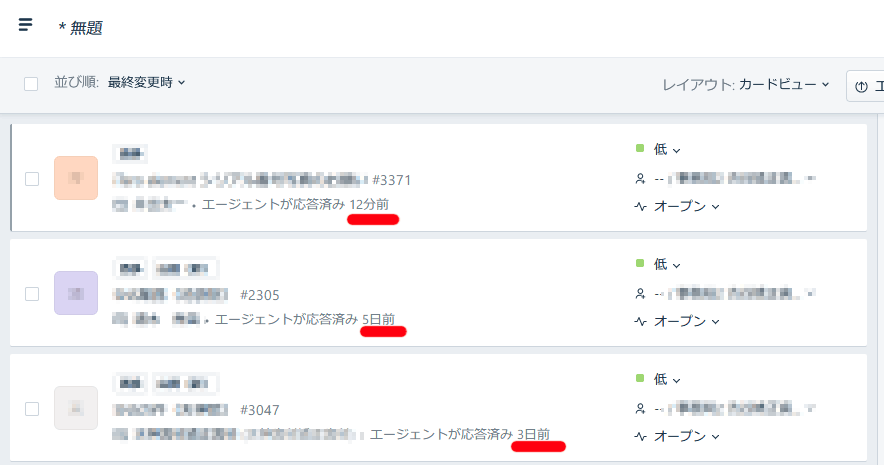
relative date notation in Japanese UI


Display Date Ticket as Created Instead of Time Past (very old article)
https://support.freshdesk.com/support/discussions/topics/18680


In this article, developer guy said that the fix has been implemented, but the current card view displays relative time, and the table view cannot display time and date information. I would like to see a quick fix or an option to choose the time notation to do efficient work.




5 replies

cdenesha
Community Debut
Forum|alt.badge.img
  • Community Debut
  • September 5, 2024

I am trying to research a ticket, but all entries say “3 hours ago” - I need more accuracy. The Freshservice UI really needs an option to change to absolute date. It should be set in the agent’s profile.

thank you


Yusuf Ahmed
Community Manager
Forum|alt.badge.img+8
  • Community Manager
  • September 8, 2024

Hi @JunN,


Greetings from Freshworks community. I understand the concern regarding the use of relative date notation in the UI. For a solution, you can use Freshdesk Analytics to view ticket dates in absolute notation. This allows you to see the exact creation dates of tickets, which might help in your current scenario.

Please refer to this guide for details on how to view, filter, and export the underlying data for widgets in Freshdesk Analytics.


Yusuf Ahmed
Community Manager
Forum|alt.badge.img+8
  • Community Manager
  • September 8, 2024

Hi @cdenesha,


Good day to you. I’ll loop in @rajagopal.baladhandayutham to assist you with Freshservice .


  • Community Debut
  • September 8, 2024

Sometimes, there are options in the admin panel or user interface settings where date formats can be adjusted. Make sure you've explored all the customization options within your account settings.

Since this issue seems to persist despite a past fix, it’s a good idea to contact Freshdesk support. Explain your case, referencing the old support discussion if needed. They may be able to provide insight on whether this issue is specific to your version or UI language, or if it's a bug that needs readdressing.


  • Community Debut
  • March 13, 2025

Hello, is there any solution available in Freshdesk to set absolute date view on the ticket in card view display mode?

