Closed

Add a custom ticket "date" field

Related products:Freshdesk
  • Mar 5, 2013 3:19 PM UTC
  • 32 replies
  • 154 views

It would be awesome to have a custom ticket "date" field with a simple "one-click" way to choose a date (from a calendar). I intend to use this feature in a "deadline" type field.


Thanxs


32 replies

 Be good also if alerts could be run from that deadline? Like X days before hand. I guess kind of like a SLA feature.


We have this on OTRS and it's very useful. "Pending until some date" 

Then we receive notification for pending ticket.


  • Community Debut
  • Jan 16, 2014 3:45 PM UTC

This would be a great feature to have - we're using Freshdesk to capture and manage service requests, and having the client being able to choose a "needed by" date from a calendar on the ticket form would be really helpful!


  • Community Debut
  • Jan 18, 2014 3:56 PM UTC
Absolutely support this feature-add.  There are times when a custom "requsted" or "opened" date needs to be opened in order for proper ticket tracking.  We have engineers at client sites frequently and often times come back to the office with additional tickets they need to open and log time for.  If they don't get to this administrative duty until the next day, there is no way (that i know of) today to mark the ticket as requested/opened on a previous date.  If this is possible presently, please can someone direct me how?  Thanks!


  • Contributor
  • Mar 2, 2014 9:28 PM UTC

We like this one too. It says "in progress" -- can we get an update from Freshdesk on when this will be in a release?


Hi Marc, 


I'm sorry we don't have a concrete ETA as of now. Will give you an update once we roll out this feature. 


Thanks 


  • Contributor
  • Mar 12, 2014 8:30 AM UTC

+1


This would basically just complete the package for us. Custom date field that you could use in Observer to trigger an alert would be awesome. Also the pending until would be great for planned work  


  • Apprentice
  • Apr 8, 2014 4:40 PM UTC

+1 Thanks for taking on this feature Freshdesk team!


  • Community Debut
  • Jun 29, 2014 1:59 PM UTC

Hi, 


Just wanted to let you know that Zen Desk added this feature. When will we have it?


A very much wanted feature for us!

Please add this asap. :)


Thanks!


  • Contributor
  • May 31, 2015 10:29 AM UTC

This would be absolutely fantastic! Needed asap! 


  • Community Debut
  • Jun 1, 2015 11:46 PM UTC

Please add this asap


  • Community Debut
  • Jun 20, 2015 12:17 AM UTC

Agreed, plz add ASAP :) :)


Definitely needed!


  • Apprentice
  • Jul 22, 2015 1:40 PM UTC

I definitely think this would be awesome! 


As of right now, I am using a text field and some manual work to maintain the "Date Needed" and it is definitely more work than what should be necessary. 


  • Community Debut
  • Jul 22, 2015 7:18 PM UTC

Another vote here for this feature, please.


  • Apprentice
  • Jul 23, 2015 9:23 PM UTC

I love the idea of a required by date. It would be nice if there was a way to show these metrics in reporting too. To compare them to the time tracked by tickets.


  • Community Debut
  • Aug 24, 2015 1:23 PM UTC

DATE type Custom Field for Freshdesk Tickets

When will a custom field of the "date" data-type be added to the types of custom fields available to Freshdesk Ticket custom fields?

Please update this thread regarding where the roll-out of this feature stands.


  • Community Debut
  • Aug 27, 2015 12:03 AM UTC
Please keep me posted when this is implemented.


Hello Everyone,


We have rolled out the ability to add date fields to ticket forms for all plans.

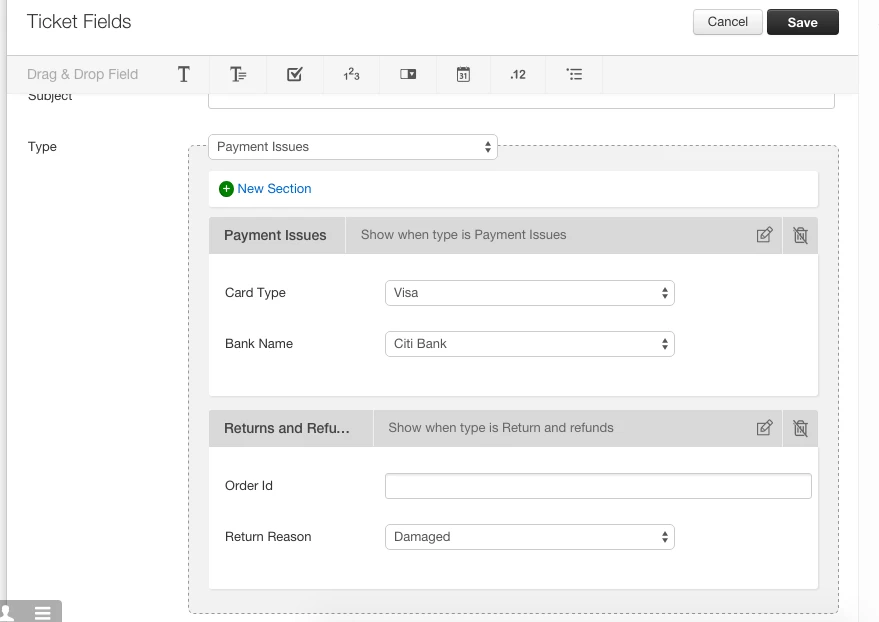
To include date field in your ticket form, please go to Admin> Ticket Fields. You will see a calendar/ date picker icon on the top bar.


Drag and drop the field to add it to the ticket form. 

Note: A maximum of 10 date fields can be added to the form. 


On a similar note, we have also released another feature called dynamic forms. This will give you the ability to show/hide fields based on the "type" selected by the customer. For example, in an ecommerce scenario, when the type is chosen as "Replacement", a section with a field called "Reason" can open up that will collect the reason why customer needs a replacement for the item. You can read more about dynamic forms in this article.


As always, thanks much for the detailed use-cases and patience while we built this! 

We would love to hear your feedback. Please feel free to post your comments.


Also, I'll keep this thread open until we implement a solution to use these date fields in Supervisor to :

1) send out reminder emails or 

2) change status back to open when current date is the same as custom date field's value


Thanks,

Janani


  • Contributor
  • Nov 3, 2015 9:38 AM UTC

This feature is now live!!!! Thank you Freshdesk! 


mrenaud
Skilled Expert
Forum|alt.badge.img+6
  • Skilled Expert
  • Nov 3, 2015 2:50 PM UTC

Very, very nice feature. Thanks!


  • Community Debut
  • Nov 4, 2015 1:46 AM UTC

thanks team! keep up the great work!


  • Community Debut
  • Nov 21, 2015 9:26 PM UTC
A new 'Date' field has been added in the October release. It's quite useful but you can't run Supervisor rules or Reports on the new field afaia.

Also, you can't set or change the date field using the mobile app.


  • Contributor
  • Nov 29, 2015 2:04 PM UTC

Setting the time is next :)