Closed for Voting

Add a note to a ticket on dispatch rule

Related products:Freshdesk
  • October 5, 2012
  • 23 replies
  • 36 views

it would be great to add an auto note in Dispatcher to a ticket e.g.

- Guest logs a ticket with a particular item selected 

- Note is added to the ticket to tell the agent "Hi Agent, remember this product isn't available in the US so keep this in mind when replying" 


this would be great! as at the moment I can only "send an email to agent" for these types of things (correct me if I am wrong) 

23 replies

Planned 2 years ago? Can you tell something about this?


Please add it


  • Community Debut
  • May 6, 2015

+1


Please!!


Note for remember the agent that the customer is temporaly blocked!


  • Contributor
  • August 5, 2015

+1


 +1.

The possibility of adding notes would be very useful in being to mark with notes which rule performed automatic action on a ticket.


  • Community Debut
  • April 25, 2016

+1


  • Community Debut
  • July 27, 2016

Just had a live chat with support today and found out this is still not feasible or under consideration. This is a significant need on our end, +1 to seeing this added. 


  • Community Debut
  • August 10, 2016

+1

Great feature to have. I would like to say "Hi agent, an auto reply has been sent to the user" as a note. I know it can send an email saying that but there is no good way to tell the auto reply was sent in ticket view.. Right now we have the dispatch'r add a tag to it that says "Auto Reply Executed" as a simple workaround.


Freashdesk Team, please say something

* we dont' want this

* we can't do this now

* it's interesting, it's in our roadmap


  • Apprentice
  • March 7, 2017

We would also love to see this possibility being available soon on both the dispatch'r and supervisor. We've got a couple of automated rules in the supervisor that will bring back our agent's attention to a specific ticket on which they will be required to take a specific action. Would be very helpful if we can help remind them of these actions by adding a private note within the same supervisor or dispatch'r rule. 


  • Contributor
  • November 11, 2017

Any news when this can be implemented? I have been looking how to achieve this and found number of topics on the forum where other people are asking for this feature too. Keeping my fingers crossed it is coming to FD soon!


  • Contributor
  • November 14, 2017

+1


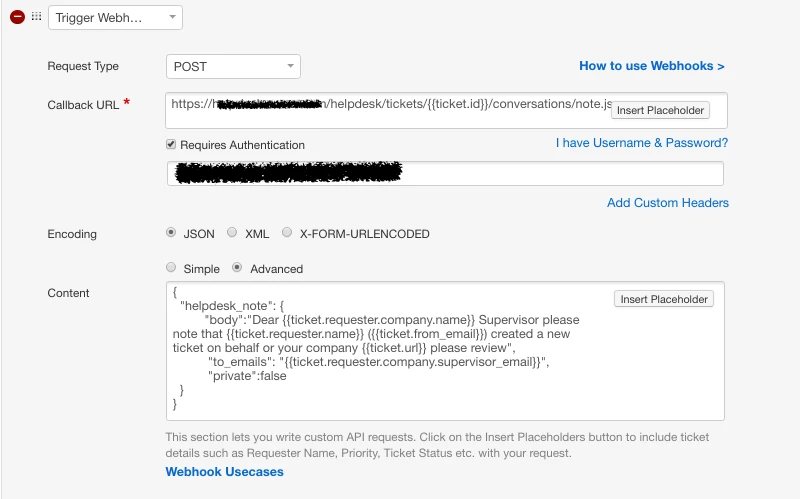
I manage that with a small workaround trough webhook and the freshdesk API


image


aravind.sundararajan
Skilled Expert
Forum|alt.badge.img+12

Hello,


At the moment, this is not planned in our immediate roadmap but I'll have a chat with the product manager to see if we can create some room for this. Having said that, it is still possible to post a note on a ticket through Dispatch'r rules, thanks to @Pietro who has cracked it up.


The Dispatch'r rule will make use of our API endpoint for adding notes - Add note to a ticket. You can use the Trigger Webhook action in the Dispatch'r rule to make an API call to this endpoint.


Let me breakdown the different config items for the webhook.


Request type: POST


Callback URL: https://<yourcompanyname>.freshdesk.com/api/v2/tickets/{{ticket.id}}/notes


Requires authentication: checked , choose the option I have an API key and input your API Key


Encoding: Json


Content: Advanced


{ "body":"Your note content", "private":true, "notify_emails":["tom@yourcompany.com"] }


Cheers!


  • Community Debut
  • May 28, 2018

Any updates on this? Planned 6 years ago!!!


  • Apprentice
  • August 1, 2018

Please take note that the solution piedro suggests is no longer functional, you need to use 'Aravind S' solution, its subtly different.


  • Community Debut
  • April 7, 2019

This would be incredibly useful.


  • Contributor
  • June 19, 2019

This would be useful to me too.


It would also be better to send the agent a reminder in a private note to make sure the customer doesn't see the internal communication.


  • Apprentice
  • September 9, 2019

+1


  • Contributor
  • September 9, 2019

This feature is now possible with the new automations in beta:

https://support.freshdesk.com/support/discussions/topics/50000000107