Open : Open for Consideration

Allow the Timer node to accept the results of a function

Related products:Freshservice
  • August 18, 2022
  • 8 replies
  • 180 views

KrisC
Skilled Expert
Forum|alt.badge.img+7

It would be very nice if the Timer node can be dependent on the results of a expression node.


My example:

I have a workflow that will determine the amount of hours until the next action needs to take place. In this case, HR submits a offboarding request > Workflow calculates the hours until the termination date/time then pauses and waits to finish the rest of the workflow until that timer ends. 


The end result I would like to trigger a orch in google at that time.

8 replies

christian.mentor
Skilled Expert
Forum|alt.badge.img+6

I would like to echo this request for the same exact use case, plus something similar for onboarding someone new.

Adding a placeholder-type ability to add the results of an expression would do wonders for the user lifecycle management experience.


RYGUY
Community Debut
  • Community Debut
  • November 4, 2022

It would be very nice if the Timer node can be dependent on the results of a expression node.


My example:

I have a workflow that will determine the amount of hours until the next action needs to take place. In this case, HR submits a offboarding request > Workflow calculates the hours until the termination date/time then pauses and waits to finish the rest of the workflow until that timer ends. 


The end result I would like to trigger a orch in google at that time.

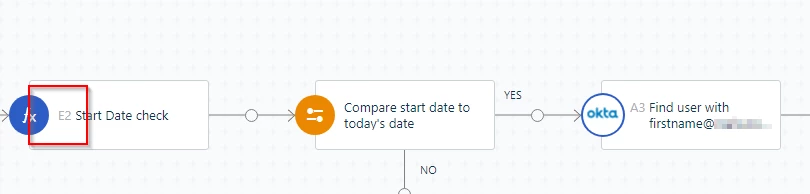
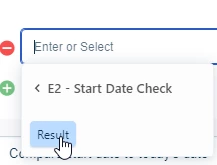
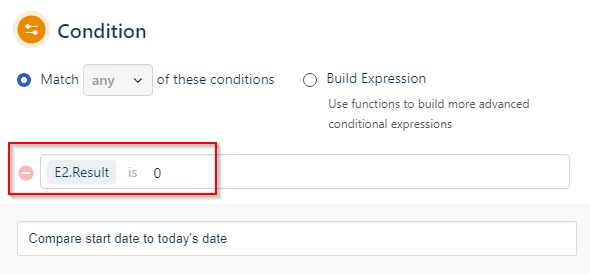
You can use placeholders from expressions: in this case the expression is “E2”

 In the Condition you see i call the E2 node output. 


RYGUY
Community Debut
  • Community Debut
  • November 4, 2022

I see what both of you mean after reading again. Likely going to need to wait for the task scheduler that's supposed to come out this quarter to do what you are wanting.


alyssia.correa
Skilled Expert
Forum|alt.badge.img+8
New IdeaOpen : Open for Consideration

  • Community Debut
  • July 29, 2024

I would like to add that I need this. We often have requests that either see a temporary solution implemented that needs to be removed, or just needs a follow up at a specified interval in general.

I can currently now easily reset the ticket status and send an email that follow up is now due, but I have no way to push the due date of the ticket out. In the ticket Automator, there is no date function when choosing SET DUE DATE.


Forum|alt.badge.img+2

We need this too….we have requests where someone goes on leave (for instance) and needs international access on their mobile for a time. They may raise this request before going, in which case we need to put the request on ‘pending’ until the day before they go (which is a field in the request form).


We then need to put the request BACK in ‘pending’ until the day they come back (which is also a field in the request form) so that we can then remove their international roaming rights.


Daniel Söderlund
Top Contributor ⭐
Forum|alt.badge.img+14

We need this too….we have requests where someone goes on leave (for instance) and needs international access on their mobile for a time. They may raise this request before going, in which case we need to put the request on ‘pending’ until the day before they go (which is a field in the request form).


We then need to put the request BACK in ‘pending’ until the day they come back (which is also a field in the request form) so that we can then remove their international roaming rights.


You can do that using the timed workflow and a custom date field on the ticket. 


Daniel Söderlund
Top Contributor ⭐
Forum|alt.badge.img+14

I would like to add that I need this. We often have requests that either see a temporary solution implemented that needs to be removed, or just needs a follow up at a specified interval in general.

I can currently now easily reset the ticket status and send an email that follow up is now due, but I have no way to push the due date of the ticket out. In the ticket Automator, there is no date function when choosing SET DUE DATE.

You can use expressions and have it to use date as output and you will have the option to use it.