



When creating a widget, you can set up rules whereby matching URLs get specific articles shown to the user: https://support.freshdesk.com/en/support/solutions/articles/50000001663-showing-specific-solution-articles-based-on-pages-on-your-website-to-provide-contextual-help
This is great, but it has a limitation.
You can specify partial urls, as mentioned in the article, which is good. HOWEVER, if your URLs have dynamic information in the wrong place, there’s no way to match them.
For example, let’s suppose that my url structure is as follows:
www.example.org/books/<BOOK_ID>/synopsis
www.example.org/books/<BOOK_ID>/reviews
www.example.org/authors/<AUTHOR_ID>/books
www.example.org/authors/<AUTHOR_ID>/reviews
If I wanted to use my widget to suggest different articles for each of these URL patterns, I cannot.
Creating a rule that looks like this
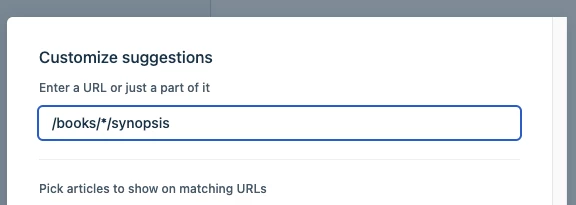
… does not work.
It would be REALLY great if it could be made possible to achieve this either with a “*” wildcard, or better, with a regular expression match in the url like /books/(%d+)/synopsis or something, anything like that really!
It would make the specified suggested articles feature so much more powerful
Thanks!
