Closed for Voting

automate first response

Related products:Freshdesk
  • October 29, 2019
  • 9 replies
  • 119 views

Hello,


I want to automate 1st response when ticket created. it this possible??

9 replies

Forum|alt.badge.img+7

You can do that in two ways:

  1. In Admin go to Email notifications, and choose the tab "Requester notifications". These are notifications based on specific actions. If this is a reaction to a new ticket, select that line, activate it, and set up the mail as applicable. This is then a standard reaction to all new tickets.
  2. In Admin, go to automations and set up a rule for ticket creation. Here you can determine the action and response based on criteria in the ticket. Please note that the sequence in this section is important, as well as the setting whether all rules should apply, or only the first applicable one (default). 
Hope this helps.

  • Author
  • Apprentice
  • November 5, 2019

Hi Mark, Thank you for your response.


but i have another question.

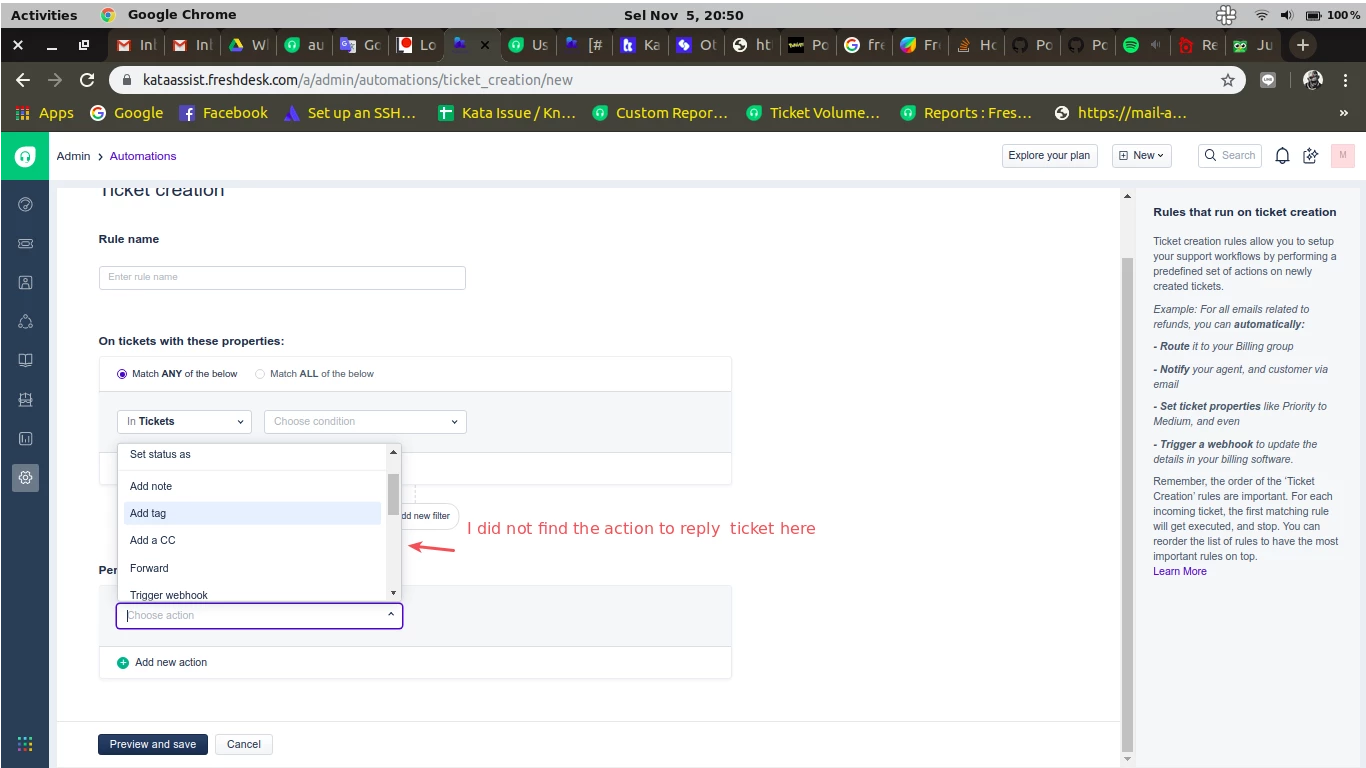
if what I want is to automate a reply when ticket received, is it possible?? because in automation I found no action for replying the ticket

workspace1059_44752.png

Forum|alt.badge.img+7

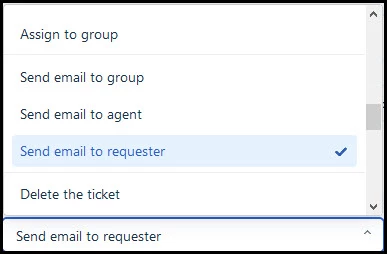
The action is "Send email to requester"

image

.


However, these do not reflect as reply in SLA calculation. Or is there a trick we have not found?

It would be extremely important for us to be able set up automated replies with timestamp that is actually calculated as reply or public note.

Since "Add note" in automations only adds a private note, you cannot select adding either a private note or a public one.


Forum|alt.badge.img+7

Sorry, can't help you. But to me it seems a bit strange that when sending an automated reply you want this to be seen (in the SLA calculation) as a  proper answer. That way the SLA is always met, but the customer's problem has not been addressed. If the mail you sent requires an answer from the customer, then you can change the status. That will also stop the SLA timer.

But obviously your choice.


Well...due to integration to other services and the rule set-up possibilites of your highly promoted automations would allow us in certain situations and with certain services to determine when to send a response to customer without agents having to do it manually. Which is the point in using automations. Or the it should possible to more flexibly determin SLA calculation rules.


Forum|alt.badge.img+7

I don't work for Freshdesk, I am just a user like you. But if the automated reply is probably an answer for the customer, why not change the status to "Waiting for customer" when you send out the mail? You can do that with automations, and that will also stop the SLA timer.


We support business-to-business customers and in the vast majority of SLA agreements with those corporations Initial Response Time timestamp is when an agents starts working towards resolution. I.e. ticket status is updated from New/Open to In Progress.
It is unnecessary and a waste of time of both the requester and the agent to manually comment or reply since there is nothing to communicate other than “no I start working with your problem”. It has no informative value as to the resolution. (And the tickect is not pending or waiting for customer - wron g status.)

Automations would make it possible to use status change as SLA timestamp if it were possible to generate a public comment or reply (instead of only a private note or an email that is not considered as reply) e.g. when ticket status gets updated to In progress.


As Mark has mentioned, you can change the status to Waiting on Customer after you send the email to the requester but it will not be present in the ticket conversations, due to which it will not be affecting the SLA. 


Also, if this is the first response, the SLA timer will have no impact over the same as well. I would suggest you make use of our Reply APIs and use a Ticket Creation automation to trigger a webhook that will 'reply' to the ticket, on a particular user's behalf or add a public note in the ticket using webhooks and send the content added in the public note as a email notification using Agent adds comment to a ticket. 


Link for the Reply APIs:

https://developers.freshdesk.com/api/#reply_ticket


Cheers!