Closed for Voting

Automated email response for Holidays and outside of business hours

Related products:Freshdesk
  • June 2, 2014
  • 5 replies
  • 134 views

Having the ability to set vacation days in the admin is great. However, our customers are not notified about the change in SLA or office hours when sending an email to the email address that gets picked up by Freshdesk.

Feature request 1. It would be great if we were to be able to send a custom notification (automated reply) to the sender, which informs them that we are closed for the holiday. Reason: customer will be informed and expectations are managed.

Feature request 2. It would be great if we could set a different template for each of the holidays. Reason: certain holidays fall on a Thursday or on a Monday. This means that when it comes to deliveries and shipments in an e-commerce business, the customer will have to wait a couple days longer for their shipment.

5 replies

Hi Tristan,

Customers can be notified if they send in requests during non-business hours/holidays

For sending custom response during holidays:

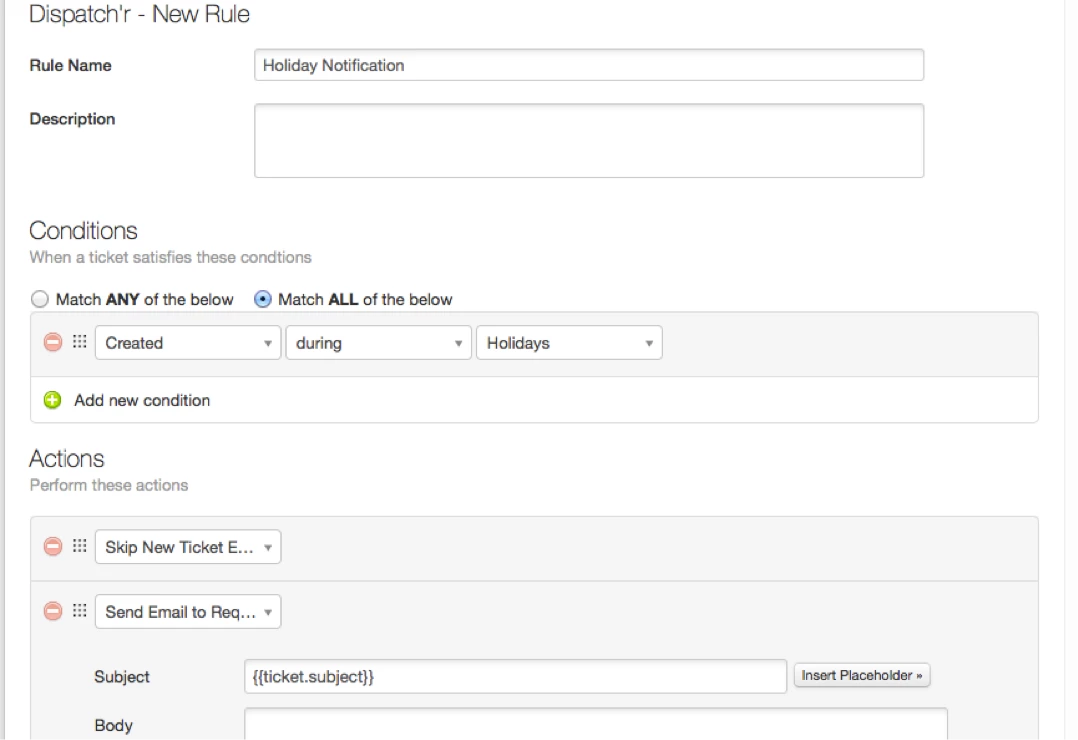
1) Go to Admin> Dispatch'r > New Rule
2) Set Condition As:  Created during Holidays
3) Set Action As: Skip New Ticket Email Notification (This will avoid sending your regular New Ticket Created Notification to Requester)

4) Add another Action : Send Email To Requester; You can set your custom message here.

Attached a screenshot for reference.

Different template for each holiday will be a useful feature. We may take it up in the future depending upon our internal priorities.

holiday_notification_14995.png

  • Author
  • Contributor
  • June 3, 2014

Thank you so much, Janani! This will work.

Could I ask an additional question? Is it possible to use a placeholder in our automated email reply to our customer and automatically fill in the reason why were are closed? This would be the name of the holiday (or the name given to that day off)?


Tristan, placeholders are currently used to insert a ticket or its requester's details. Am afraid there isn't way to use it for holiday notification right now.


Tristan,
I was thinking about a way to inform customers about the reason for support being closed. One thing that might help is to provide them the link to the list of holidays in "Send email to Requester" description. For example this link will inform them about why support is closed (holiday name) and when it will be back up again (subsequent working day). 


  • Author
  • Contributor
  • June 6, 2014

Thanks for the tip, Janani. We'll figure something out. :-)