Closed for Voting

"Bring Your Own" SSL

Related products:Freshdesk
  • January 6, 2015
  • 87 replies
  • 158 views

Show first post

87 replies

  • Contributor
  • March 2, 2020

I've now cancelled my Freshdesk subscription and moved to another solution because of this. Vote with your feet people.


  • Community Debut
  • March 2, 2020

Freshdesk moved to LetsEncrypt

This was a real sticking point for me, we only moved to Freshdesk ~ 2 months ago. I complained to our account manager, and they have since added our SSL Cert Free of Charge, and explained that FD has now, or is in the process of moving to Lets Encrypt, so future SSL cert's should be Free. they don't seem to have publicised this or updated any documentation about it yet though? Frustrating.


  • Contributor
  • March 2, 2020

Oh letsEncrypt ...... but how work this?

I Have a Cert for my Domain.
And FD runs on a Subdomain.

It must be the same CERT .... or not?


  • Community Debut
  • March 2, 2020

I'd say message support or give your account manager a shout and find out what's up.

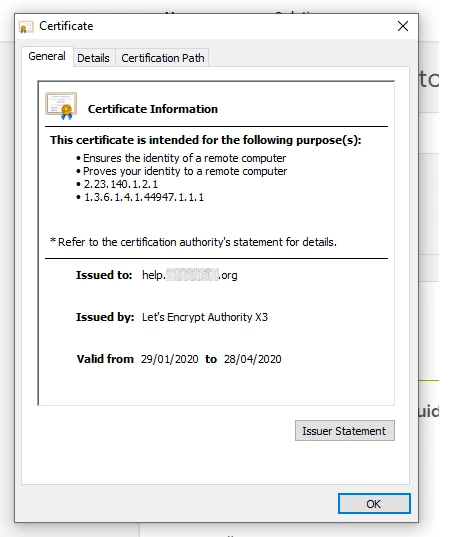
image


@Ash Kierans. If that is in fact true then it will be awesome! I also have not seen this advertised as a forthcoming feature but I feel they should say something to keep the peace and keep people at bay from skipping out on Freshdesk and on to another support solution. Since the first complaint on this is just tapping 6 years ago, I dont think I could be blamed for taking the stand of I'll believe it when I see it.


  • Community Debut
  • March 3, 2020

I am unsure what the status of this is with FreshDesk, the most recent TLS certificate that we had to add to a portal did not result in the previous $$$ add on purchase needed because FreshDesk was buying from a CA and not using Let's Encrypt for custom TLS certificates on portal URLs.... I was told that Freshdesk is now using Let'sEncrypt and all I had to do was set the DNS rec on my end!

Great news?!?! Unfortunately this doesn't seem to be documented anywhere within the webapp or forums,docs, etc. The whole process still took more than 24 hours waiting for replies/updates on the ticket that was opened https://support.freshdesk.com/support/tickets/5732187

I wanted to at least post this here to offer some kudos that Freshdesk is adding this much needed feature and hope that it gets documented/announced/released soon.


aravind.sundararajan
Skilled Expert
Forum|alt.badge.img+12

Hello everyone,


We've recently switched from Digicert to Let's encrypt as the service provider for SSL certificates. Over the last few weeks, we've been migrating the existing certificates issued by Digicert to Let's encrypt. As you all know, Let's Encrypt is a free, open-source certificate authority that provides trusted certificates. Going forward, you can obtain SSL certificates for your custom domains issued by Let's encrypt at no extra cost. 


We're updating our existing articles to reflect the change and we're sorry for the silence so far on this thread. We'll take it up on us and try to be vocal about any enhancements across the board. There hasn't been any change in the process for obtaining the custom SSL certificates though. You can continue writing to us on support(at)freshdesk(dot)com and our support heroes will assist you in procuring a free SSL certificate for your custom domain. 

Cheers!


  • Contributor
  • March 3, 2020

Hello Aravind

And if I already have a LetEncrypt certificate? (Which I guess everyone already has). How do you proceed then?

Is it possible to "integrate" the Freshdesk environment on my subdomain and in the EXISTING certificate?

Best regrads, Markus


aravind.sundararajan
Skilled Expert
Forum|alt.badge.img+12

Hi Markus,


The change allows you to obtain a new certificate free-of-cost from Let's encrypt. We don't have any option to import a custom certificate, let alone one from Let's encrypt (We'll get there eventually!). You might have to request for a new certificate for your custom domain and set up the necessary DNS records to get your portal up and running on https.

Cheers!


  • Contributor
  • March 3, 2020

Hi Aravind

Pleas help me, I don't understand it now.

- If I have a certificate, I have to delete it?
- then i order one via freshdesk

and then? How I use the new cert in my normal domain?

Is there a "how-to" to read, what I have to do`?


Thanks, Markus


aravind.sundararajan
Skilled Expert
Forum|alt.badge.img+12

Hi Markus,


You cannot use a certificate that you've already purchased for your custom domain in Freshdesk. We don't have the infra setup to support custom certificates that have been issued already. You'll have to request for a new certificate for your domain and setup the DNS records accordingly.


We'll be updating the self-help articles with the latest information on what needs to be done to get a SSL certificate for custom domains. You can write an email to support@freshdesk.com with information about your Freshdesk account and our support heroes will help you with the process.


Cheers!


  • Community Debut
  • March 23, 2020

Aravind,


Thank you for the good news - it's good to see Freshdesk finally catching up with the industry on free SSL certs.


Unfortunately, Freshdesk has lost a lot of goodwill amongst users and developers since this issue was given inadequate attention over many years. Many of us will continue to have low confidence that Freshdesk will "pull through" for us when needed. This was an opportunity to thrill us and regain some of our trust, but this good step forward falls flat. Stating that Freshdesk will "try to be vocal" is vague and doesn't actually commit to changed behavior.


While we do appreciate this change, Freshdesk needs to step up its game with better communication and interaction with key stakeholders that are ultimately driving Freshdesk's bottom line.