


In progress : Included in Product Roadmap

Business Hours Metics

Related products:Freshdesk
  • February 10, 2025
  • 8 replies
  • 62 views

Forum|alt.badge.img+2

I can see there are multiple questions raised on this, such as this, but can see no ideas that align unfortunately.

When displaying any Business Hours metric and displaying Auto, the days calculation completely disregards the length of a business day per the Business Hours settings and instead counts 24 hours as a day - thus inferring false information and the only workaround is to display in secs/mins/hours only and introducing terrible UX. 

This issue only gets compounded if it tracks as far as a week as this = 168 hours. Where as if a business day was set to 8 hours and 5 working days it would be 40 hours and in turn 168 hours should return 4w 0d 8h 
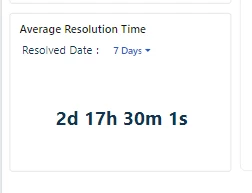
This is an issue in both FS and FD in all areas these metrics can be chosen including, dashboard (in FS), analytics and automations


8 replies

Amrit Mishra
Community Manager
Forum|alt.badge.img+8
  • Community Manager
  • February 10, 2025
New IdeaOpen : Open for Consideration

Amrit Mishra
Community Manager
Forum|alt.badge.img+8
  • Community Manager
  • February 10, 2025
Open : Open for ConsiderationIn progress : Included in Product Roadmap

Forum|alt.badge.img+2
  • Author
  • Active Contributor
  • July 4, 2025

Can we get an update on this issue please


Amrit Mishra
Community Manager
Forum|alt.badge.img+8
  • Community Manager
  • July 4, 2025

@Morourke please see this solution article that explains how to change the unit of measure of time metrics: How to change the unit of measure for time-based metrics? Hope this helps.

We are also working on making a few changes in the downloaded data output files to improve the user experience.


Amrit Mishra
Community Manager
Forum|alt.badge.img+8
  • Community Manager
  • July 4, 2025

On the issue of honoring the business hours configured in the settings in reports, this is something that we’ve added to our roadmap and can share an update when we are closer to actual delivery.


Forum|alt.badge.img+2
  • Author
  • Active Contributor
  • July 4, 2025

@Morourke please see this solution article that explains how to change the unit of measure of time metrics: How to change the unit of measure for time-based metrics? Hope this helps.

We are also working on making a few changes in the downloaded data output files to improve the user experience.

Am aware of this but customers do not like time displayed in hours when above a day as this seems alien and strange compared to every other system that offers business hours including other helpdesk provider so this workaround does not satisfy 


Forum|alt.badge.img+2
  • Author
  • Active Contributor
  • July 4, 2025

On the issue of honoring the business hours configured in the settings in reports, this is something that we’ve added to our roadmap and can share an update when we are closer to actual delivery.

And when do we think that will be? If a fix for this issue is on the roadmap, assuming this is planned to a release at some stage


Amrit Mishra
Community Manager
Forum|alt.badge.img+8
  • Community Manager
  • July 4, 2025

@Morourke We won’t be able to share an ETA as this point as we are still finalizing the details. This feature will be available in an upcoming release, and we’ll share more details and timeline as we are closer to completion.
