Closed for Voting

Business Hours - SLAs: Exact Time Entry

Related products:Freshdesk
  • August 14, 2014
  • 2 replies
  • 33 views

Our business offers one SLA during business hours, (M-F, 9am - 5pm), and another outside those hours, (M-F 12am - 9am & 5pm - 11:59pm; S-Su 12-12).


The interface for entering time is a pop-up menu with 30 min. increments.

  • There is no way to enter a time to the end of the day, 11:59pm. The latest available hour is 11:30pm.
  • There is no way to set business hours spanning midnight. So an overnight shift must be set for 5pm - 11:30pm rather than 5pm - 9am.
  • This mechanism means that some times cannot be covered - No support between 11:30 and 12?!
Feature Request:

As an administrator, Time can be entered to the minute (not :30).

2 replies

aravind.sundararajan
Skilled Expert
Forum|alt.badge.img+12

Hello,


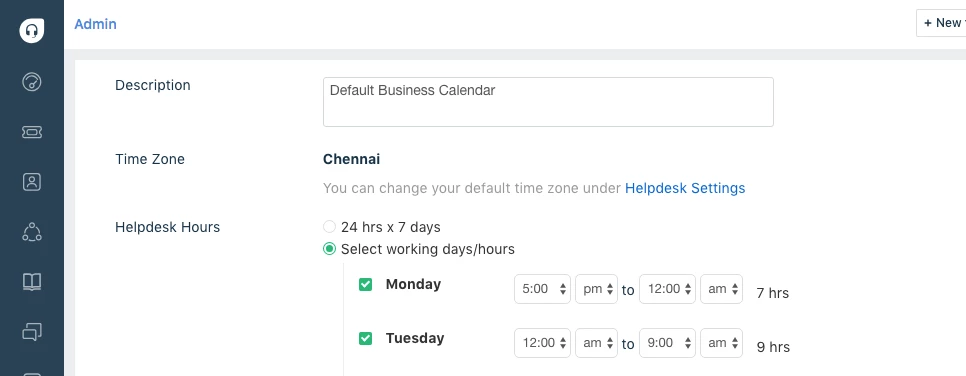
The requirement to setup overnight shift hours can be satisfied with the current Business hours calendar. Let me explain how to setup the shift timings from 5pm to 9am of the next day.


You can input the start time as 5pm, say on Monday. This is simple and straightforward. Now, the shift has to span across the Tuesday morning and ends at 9am. To set this up, select the end time on Monday as 12 am and then set 12am as the start of business hour on Tuesday. Now, we're all set to select the end time on Tuesday, ie. 9am. 


Cheers!


mford_gd
Top Contributor ⭐
Forum|alt.badge.img+5
  • Top Contributor ⭐
  • August 31, 2023

How do you then set Tuesdays hours from 5 to 12?  This works only for a one day shift.