

New Idea

Business Rules - Same field as condition AND action

Related products:Freshservice
  • July 17, 2024
  • 2 replies
  • 155 views

DanielRuff
Top Contributor ⭐
Forum|alt.badge.img+9

I guess everyone came across that behaviour when trying to configure business rules.
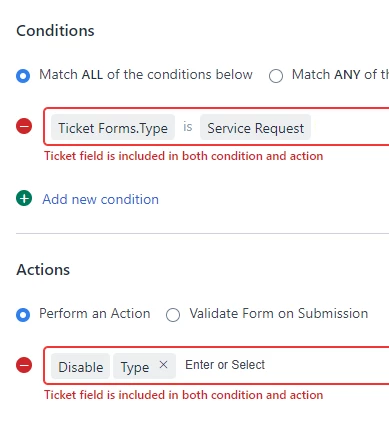
The idea is to have the same field as condition for that business rule to apply and the same field/dropdown as action. Can one of you think of other interesting use cases?

Here a few from my side.


Hiding status "closed"

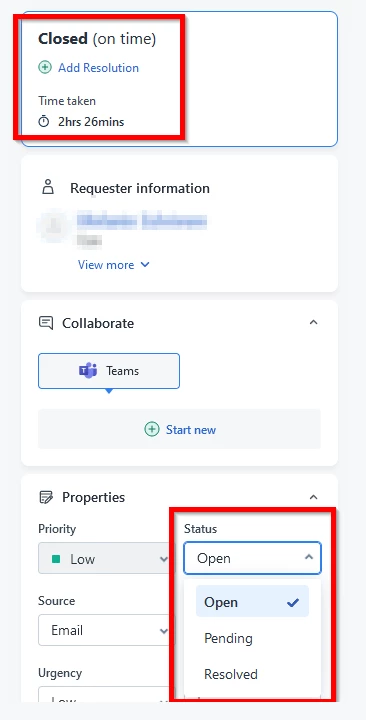
Freshservice implemented a feature for hiding the close button in the navigation bar of a ticket (editing a ticket). You can now disable the field “save and close” when creating an incident (new tickets). Great for us.

As a consequence of disabling this button you can no longer see the status “closed” in a ticket dropdown. An agent checking a closed ticket now shows “open” in the dropdown as this is the first value and “closed” is shown at the top right. This could get fixed by this idea. Only when the ticket status is “closed” extend the dropdown and show “closed” again.
 

Archived agent groups

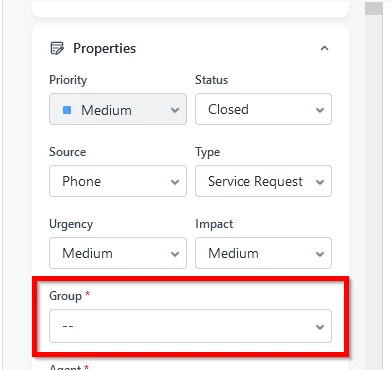
We disable archived agent groups that are no longer needed. We need this for history and audit purposes. Agents are not allowed to send a ticket to that group as we hide this group within the dropdown. Another issue is that in the overview you can still select that group as the ticket overview is not affected by business rules - bypassing business rules is possible which is also an issue for us in change management. This ticket for example is in an archived group, an agent checking this ticket shows no agent group. Same logic as use case before.
 

Limit functionalities for a field to only specific persons

Imagine a checkbox that everyone should be able to check. But not everyone is allowed to remove again. Everyone can mark a ticket as a security issue. But only the security department should be able to uncheck this checkbox again, so I wanted to disable this field. Once checkbox is ticked, disable this checkbox - same field for condition and action which is not possible as of now.


Change ticket type

You are able to change an incident to a service request. No information gets lost in this case. But if you convert a service request (with a catalog item attached) to an incident, the information the customer entered is lost. So i could imagine a business rule: Condition: type is servcie request, Action: Disable type.

I know this can be handled by the condition “service request item is attached”. 

Happy for anyone to share other ideas.

2 replies

Medic1334
Top Contributor ⭐
Forum|alt.badge.img+9
  • Top Contributor ⭐
  • August 11, 2024

For the archived agent group, use a business rule for edit/new ticket for all users that removes the agent group from the options when the status is not closed. This wont hide it from the list view, but it will hide it from the gui while still allowing it to display from a historical view. You’d have to do this for change and tickets modules separately (I have a generic rule called Hide deprecated items that handles this as a whole for me).

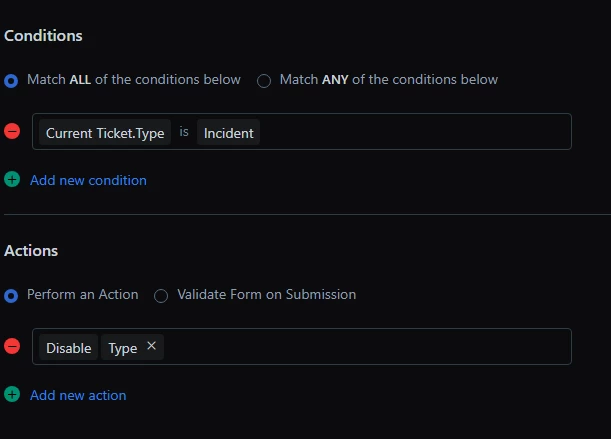
For the disable type, make sure you are using the Current Ticket instead of Ticket form. Current ticket means that the rule always applies. The example below works in my tenant (so you’d just flip from Inc to SR). Ticket form means that it applies on change in the gui (client side) prior to committing the change (hitting the update button) so that option is a little more restricted than current ticket.


  • Community Debut
  • August 13, 2024

For the archived agent group, use a business rule for edit/new ticket for all users that removes the agent group from the options when the status is not closed. This wont hide it from the list view, but it will hide it from the gui while still allowing it to display from a historical view. You’d have to do this for change and tickets modules separately (I have a generic rule called Hide deprecated items that handles this as a whole for me).

For the disable type, make sure you are using the Current Ticket instead of Ticket form. Current ticket means that the rule always applies. The example below works in my tenant (so you’d just flip from Inc to SR). Ticket form means that it applies on change in the gui (client side) prior to committing the change (hitting the update button) so that option is a little more restricted than current ticket.

fintechzoom

In business rule management, when the same field is used in both the condition and action, it means that the rule will evaluate the field's value to determine if certain actions should be executed. For instance, consider a business rule where the condition checks if the "status" field is "Pending" and the action updates the "status" field to "Completed." In this scenario, the rule first evaluates whether the "status" field matches the specified condition ("Pending"). If true, the action is triggered, which changes the value of the same "status" field to "Completed." This approach ensures that the system only updates the field when it meets the specific criteria, maintaining data integrity and automating workflows efficiently.