Closed for Voting

Canned Response Formatting

Related products:Freshdesk
  • April 29, 2018
  • 5 replies
  • 53 views

Hi,


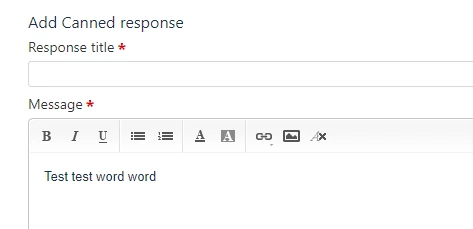
When creating/editing a "Canned Response" there is no option to select the font.


This means that with the new layout (and text font) we can end up replying with different fonts to customers.


The only solution is to manually clear the formatting each time we use a response.


It would be great if you change the default of the canned response font to match the messages or add the option to format the font when creating one.


5 replies

aravind.sundararajan
Skilled Expert
Forum|alt.badge.img+12

Hello Amir,


The Canned responses are always made available on the global helpdesk font. You can setup the global font for all emails under Admin -> Email notifications section. 


Cheers!


  • Author
  • Apprentice
  • May 2, 2018

Hi Aravind,


I mean when you created a 'Canned Response' there is no option to manage the font.

This option is only available in the email replies as you've mentioned.

image


  • Contributor
  • February 22, 2019

For some odd reason though, I have found that if I create something in Word with different font sizes and then copy and paste that into a canned response, the different font sizes are preserved.


  • Contributor
  • April 5, 2019

We would like to see this added as well.


In addition adding an HTML Table in the formatting toolbar would be VERY MUCH appreciated!


Hello All,


Good day. 


Thanks for your insightful feedback and we have this one already added to the list of Feature requests. Kindly note that new enhancements are taken up based on the feasibility and implemented based on the number of asks. 


We would make sure to notify when this is available.


Cheers!