Closed for Voting

Change order of ticket fields

Related products:Freshdesk
  • May 1, 2014
  • 13 replies
  • 47 views

Please add the ability to change the order of the ticket fields.  You already have the drag/drop functionality, so just make it so that the order displayed on the Ticket Fields page is the same order displayed to the customer on the embedded ticket page.

13 replies

  • Contributor
  • June 19, 2015

+1 on this. 

It's a PAIN, and wastes agent time, to have to scroll down on every single ticket to mark the required categories, when I should be able to place all the required fields at the top of the ticket properties on the right side of a ticket. 


Josh,

I can see that one of my colleagues has raised a ticket on your behalf regarding this. 

Let us know if you'd like more info about the plug.


  • Community Debut
  • November 3, 2016

This still seems to be a problem. I drag a text field in between the first and second fields, but when I save it and view it, it's at the very bottom of the form. See attached.


  • Contributor
  • November 5, 2016
Same problem here. We would like to customize the ticket layout page and display it the way it is important to our business. Can this be accomodated please.


  • Community Debut
  • November 6, 2016

I opened a new ticket about this, but the response I got is that it works for the ticket form (I checked and it does), but for the feedback form/widget it adds any new fields to the bottom.


  • Community Debut
  • December 14, 2016

Glad I found this post.   I really want the ability to customize the form order on the feedback widget AND have the ability to make style it the same as the requester and email fields. I don't like the way the label appears off to the side and there is no placeholder text in the field like the others.


  • Contributor
  • January 26, 2017

Can someone post the plug that was referenced above? 


I'm also looking for the ability to change the ticket property field order when viewing a ticket. The default should be to move the required fields to the top or follow the order set in the ticket properties. Right now, we have the type which is a required field below the page fold so ti's always missed. 


  • Community Debut
  • August 15, 2017

SO, WHEN WILL YOU FIX THIS EVENTUALLY??? THE THREAD HAS BEEN HERE FOR YEARS AND STILL NO SOLUTION.


  • Contributor
  • August 16, 2017

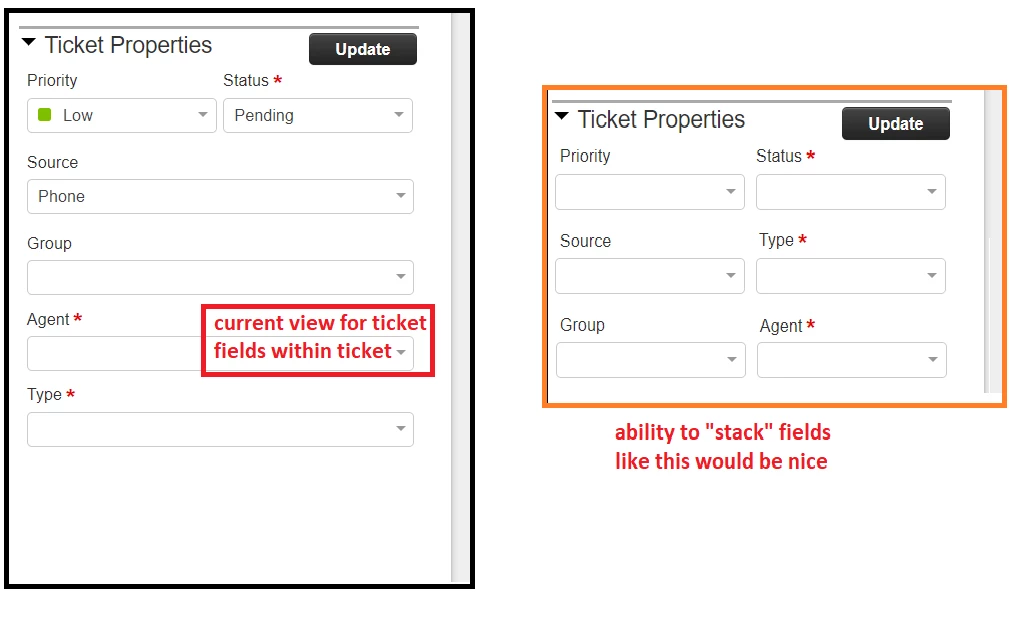
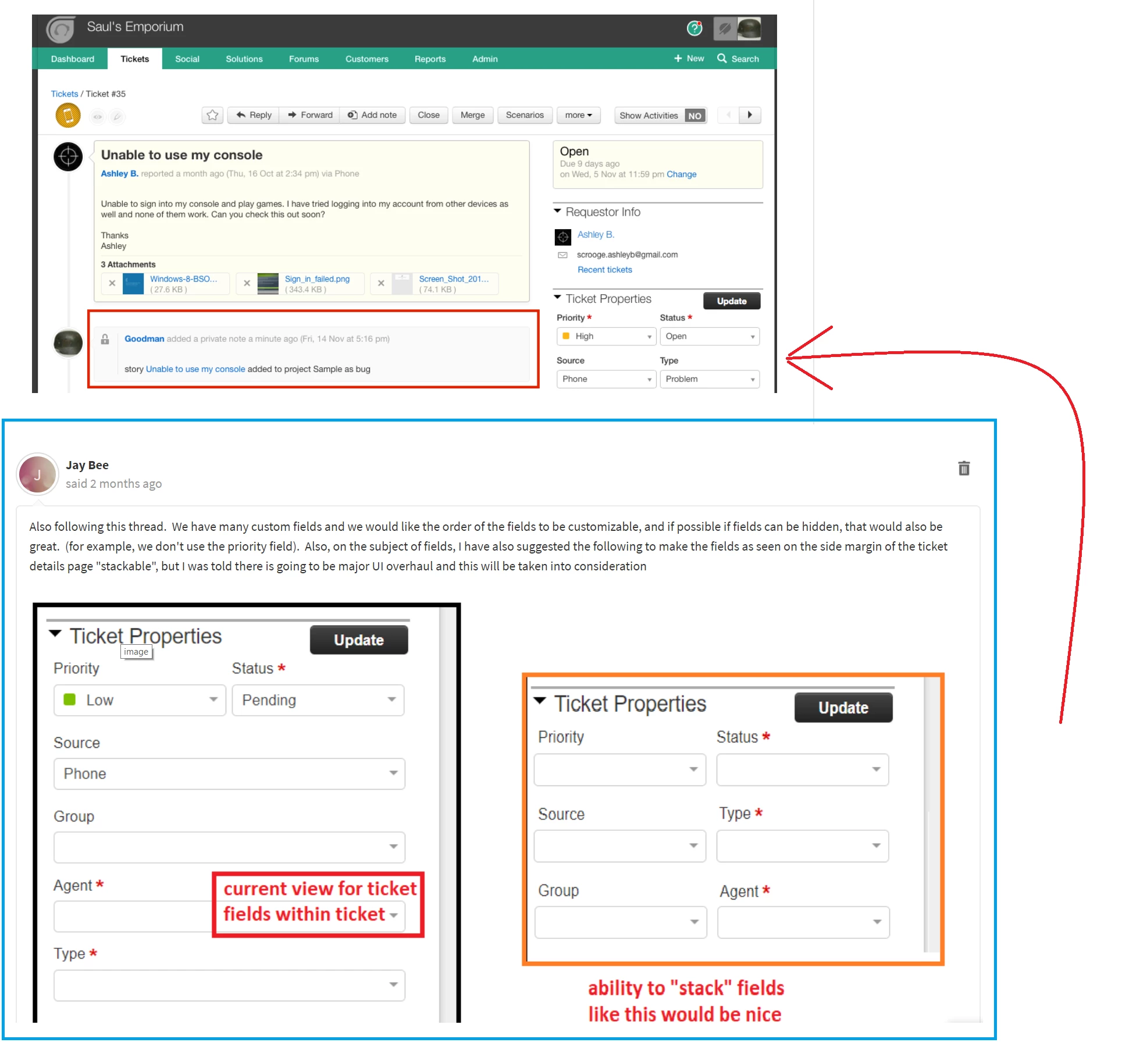
Also following this thread.  We have many custom fields and we would like the order of the fields to be customizable, and if possible if fields can be hidden, that would also be great.  (for example, we don't use the priority field).  Also, on the subject of fields, I have also suggested the following to make the fields as seen on the side margin of the ticket details page "stackable", but I was told there is going to be major UI overhaul and this will be taken into consideration


image


With freshplugs and jquery, rearranging fields is rather easy. Example for moving 'To Do' section after 'Requester Info':
<div id="move_fields"></div>
<script type="text/javascript">
  jQuery('#move_fields').closest('.widget').removeClass('widget');
  jQuery("#ToDoList").insertAfter("#requester_info");  // Move the 'To Do' div after the 'Requester Info' div
</script>

 You can also hide fields, disable them, change how they display etc.


  • Contributor
  • October 23, 2017

I saw this in a screenshot in the Pivotal Tracker App. It looks oddly like the suggestion I made 2 months ago. @Freshdesk- Did my suggestion get implemented here? :)


image


  • Community Debut
  • October 18, 2019

Is there an update on this? would like to have the fields displayed in the feedback form same as I put them in the Ticket Fields settings


  • Community Debut
  • October 23, 2019

In response to Thanos Massias' comment about Freshplugs and Jquery, anyone know how would I go about adding this to my FreshDesk account? I was looking at trying to add something similar to the script he had suggested to my Freshdesk account and it looked like I would have to add a custom application but I'm not sure if that's the right route to be taking. 


If anyone knows the answer, any help would be appreciated!