

Closed for Voting

Change title of service catalog request so they don't all look the same

Related products:Freshservice
  • November 21, 2014
  • 22 replies
  • 62 views

One of the things I am noticing is that when I get a lot of the same kind of service catalog requests, they all look identical in the list. The description that appears is also the same for every one. I can go in and manually change the title on every one, but it might be nice to have something a little more automatic that the user would complete


For example: Leave the Subject and Description fields on the catalog items and let the user fill that out like normal. Either append the Subject to the catalog item in the title, or have the service catalog item show some other way on the list.


It would be nice in general to have another field for the catalog item instead of just the title. I'd love to be able to filter for all the items for a specific catalog item, for example.

22 replies

  • Contributor
  • February 3, 2015

I was about to request this, but the search feature found a similar request so I will post here.


Right now we have a few service catalog items that would benefit from having a field appended to the title. For example... all of our on-boarding requests come in as "On-boarding Request" when it would be really helpful to have it automatically append the name of the new employee from a custom field inside the Service Catalog Item like "On-boarding Request - NewHireName" 


  • Contributor
  • March 5, 2015

We have recently introduced freshservice and this problem was the first thing our agents picked up on. Makes it quite difficult to filter through your requests especially when as part of your role you typically get the same type of service request. 


  • Contributor
  • March 9, 2015

We have the same issue and it would be nice if something could be appended to the title to make it easier to work with and follow. At the moment we edit the ticket and change the name which requires additional steps/work.


  • Contributor
  • March 13, 2015

Furthermore to this, when a requestor logs a service request they see the same Title when clicking on "your tickets" on the homepage. Creates a lot of confusion. 


  • Contributor
  • March 20, 2015

This problem is actually driving our agents and requestor's a bit nuts! Can this be given some priority. 


Another problem that is happening as a cause of this, when a requestor receives an update or resolved notification to a service request ticket, there is no indication of what it relates to. The user would need to go freshservice, look up the service request number to view what it was originally logged for. This is a problem particularly when they have logged multiple service requests of the same type. 


Sorry for the delayed response.


This is definitely inconvenient, especially when a specific service is requested several times. We are implementing a solution for this very soon.


Like Jeff suggested, the requester’s name will be added to the subject line to help differentiate service requests.


  • Author
  • Contributor
  • March 20, 2015

I'm not sure name would be very helpful at all, since you can already see the requestors name in the list. What would be helpful is having a "subject' field just like a regular ticket, and have the system just append the service catalog item name before it. So the list would look something like:


Install Software - I need Visio 2013 on my laptop

Install Software - Can you upgrade my Office version?

Install Software - SnagIt


...or whatever else the user enters in the subject


  • Author
  • Contributor
  • March 20, 2015

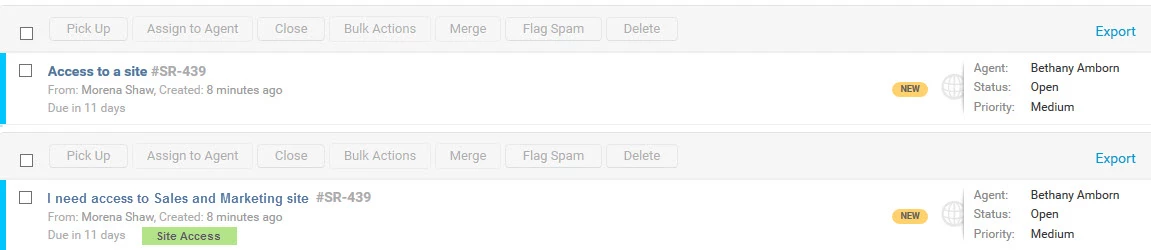
Or better yet - treat the subject just like any other ticket and leave it alone, and show the service catalog item in another way. You could show a badge on the ticket list, for example. I assume eventually there will be a way to attach more than one item to a ticket, and this would be a more effective way as you are going to run into "subject line conflict" with your current method.


Attached is an example of what I am talking about - what it looks like now, and what it could look like with a badge instead. You could have more than one badge this way, and even allow people to assign badge colors at the item category level. It would be a great visual marker without creating this "blank" list thing we have now.

example_18152.jpg

  • Contributor
  • March 20, 2015

I wasn't asking for the requester. I wanted something appended from a custom field, like the actual new hire's name. Requester name will not help as about 90% of our on-boardings come from a single HR employee. I meant more like this. see attachment.


  • Contributor
  • March 21, 2015

Bethany's solution nails it to the wall for me and allows the system to grow and expand naturally :)


  • Contributor
  • March 24, 2015

Me too, Bethany your second solution makes comes sense. Would love to see this implemented. 


  • Author
  • Contributor
  • March 26, 2015

@FreshService team - I'm not suggesting, by the way, that you put all that functionality in there right now.


Any modification here would have to start with separating the catalog item names and descriptions from the subject and description of the ticket, which are obviously tied right now. None of us know your code, so we don't really know how big of a request that is. However, I think in the long run that's the only way you're going to be able to 1) make it easier to read in the list and 2) allow more than one item on a ticket.


If that change can be made, this request can be fulfilled by simply putting the subject line (and/or description) in the catalog item form like they are on any other ticket, and putting the catalog item name in a badge somewhere.


Later, as the system develops, you can expand the functionality with badge colors by category, etc. - whatever makes sense for where you want the tool to go.


  • Contributor
  • April 13, 2015

Hi all, I think the change that was implemented has actually made this no better. The requester's name is readily available in the second line of the ticket in most views. It's actually pushed some of the important information offscreen and is a nuisance. I would vote to have this change of adding the requester's name rolled back and something more useful be implemented. I did speak to someone at Freshservice and they heard my concern. I do not see a a benefit from replicating the users name in the subject line when it is available directly below. I know not all use cases are the same. Anyone else ?


  • Author
  • Contributor
  • April 13, 2015

I agree Jeff, the recent change has not improved this at all for me. I go in an edit the subject line of ever request to make it specific to the case, and this has no alleviated the need to do that at all. 


I still think the subject should be made available to the user at the time of submission, and the catalog item should be shows on the list in a badge. That would be visually helpful.


  • Contributor
  • April 20, 2015

Agree with Jeff and Bethany also. Would love to see a fix soon!


  • Community Debut
  • May 25, 2015

Any word on an update to change this?


Have just started using Freshservice and it's annoying not being able to see what the service request is for at a glance


  • Contributor
  • June 9, 2015

Hi There, 


When are we likely to see a resolution to this problem? This is increasingly frustrating. What is also occurring is when a user requests something from the service catalog, they receive an email with the title and description of the service item. If that user was to request the same service item again and again (quite often the case), how do they differentiate from the previously logged request/s (besides the service request ID)?


Again, the ability to append a "Title" to service request items would help end user's differentiate their requests. What also would be good is to remove the "description" field from the email they receive and append custom fields, if present. 


We also need a fix for this very soon. Meanwhile we have to rename everything as the current title is not acceptable. I like the previous suggestions, but I would like even more control over the subject-ticket title. If there were a set of variables you could use to build your own title line, we'd all be able to make it work how we want it. For example


%Subject%

%Request%

%Requester%

%CustomField%


When configuring a Service Request item, there would be a system field to add these variables to:


%Requester% - %Subject% by %Requester%


This is quite common in CRM/CRM systems. Syntactically you can follow the Liquid format used for other formatting templates in FS.


  • Contributor
  • August 31, 2015

Thanks for all your comments & suggestions on this issue. 


While adding the requester's name to the subject line helped in some cases, it sounds like it didn't address the underlying issue here. We're now looking at a solution that does provide users more control over what they can see in the tickets list view. Stay tuned for more updates , we'll share more specifics with you soon. 


And please keep using the forums for your feedback & let us know what you'd like to the see in the product. We're listening!


- FreshService Product Team


Any updates on this effort? Thanks


Hi everyone, 


Sorry for the delayed response. We are working on a solution that will allow the admin to configure the service request subject at the item level i.e. For a New employee Hire service item, the admin can configure the subject of this service request to include custom fields of the item such as Employee name, Employee ID, Department, Job Role etc., allowing agents to filter/search for service requests by specific fields of the item on the ticket list view page. This feature will be available by early Q3 of 2016. 


Please check back here for more updates on this enhancement. 


Thanks

Freshservice Product Team


Hi everyone,


Admins can now customise the service request title with default and custom fields of the service item (on the service item creation page). 


Go to Admin -> Service Catalog. Create a new service item OR choose as existing item. 

You can customise the service request subject under this section. 


Thank your for all the suggestions. Would love to hear your feedback on this feature! 


Thanks

Freshservice Product Team

