Closed for Voting

Change "To" field

Related products:Freshdesk
  • October 24, 2014
  • 21 replies
  • 36 views

I raised this as a support ticket (181268), but was told this was by design, so I'd just like to see if anyone else agrees with me.


If I receive a support ticket that is initially sent by Person A, but CCing Person B.  If I reply to this, and then Person B replies to my response, when I then go to reply a second time the ticket always defaults to sending to the person who opened the ticket.  It should be replying to the person who last sent the email.


I am seeing this quite often, and because the person is just CC'd into the email, they often ignore the email.  In a normal email conversation it will always reply to the person who sent the email - why doesn't Freshdesk behave the same way?  Or at least give us the option to change the To field.

21 replies

  • Contributor
  • December 28, 2014

I agree with you. This is a feature I need as well.  I could do this in OTRS.  It is helpful when someone put a typo in their email address and you can catch it. Stuff like gmail.net instead of gmail.com or comcast.com instead of comcast.net.


Also we have a call center that can send us ticket via email, but the emails come from the call center. The body of the email has the customer name in it but I have to create a new ticket using the data instead of being able to use the ticket from the call center and hit reply.


  • Contributor
  • April 23, 2015

We are still interested in this feature request.


  • Community Debut
  • June 16, 2015

I agree this needs to be implemented. Having to forward emails instead of changing the 'To' email address is causing major headaches. 


Any comment Freshdesk support? 


  • Contributor
  • June 16, 2015

Same here!


  • Contributor
  • July 21, 2015

I ran into this again today. While I did find a work around, it is not straight forward. You have to edit the ticket from the "More" menu and change the requester.


I ran into this today, only now the option to Edit from the More menu is gone! Midway through a conversation the requestor asked to move the thread to another person as they were going on vacation. My only option seems to be creating a new ticket and then merging them to get the history, and if I do that my initial reply won't have the previous conversation history in the email to the new client contact.


I am waiting for this modification too, but it seems there will not be implemented.


  • Community Debut
  • June 9, 2017

We need this feature. The person who raised the ticket can leave the company so she/he is no longer relevant to the ticket. We need to be able to change the reply-to address.


I'm also interested in this idea. I hope this feature is looked into soon.


  • Community Debut
  • November 30, 2017

wondering if this is implemented too. :)


  • Contributor
  • November 30, 2017

I had a separate topic on this that was closed, I was hoping it would have been fixed, but I havent seen anything yet.


  • Contributor
  • December 1, 2017

we just click More > Edit and change it there...


  • Contributor
  • December 1, 2017

In some cases, the ticket has actually changed users, but in many, I just simply want to reply to someone else in the string, that is not the original sender


  • Community Debut
  • May 10, 2018

We need this feature bad. Forwarding and manually adding lots of people into an email is not a good option. Please fix!


aravind.sundararajan
Skilled Expert
Forum|alt.badge.img+12

Hello,


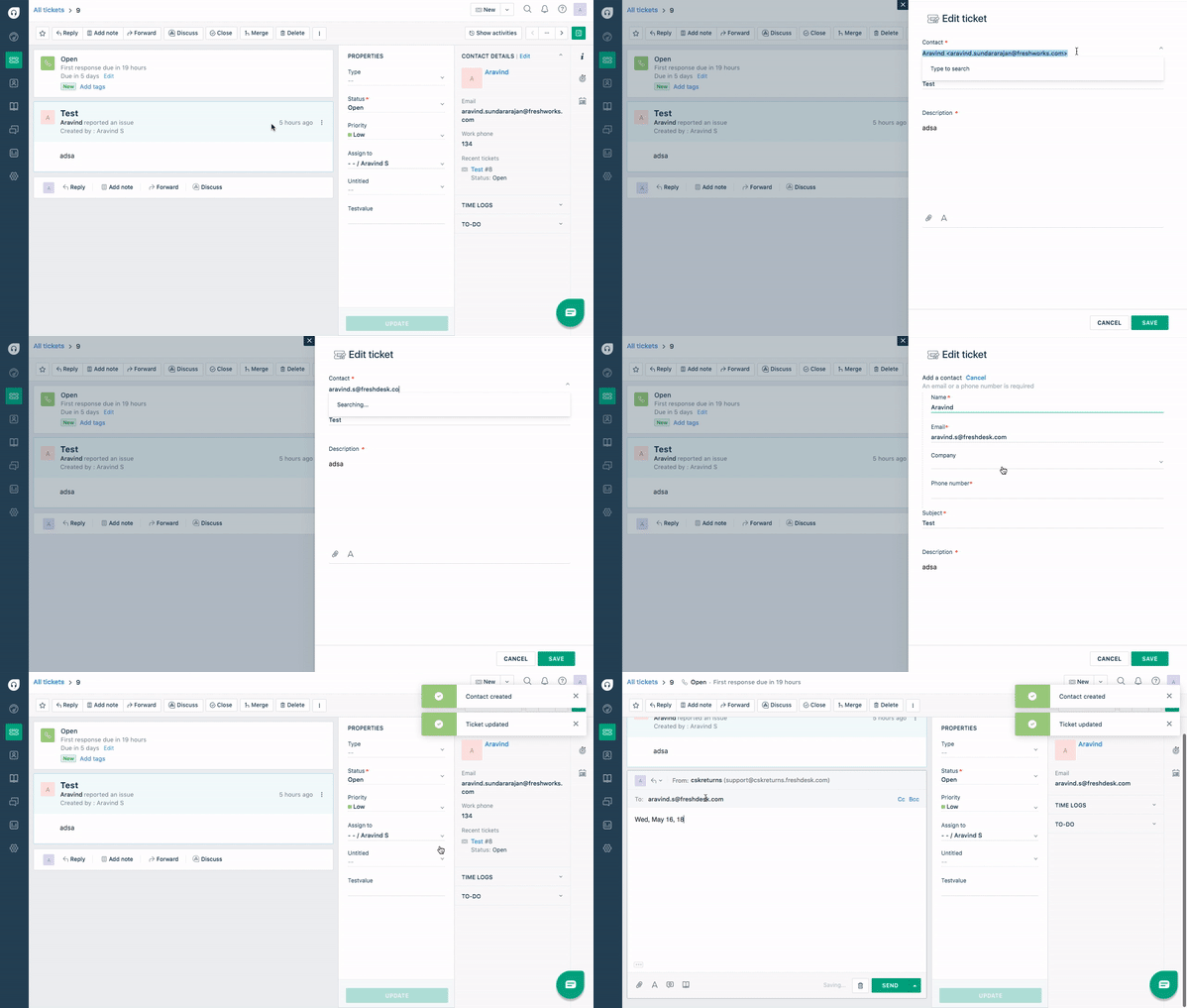
It is easier to transfer the tickets to a different requester in case if the original requester is out of office or temporarily unavailable. All you have to do is to just click on the Edit option and change the requester attached to the ticket. If you're not aware of how to edit tickets, this GIF can be handy.


Cheers!


  • Community Debut
  • September 20, 2018

hi Aravind,

this way we will edit the original ticket requester, but as some user mentioned here also, sometimes we just want to address to a different person who should read the specific email. i.e. the requester's manager, or my internal support that need to assist the requester. so the email attention is someone else, but need to keep the original requester in the email loop. is this something being look into also? 


Thanks!

Tony


  • Community Debut
  • February 13, 2020

Guys we've been wanting this feature for YEARS ... is there a solution yet, since the above reply was 2 years ago now?

It's super painful to go Edit the ticket requester temporarily, write out a reply, then change it back to the original requester.

Just let us type into the To address field!


  • Community Debut
  • April 1, 2020

It's a plus one here.

I don't understand why the "To" field cannot be modified on the fly, while writing emails. The idea of changing the requester of the ticket is absord, especially when coming from Freshdesk who "sells" us efficiency as an idea. 

Also, this is a consistent phenomena across mulitple threads I already witnessed, in which it takes your agents months and years to reply. Again, absord when it comes from Freshdesk, who sells ticketing system solutions...


  • Community Debut
  • April 6, 2020

This is something that bothers me on a weekly basis. Especially in situations where there is a third party involved, for example a SEO partner, in the ticket. I am communicating directly with the SEO partner and our customer is just involved in the ticket as a follower. If I want to keep the customer as CC I should change the ticket requester under SEO partner and then later remember to change it back to our customer so that the time I have logged in the ticket will go correctly under the customer and not under the SEO partner. This is rather frustrating and sometimes I just simply rely on replying from Outlook. If I was able to change the To on the fly without it changing the requester this would not be a problem.


suprabha.somanathan
Community Debut

Folks,


A ticket can have only one requester anytime. External email addresses could either be added as CCs or you could also hit on Forward and send across any specific reply or an email to a third party. This third party will have limited visibility that is, along with the forwarded content, they will only be able to view the last 4 agent's/customer's replies and their replies would inturn be appended to the corresponding tickets as private notes.


A good alternate to handling this use case would be adopting Freshconnect. You could invite a collaborator (any email address) from the discussion window within a ticket who will then possess a 'view-only' access to all the conversations on the specific ticket.


Reach out to us at support@freshdesk.com and our support stars would be delighted to discuss this further with you.

Cheers!


geebranz
  • March 9, 2021

Thanks for the photo reference. :)


www.sandiegolashextensions.com