Closed for Voting

Checklists

Related products:Freshservice
  • March 5, 2015
  • 64 replies
  • 217 views

 Notes and tasks are great features, but it would also be nice to have a checklist that could be added to a ticket so that different agents could easily update progress on the work. Examples would be a scenario where you are installing a new computer which has several specific steps for configuration according to our environment. Or troubleshooting checklists,  or account creation steps for an agent supporting network account creation.

64 replies

  • Community Debut
  • March 10, 2015

I absolutely agree with Rick! That would make our on-boarding process much easier to keep track of!


  • Author
  • Contributor
  • March 10, 2015

 Ed - How are you handling this right now? We have setup checklists in our Agents Only solutions area. Not ideal and no verification someone has followed all the steps


  • Community Debut
  • March 10, 2015

Hey Rick-


We just switch from Spiceworks to Freshservice, and so far, we're loving it. Except for checklists...


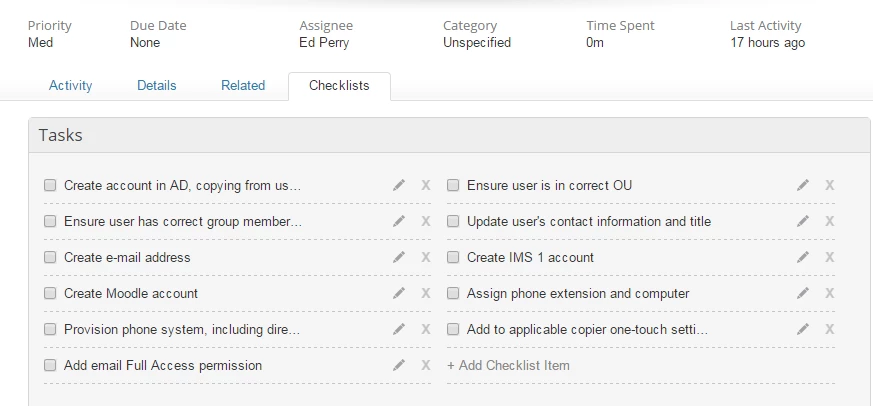
In spiceworks, you could attach a checklist template to a ticket (see screen shot attached) which was awesome for service requests with a lot of steps, like setting up a new computer, or on-boarding a new employee.


Currently, we don't' have anything set up in fresh service for this. I was looking on google for some ideas when I came across this thread.


For us, visibility isn't as important as just being able to scratch things off when they are done, especially when two techs are working on the same ticket.


I'm definitely open to any ideas/workaround though!


  • Author
  • Contributor
  • March 11, 2015
That's exactly what I'm looking for. We don't need the visibility either, just the ability to monitor the progress within the ticket easily for exactly these types  of situations that you describe. Canned checklists would be nice too so you could add a template to a ticket and not have to enter in all the repeating data.


  • Community Debut
  • March 11, 2015

Yeah, the ones in Spiceworks are all based on templates, which is great. 


I hope someone is listening, this would be a huge win for Freshservice! :)


  • Contributor
  • March 11, 2015

That feature spiceworks added to Freshservice would be an incredible thing... count me in :)


Agreed. Would be so useful.


  • Contributor
  • March 16, 2015

I also think this would be extremely useful.


  • Contributor
  • March 17, 2015

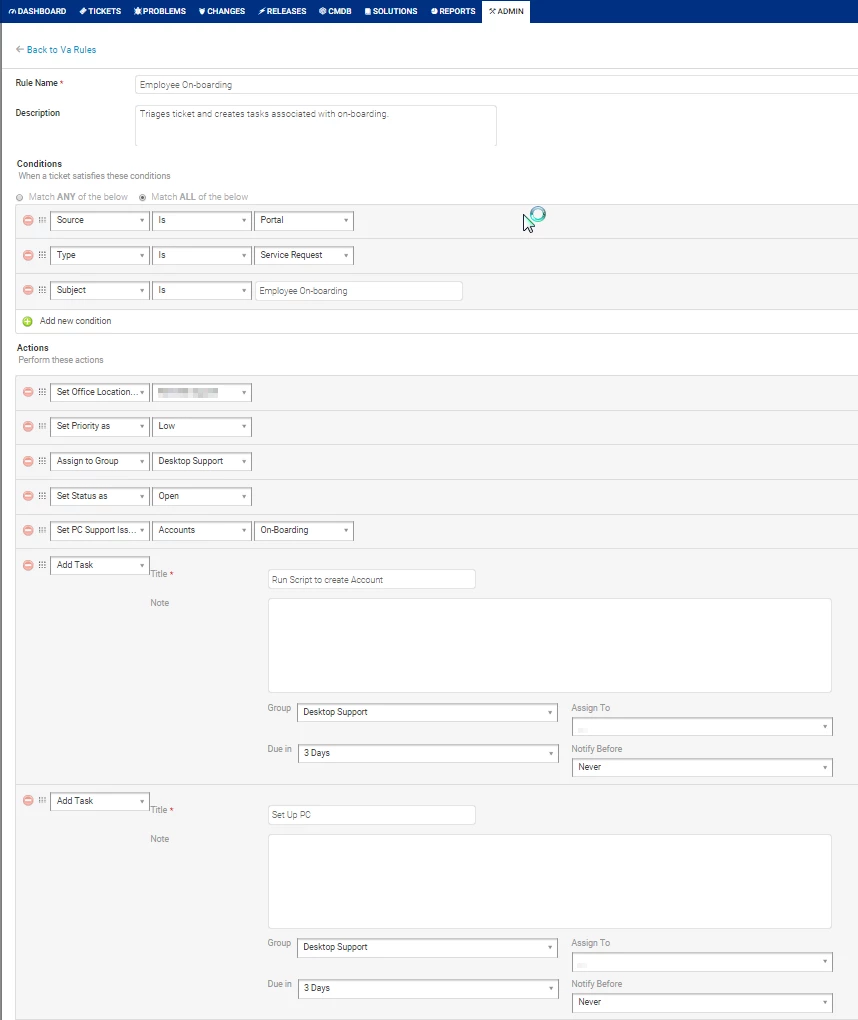
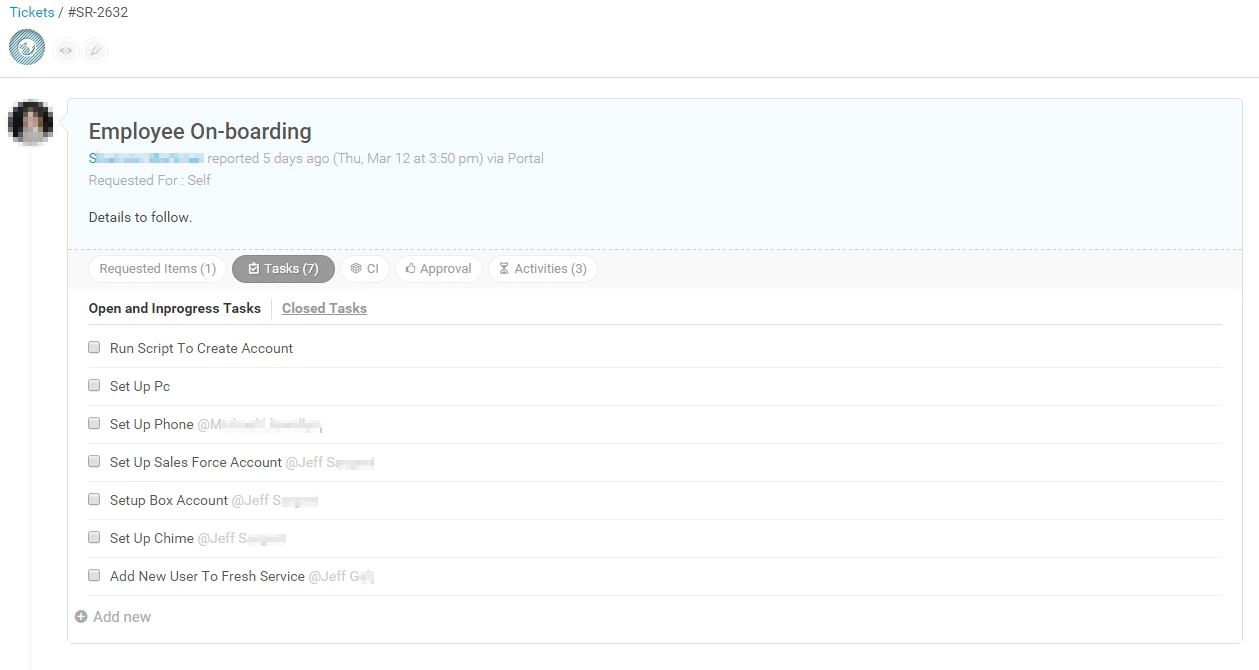
I do this by making a Dispatch'r rule. When an onboarding ticket comes in I have it auto-generate a list of tasks associated with the on-boarding process and assign each task to the appropriate agent. all agents can see which tasks have been completed in the ticket.


  • Community Debut
  • March 17, 2015

Hi Jeff-


That sounds pretty interesting. Do you mind elaborating, maybe providing some screen shots?


Thanks!


  • Contributor
  • March 17, 2015

Sure, here you go. If you need any help let me know.


First, I set up a service catalog item in the portal.

Then I created this Dispatch'r rule.I cut off some of the tasks in the screen cap.. but you get the point.


Then, when the ticket comes in...


Hi Jeff

your hint helped me very much - one action i did not find the german corresponding for is


- Set PC Support iss... - Accounts - On-Boarding


What does this action mean exactely?


  • Contributor
  • January 5, 2016

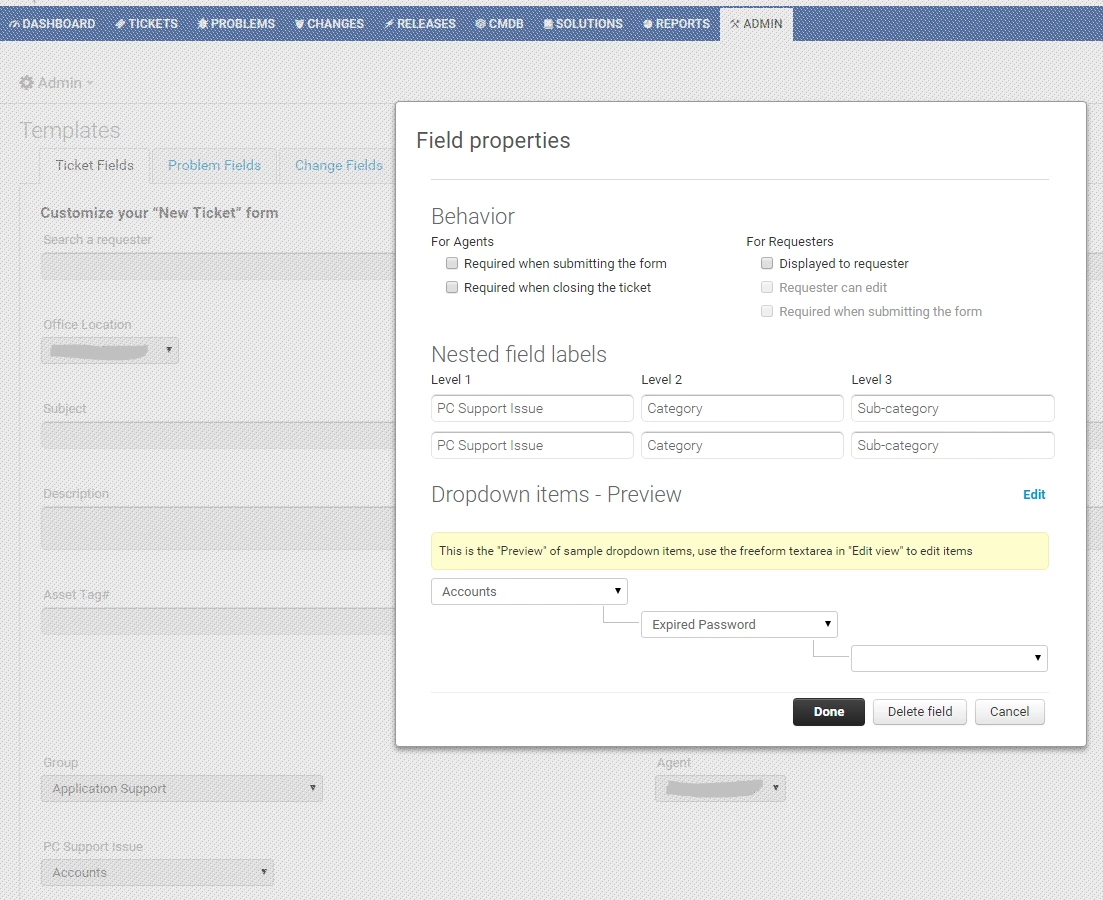
PC Support Issue is a custom field I have set up in the Admin panel to help us categorize our tickets. That Rule in dispatch'r sets the proper categorization for the ticket so we can filter back and see just the onboarding tickets, or whichever ticket category we'd like.


Admin > Field Templates > Ticket Templates.


  • Contributor
  • January 14, 2016

Jeff,  I've been using the same solution but the only issue I have with it is there is no connection between the tasks and tickets.  For example:


Ticket has 6 tasks on it.  Person A completes three of them.  Person B can close the ticket, without errors or notifications.


If a ticket has tasks it should require that they are all closed before resolving the ticket.  I still haven't found a way to do that.


Thx for the Implementation - but what exactely has been implemented now? Ability to define Template-Checklists?


  • Contributor
  • April 13, 2016

I've had a good poke about and I can't see anything new? Care to enlighten us :)


Was there an update on how this was implemented?


  • Community Debut
  • February 15, 2017

While the auto-add tasks functionality in Dispatch'r is useful, the primary purpose of having a "checklist" is to have those steps in the order they must be completed.


It appears that regardless of the order of the "add task" items in the Dispatch'r setup, the tasks themselves are added to the resulting ticket in a haphazard order.


For example, add 5 "add task" steps to a ticket based on a criteria. Make each task title be "1. test 1", 2. test 2", etc. Make a ticket that matches the criteria, and you'll notice that the tasks are added haphazardly. The first task may be halfway through the list. This is ineffective at providing the "checklist" functionality.


Could you have the order of Dispatch'r-created tasks in a ticket respect the order in which they're configured to be added?


  • Contributor
  • February 16, 2017

Brian, I reported this to FS Support and they said this is a bug.


Initially, I thought the agents were just not following the list, and then I found out that the list did not appear in the correct order. It defeats the purpose of being able to reorder the actions in the rule, when the tasks are not added to the ticket in the order they were set.


I don't understand why it says the checklist has been implemented when I don't see it anywhere. 


Hi


There is an option to create bundle service requests, which I think should solve your use case. If the tasks are mostly other items that needs to be delivered/fulfilled then you can create a bundle and add additional items to the bundle. 


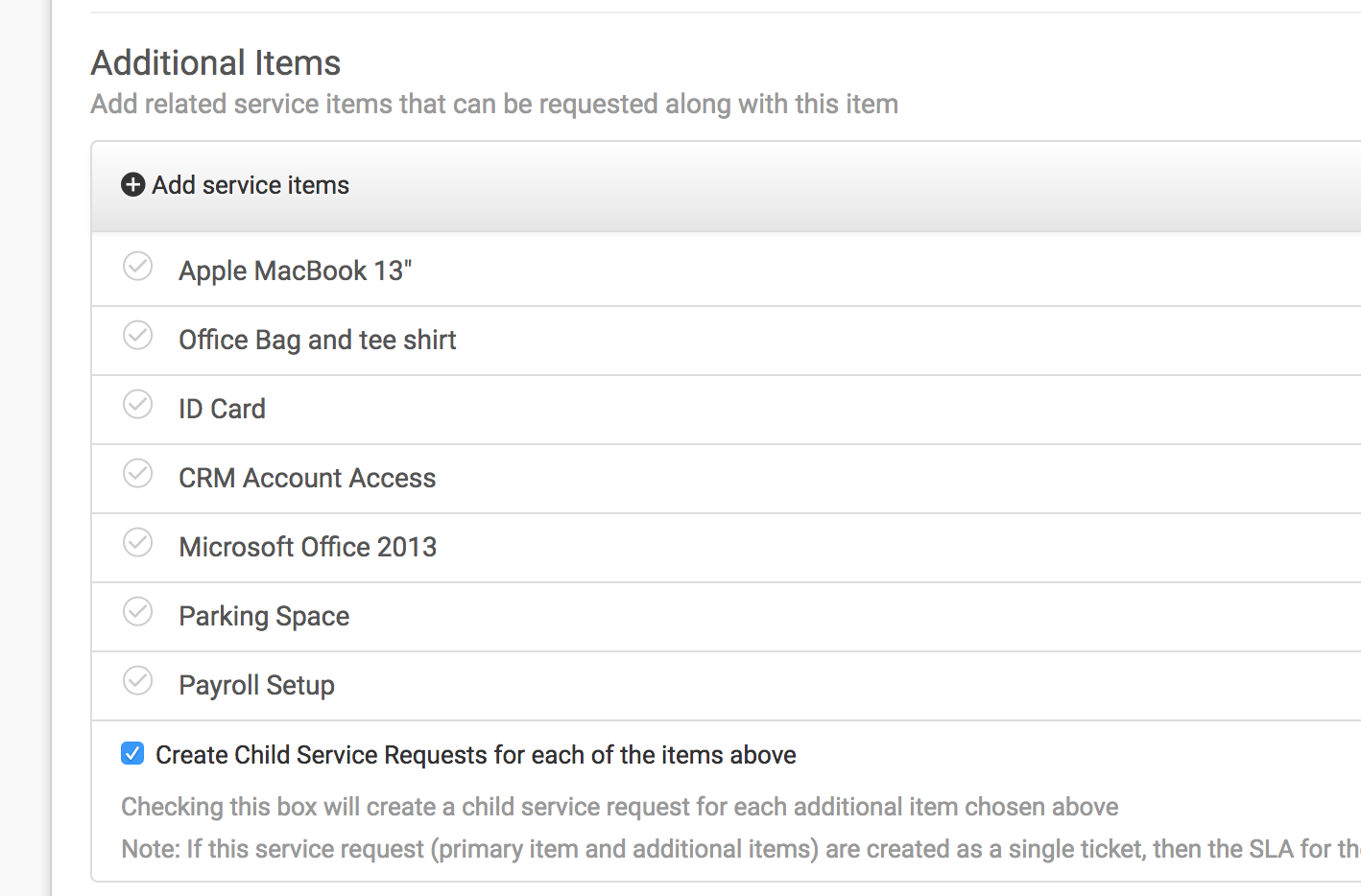
Taking an example from above, a bundle called 'employee on-boarding' is created and additional items are added to this bundle, like so: 


image


When placing a request, any of these items can be selected by the requester. 


Admin can also choose to create child tickets for all the additional items (which can be assigned to agents or groups thru dispatch'r) or to create one ticket with all these items in it. 


Let me know if this helps. 


  • Community Debut
  • May 16, 2017

When will the bug be fixed? For people that don't have the service catalog and are on the garden plan don't have the option to do this workaround of using the service catalog instead of being able to create tasks. Is there another workaround or fix that would allow the people without access to the service catalog to still be able to create tasks or automated child tickets to be created when an onboarding ticket is made?


  • Community Debut
  • August 1, 2017

Confused on how this is implemented. I do see how we can have multiple service items but not a true checklist with instructions and steps that needed to be taken to complete a task. Ex. Deployment checklist. !. Image computer, add to domain, install drivers - things like this with checkboxes to indicate completion of that task. I would like this as it keep us from using external solutions for data that would make more sense to be in FS. Right now we link our checklist to a sharepoint list we've created. 


hope that makes sense and this is something that can be looked at. 


  • Contributor
  • October 21, 2017

Hi Joseph,


I tried your suggestion a while back:


1 - We ended up flooding our service catalog with too many service items, which could be avoided if these service items could just be created as tasks in one ticket.

2 - Service items that are merely additions to a primary service item, are visible to requesters, thus some of them have incorrectly chosen these "children service items". I've checked, and a hidden service item cannot be added as an additional service item. 

3 - We have a service request with more than 30 tasks in it. We've divided it into two, since two teams work on it by using additional service items. The tasks are still appearing in random order, even with the lower number of tasks. We ended up using a solutions page with the list of tasks instead.


It is not ideal and using FS is supposed to streamline our processes. It would infinitely be better if the tasks are added in the order that they are in the rule -- as it is supposed to be -- and we could use it as a checklist. 


Jonie


Forum|alt.badge.img+6
  • Active Contributor
  • October 25, 2017

I would agree, this is definitely not "implemented". The service catalog, even if available on all plans, still doesn't meet the needs of this request. It creates a mess of tickets when a simple checklist would do, dispatch'r rules create tasks in a random order, totally not acceptable. The accordion panel of info in the ticket takes a really long time to load and there's no option to collapse all either. I really like the idea of the Spiceworks solution of attaching a checklist, I might have to go back to checking them out again, it's been a long time since I reviewed their service. 


Forum|alt.badge.img+6
  • Active Contributor
  • October 25, 2017

I would agree, this is definitely not "implemented". The service catalog, even if available on all plans, still doesn't meet the needs of this request. It creates a mess of tickets when a simple checklist would do, dispatch'r rules create tasks in a random order, totally not acceptable. The accordion panel of info in the ticket takes a really long time to load and there's no option to collapse all either. I really like the idea of the Spiceworks solution of attaching a checklist, I might have to go back to checking them out again, it's been a long time since I reviewed their service.