Closed for Voting

Collapse of long e-mails and threads

Related products:Freshdesk
  • May 15, 2013
  • 12 replies
  • 133 views

  • Contributor

In the new look, it is great that all but the last few messages are collapsed. But when having long e-mail conversations, and the entire message is continuously replied to with including the original message(s), each mail message becomes longer and longer. GMail has a nice feature that will collapse the repeated part from earlier messages in the conversation (as hidden by the in-message button with the dots). This makes it easy to get to the right (and new) information in that message.


Next to that, being able to collapse an entire message manually in the conversation list would also be nice, so we can only focus on a few messages, in stead of the entire one. this is useful when there are some internal comments in the system, but you only want to see the last two messages by the customer


12 replies

Great suggestions! Send them a ticket about this :-D


  • Community Debut
  • November 15, 2017

news?


  • Community Debut
  • December 27, 2017

Any update on this?


  • Community Debut
  • February 26, 2018

Still looking for an update on this!  It's a nuisance I have to deal with every day.


  • Community Debut
  • May 15, 2018

Is there any news about this? Without this feature it is very confusing, when the tread is long.


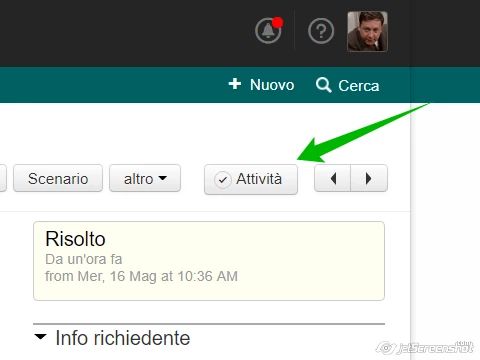
If it could be useful, in these cases, I switch the tickets view in "Activities" . 


image


Agree - my users would like to see each message in the thread collapsed like in gmail with the ability to expand/collapse each one individually.  They don't like having a group of messages collapsed together as they are unable to see what is in those messages "at a glance" and they have to scroll through long messages in order to see the next message in the thread.


  • Contributor
  • February 11, 2019

This is a good idea. The fully collapsed (hidden) version is good when there are 20+ replies, but you should be able to click to expand to individually collapsed reply mode and click each reply to expand just the reply, AND there should be a button to "expand all".


  • Community Debut
  • August 30, 2019

+1


Is there a way to get this higher on the backog? This ticket is 6 years old?!


Sorerly needed. If a customer replies, the quoted text which is useful for the customers, but not so much for the agent since they can already see the other replies in the ticket itself can't be hidden. This basically creates a long list of previous replies when a customer replies again to a ticket. 


There should be an option to hide quoted text send from the customer. 


hemanth.ramya
Community Manager
Forum|alt.badge.img+9
  • Community Manager
  • May 1, 2020

Hello Everyone!


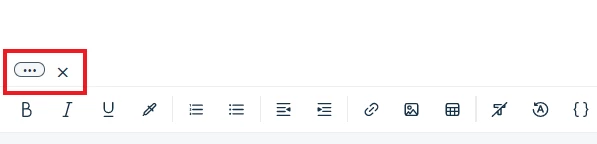
Apologies for not having been active here. I'm sure that you would be already aware of the feature -> Removal of quoted text from replies. You simply need to hover on top of the quoted text icon in the reply editor and click on the 'x' to remove the quoted text (as shown below).


Also, our Freshworks Marketplace app: Remove Quoted text would help automatically remove the quoted text in the reply editor so that you don't have to worry about it every single time. Check this link for detailed insights on the app.


For further queries, reach out to support@freshdesk.com and we would be happy to help!


Cheers.


geebranz
  • March 9, 2021

Any news? Can’t figure it out


www.eyelashextensionssantafe.com