Closed for Voting

Contact locked out account - need to be able to unlock

Related products:Freshdesk
  • April 7, 2016
  • 43 replies
  • 104 views

Show first post

43 replies

aravind.sundararajan
Skilled Expert
Forum|alt.badge.img+12

Hello Folks,


We don't want the agents to be locked out for 2 hours which might end up hampering their productivity. The agents can request for a password reset as soon as the failed login counts increase and the visual indicator helps agents to locate the reset password option . However, on unfortunate circumstances , if the agent's account gets blocked, please reach out to our support ( https://support.freshdesk.com ) or write us an email on support@freshdesk.com and we'll act upon it immediately.


Cheers!


  • Community Debut
  • November 2, 2017

Sorry to say Aravind, but contacting support and wait until they have reset the account seems to be way much effort. Why not just add that feature in the admin console? That will also minimize the number of support calls you get, which seems to be a win/win situation.


aravind.sundararajan
Skilled Expert
Forum|alt.badge.img+12

Hello Patrick,


Definitely yes! Will take it to the product and gather their thoughts around this. Just wanted to provide the community a faster option to get the agents re-login again to the system :)


Cheers!


  • Community Debut
  • November 2, 2017

Can you give any progress reports on this? It is two years already since the feature was requested, and still little to no information on the expected release date, if there is any.


  • Community Debut
  • December 12, 2017

Just happened to me... I reset the password but the account is still locked out... Terrible functionality... basically any account lockout you loose 2 hours of productivity... This is not solved and is a big problem... really there should be a administrator access to forcibly unlock an account .. either an agent or a contact. 


  • Contributor
  • December 13, 2017

I'm actually a very happy Freshdesk user based on six months of running our installation. But I consider this problem an atrocious oversight (or poor design decision). If I lost an agent to this for two business hours, I'd be livid and my bosses would be as well.


  • Contributor
  • December 13, 2017

An admin should always be able to instantly unlock another agent's account, the same way they can instantly create or delete them. It really doesn't make any sense to leave this functionality out, does it?


  • Community Debut
  • December 14, 2017

Just running into this issue as well. I understand the mandatory lockout and while 2 hours seems excessive for many use cases (maybe it should be admin controllable how long the lockout period is?) the real problem is that an admin can't unlock the account. Please add this functionality asap, this has been an open issue for three years!


aravind.sundararajan
Skilled Expert
Forum|alt.badge.img+12

Hi,


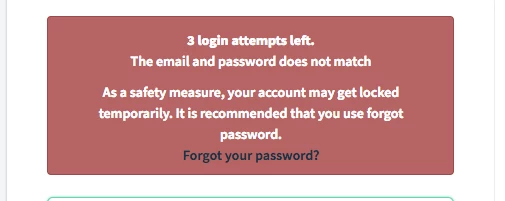
Here's how we're trying to prevent/alert the agent account lockout :


1. After 3 or 4 failed attempts, as a security measure, the re-captcha widget shows up and helps in preventing brute force attacks on the portal


2. After 7 failed attempts, a clear warning message shows up on the portal for the agent requesting them to reset the password along with the indication that the account would get locked out in another 3 attempts


3. In case of API users, the error code clearly indicates that the account has been locked out and it needs to be unblocked 


{"code":"password_lockout","message":"Maximum failed login attempts 10, reached."}


Apart from the user initiated error, what are the other cases where the agent account might get locked out ? We would like to listen to you and see if we can further explore the option suggested.


Cheers!


  • Community Debut
  • March 12, 2018

Hi aravind the problem is not how you manage getting to have your account locked... The problem is that once it is locked there should be an abbreviated way it can be unlocked.... 


What you propose simply puts more barriers to getting the account locked ... which is not necessarily good from a security point of view.  Sometimes it is good that an account gets locked... 


The problem is once an account is locked freshdesk does not have a way that an admin can unlock an account so that an agent or client can quickly get back to work...your proposed solution is over complex and does not solve the problem. 


you are approaching ths from preventing account lockout and the solution is in providing a way for an admin to shorten the solution to account lockouts rather than preventing it. 


  • Community Debut
  • March 12, 2018

In my case, it was a support agent account that got locked out.  He was trying to remember the password that he had set.  Once he got locked out, he lost two hours of productivity.  Attempting to provide better messaging around this possibility is a good start, but he still needed to figure out what his password was.  The only real solution to this is to allow an administrative user to remove the lock out.


  • Contributor
  • March 13, 2018

I agree strongly with Freshdesk customers in this thread saying we must be able to allow our own admins to unlock a user. I recommend the following from a customer needs perspective:


  • Let admins set the lockout time. Two hours is not always ideal.
  • Let admins unlock a locked-out user.
  • Encourage users to change their password well before they get locked out, as Aravind suggests above. But note that this is not a substitute for allowing admins to unlock users and to determine their own default lockout wait period.


  • Community Debut
  • May 29, 2018

Is this still not fixed?? This is so frustrating. I had an employee who got locked out of their account today and there isn't a way for me, as an admin, to unlock them? They have to wait 2 hours? When is this going to be fixed??


aravind.sundararajan
Skilled Expert
Forum|alt.badge.img+12

Hello,


We've recently launched the Freshworks switcher - it enables you to navigate across Freshworks' product suite with a single login. It is powered by a new Single Sign On mechanism and with this, we're making it easy for the admins by sending an email with the unlock link in case if an agent account gets locked out. The link would be valid for 2 hours and all the agent has to do is to just click the link and the account would get unlocked immediately.


We've started enabling this for select accounts. In case if you've not setup a custom SSO for login, drop us a note here with your account details and we shall get this feature enabled for your account.


Cheers!


  • Community Debut
  • March 20, 2019

trying to set a new password for nrg@grilloprod.com to start receiving my daily digital treatments, and the process is getting completed..Please help and simplify..

tank you


How is this still a thing?

Agents getting locked out and not being able to do anything for two hours and admins not having a way to lift this is ridiculous.


Sure, we can contact support and ask them to reset this for us, which I have done, however, it doesn't seem that support is acting on it as 'right away' as initially advertised.


Apparently this is still an issue ... I was locked out and simply cannot log back in after more than 1 1/2 hours

i reset my account, i checked the admin console from another account, and there is no option for the admin to unlock an account


Is there a development here?


  • Community Debut
  • September 23, 2019

This is my experience and considering the original message on this thread was 3yrs ago, this is horrendous and seems to actually have got worse.

A 2hr lockout would at least have been manageable even if it was down to some stupid bug with freshdesk.


"i logged out for a system update.

My username and password are saved to the computer. (this is the email address i use matt.mcdonald@touchretail.co.uk)

https://support.touchretail.co.uk/support/login

I go to that link as normal and click login with my saved details.

It moved to the 2nd login page (screenshotted freshdeskfail.jpg) and would not accept my details, it then said I had no account and finally locked me out due to multiple attempts.

I tried around 6 times (both before and after lockout) to request a password reset in the hope that whatever issue freshdesk was having would be resolved by resetting. I had no emails, then eventually 2 turned up as per the 2nd screenshot (freshdesknourl.jpg). In these emails im asked to click or copy and paste the link ... but there is no link, just a blank space."


Reported 3pm Friday. Still no resolve. A couple of largely unhelpful messages and needing to check with the team.

What do you need to check. You have my credentials, the lockout appears to be a bug your end, your password reset is useless .. unlock my account. .. i cant get any work done!