New Idea

Copy Requested Item Content to a private note when ticket type is changed from Service Request to Incident

Related products:Freshservice
  • April 19, 2023
  • 8 replies
  • 97 views

Forum|alt.badge.img+5

I believe this should be implemented since currently, when you convert a SR to an INC, the requested item is deleted, therefore you have a ticket with no details! So what’s the point of the option to switch between SR to INC when the agent cannot see the detail of the ticket.

Additionally, the information is not stored in the activities tab.

 

8 replies

Daniel Söderlund
Top Contributor ⭐
Forum|alt.badge.img+14

Hi, 


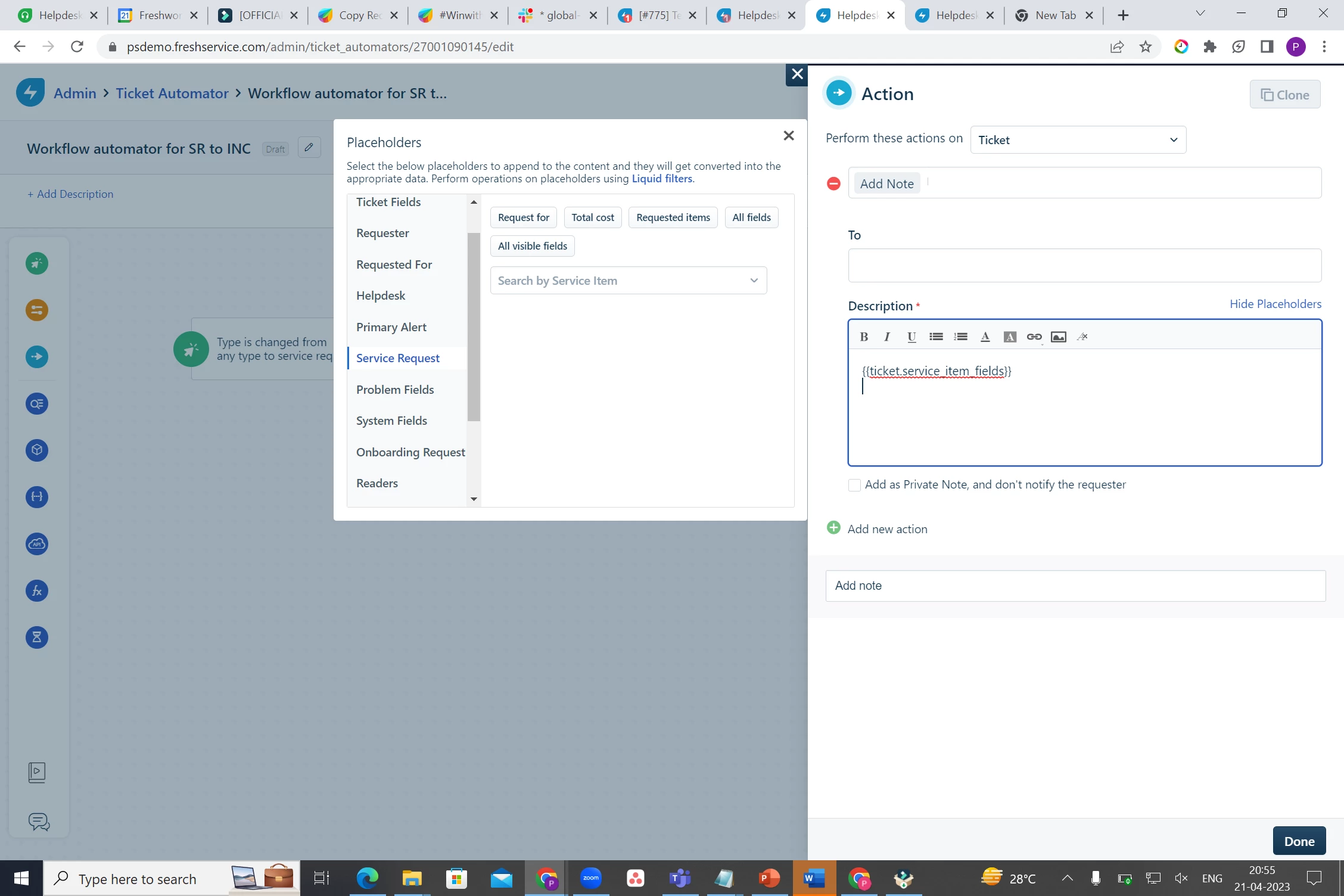
Workaround we have is to post all fields as note direct. 
Because if you change the service item the field data will be deleted. 

I think the case is more that you change a INC to a SR rather then from SR to INC. 


Forum|alt.badge.img+5
  • Author
  • Contributor
  • April 20, 2023

Hi Daniel, 

But in reality, it doesn’t really make sense that you copy the information in a note (since like you said, it’s workaround)… It should be done automatically when you trigger the change rather than doing it for all Service Requests. I don’t find it neat to be honest.

When you convert an INC to SR, the description remains, but a requested item is added so no, my idea is to have something done when you convert SR to INC.

Thanks

Mar


Preethi S
Community Debut
Forum|alt.badge.img+3
  • Community Debut
  • April 21, 2023

@Daniel Söderlund 


Just wanted to understand if this workaround you have suggested will be applied via the workflow automator. 


@matrevisan


If you are going to apply this workaround with the WFA, it happens as follows

  • Event>Type is changed from Any to SR
  • Action>Add note with placeholders from Service request fields


Thanks :)


Daniel Söderlund
Top Contributor ⭐
Forum|alt.badge.img+14

@Daniel Söderlund


Just wanted to understand if this workaround you have suggested will be applied via the workflow automator. 


Hi, Yes it’s was using the workflow automator. 


Forum|alt.badge.img+5
  • Author
  • Contributor
  • April 24, 2023

@Preethi S / @Daniel Söderlund I actually found a better workaround here since the workflow automator does not actually copy the information since the requested item would be already deleted at that point.

So what i did is that i have created a business rule to disable the update of the request Type Incident / Service Request so that agents can trigger this through a scenario only. This way, first i copy the information of the requested item in a private note, then i change the status to Incident. And i confirm, it works like a charm! :)


Daniel Söderlund
Top Contributor ⭐
Forum|alt.badge.img+14

@Preethi S / @Daniel Söderlund I actually found a better workaround here since the workflow automator does not actually copy the information since the requested item would be already deleted at that point.

So what i did is that i have created a business rule to disable the update of the request Type Incident / Service Request so that agents can trigger this through a scenario only. This way, first i copy the information of the requested item in a private note, then i change the status to Incident. And i confirm, it works like a charm! :)

Ahh that is a way to do it on demand :) 

Still do not help if you change the fields in the Service request item. 


Forum|alt.badge.img+5
  • Author
  • Contributor
  • April 25, 2023

@Daniel Söderlund what do you mean if you change the fields in the service request item?


Daniel Söderlund
Top Contributor ⭐
Forum|alt.badge.img+14

@Daniel Söderlund what do you mean if you change the fields in the service request item?

If you delete a field in a service request item all tickets with that item vill be affected.