

New Idea

CSV Import for Asset Fields

Related products:Freshservice
  • March 25, 2025
  • 2 replies
  • 41 views

JoramP
Contributor
Forum|alt.badge.img+2

Currently, when importing assets via CSV in Freshservice, the fields Cost, Salvage (€), and Depreciation Type cannot be imported. These fields must be added manually, which can be time-consuming when importing large quantities of assets. Allowing these fields to be included in the CSV import would save a significant amount of time and make asset management much more efficient for users managing large asset lists.

Looking forward to this improvement being made!

2 replies

mbackwater42
Top Contributor ⭐
Forum|alt.badge.img+8
  • Top Contributor ⭐
  • January 6, 2026

We would love to be able to easily import this crucial data. A lot of why we aren’t using Freshservice for Asset Management is how many of these little annoyances add up to make an unusable platform for our purposes. 


Forum|alt.badge.img
  • Community Debut
  • January 20, 2026

I don’t use these fields. 

I did take a quick look in our test environment and seen that cost is a field that I could import, and a quick test did work.  But, the other two fields are valid. 

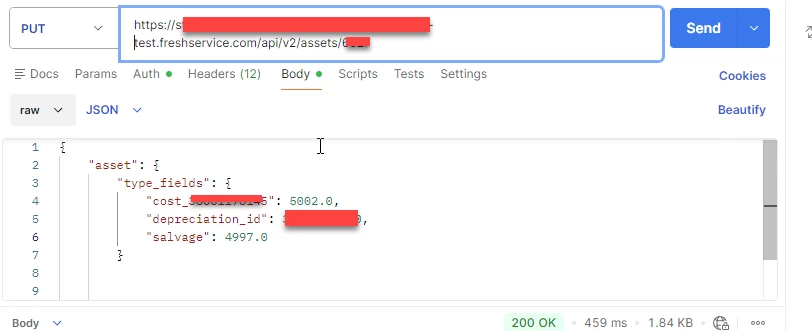
Since you can’t import the fields you can use the api as they are documented in the type fields      /api/v2/assets/[display_id]?include=type_fields   In FreshService’s document  Service Desk API for Developers | Freshservice  

Below is a screenshot of postman updating all 3 of the fields.  Granted they are in USD values.  (But hoping they close enough for your needs. )  So you could take the basic idea to  custom read your CSV file and do a mass automated import of your missing data.   Personally, I would consider the use of the PowerShell module, or SDK since it would also handle the rate limiting, but there are also other good choices available.  

But, if you’re wanting to update the asset manually here is the documentation Service Desk API for Developers | Freshservice