


New Idea

Custom CRM initiated triggers to manually kick off a customer journey

Related products:Freshsales
  • March 6, 2023
  • 1 reply
  • 69 views

Rogier
Apprentice
Forum|alt.badge.img+2

In order to make Freshsales Suite the central part of company processes, I would like to be able to have Freshsales Suite make events/triggers directly.


Examples

When looking at a Contact, think about the options to:

  • Cancel subscription” (webhook call to external system that manages subscriptions)
  • Send notification” (Whatsapp message to their phone that their product is ready for pickup)
  • Sync data” (webhook to trigger external system to update the data in CRM)
  • Start demo account” (after contact, kick off a process to setup a demo environment in our own software (webhook + email)

→ Basically anything that would start a “customer journey”, but now by the hand of an agent.


Possible implementations

  • Add the option to the submenu for a contact (“Trigger event x”) : 
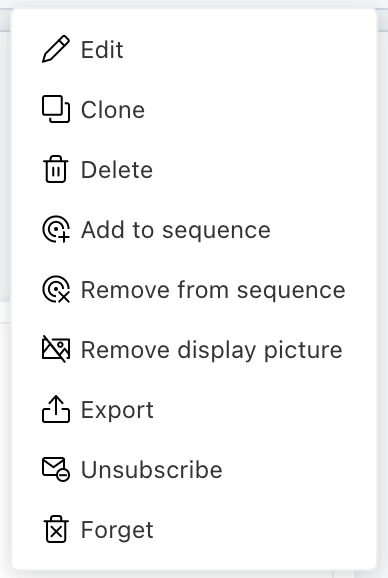
     

  • Or, even better: Have a way to add a button to the button bar on the Contact view (“Send email”, “make call”): “Do x” (just fires an event):

Motivation

→ Such an event can work as a trigger to kick off a customer journey and call external webhooks, send a WhatsApp message, send an email, update a field or basically anything of the cool things customer journeys can do! 🤩

This would leverage all possibilities of customer journeys even further, as right now there is no way to ‘kick off’ a process manually.

1 reply

  • Community Debut
  • September 12, 2024

To fully integrate Freshsales Suite with external systems and streamline processes like subscription management, notifications, and data syncing, you can leverage webhooks and CRM enrichment to optimize workflows. This allows for the automation of tasks such as managing subscriptions, sending notifications, and syncing data, all while CRM enrichment with updated information from external systems.

One way to achieve this is by setting up custom workflow actions that interact directly with contacts in Freshsales Suite. For instance, you could implement options like canceling a subscription via a webhook that communicates with an external system responsible for managing subscriptions. Similarly, you could enable sending notifications, such as WhatsApp messages, when a product is ready for pickup, enhancing your customer communication. Another possibility is syncing data between systems through a webhook that updates the information in your CRM, ensuring data consistency across platforms.

To enhance user interaction, you could implement these actions as submenu options within a contact's profile in Freshsales. For example, an agent could choose to cancel a subscription, send a WhatsApp notification, or start a demo account, all of which would be triggered by webhooks. Another potential enhancement is the addition of custom buttons in the contact view. These buttons would allow agents to trigger actions manually, such as sending an email, making a webhook call, or sending a text message, thereby making the system more dynamic and interactive.