Closed for Voting

Day pass usage reports

Related products:Freshdesk
  • February 2, 2017
  • 4 replies
  • 58 views

The day pass page that shows remaining passes is not good enough to use as a way to determine whether you need to convert occasional agents to full time agents as it doesn't have the facility to put in a custom time span.

      The Occasional agent page only shows the total of passes used by individual agents with no time context at all.

     Neither of these alone or in combination can help you judge how many passes to buy or at what point to convert the agents status.

    The data is in the application it just needs the will of the developers to make Freshdesk capable of producing a report that can be used to accomplish both of these tasks.

    Without this feature it makes it near impossible to budget successfully for the correct use of the product.


4 replies

  • Contributor
  • September 10, 2017

I believe this is a very important report to have. I need to know monthly whether an occasional agent is costing us more than a full agent. What can be done here? Perhaps some customer alerts so that I know when an occasional agent has exceeded $xx in a month?


Please don't let this go unanswered for 7 months like the original post for this thread.


aravind.sundararajan
Skilled Expert
Forum|alt.badge.img+12

Hi,


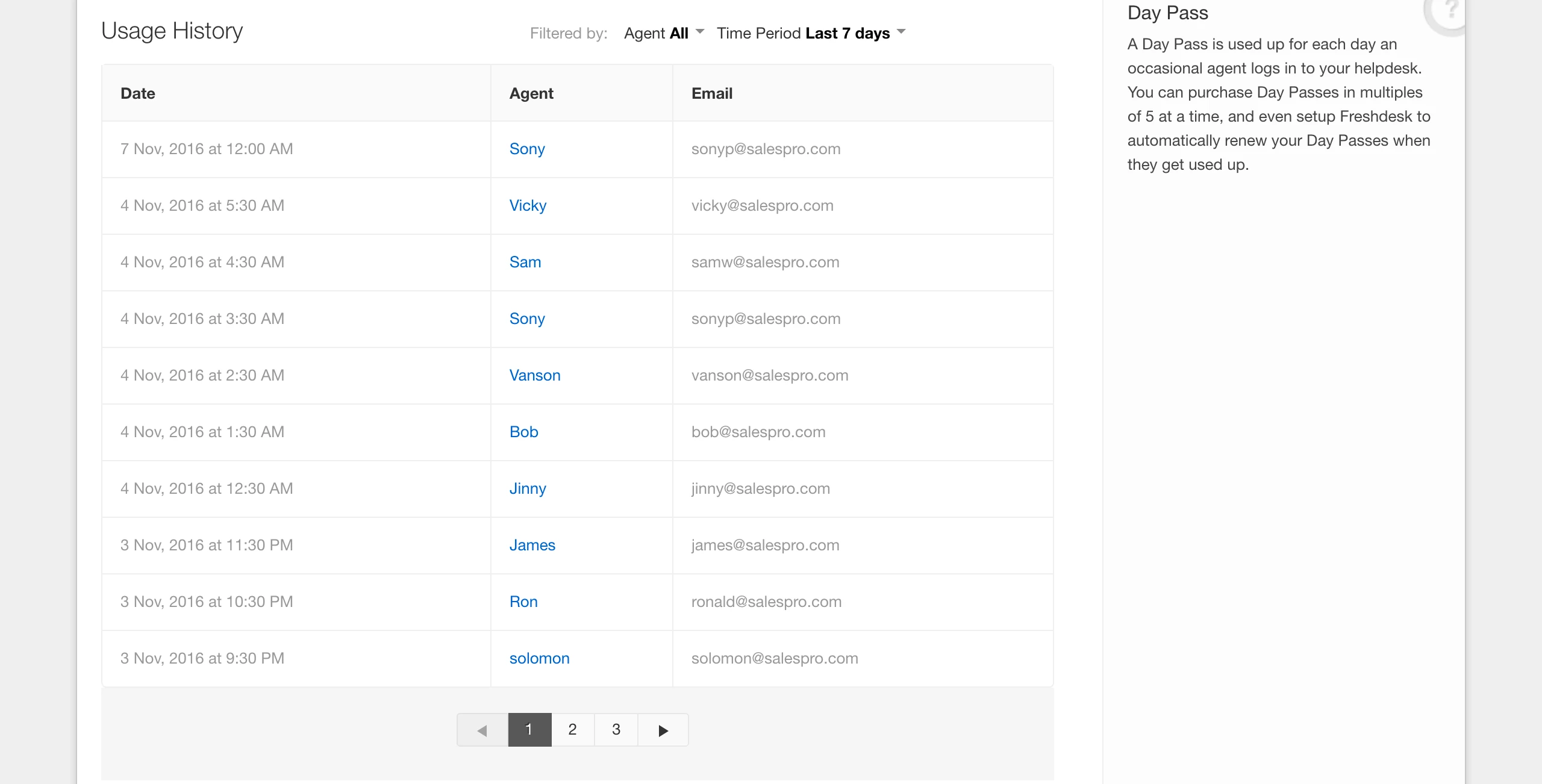
Usage History lets you keep a tab on occasional agents who use your purchased day passes by tracking the date, agent name and email address. An admin can access it from Admin Tab -> Account Settings -> Day Passes. You can pull up usage history for the last 90 days and it also has a filter to narrow down your usage based on agent names as well.


Screen%20Shot%202016-11-07%20at%202.37.29%20PM.png


Hope this helps.

Cheers!


  • Community Debut
  • June 28, 2018

I realize this is an old topic, but I still think you could do better.   The screen shot above should not sort only by Date.  It should ALSO sort by agent and quantity of day passes used, per agent over the previous week/month/90 days.    Yes, you *can* extract this data by selecting each user from the drop down list (that, oddly, includes both full time and occasional agents so even there you aren't making this easy) and then counting up the number of day passes they've used over the time period select.   


It is a tedious manual process that could easily be solved by the developers.


  • Contributor
  • June 28, 2018

Agree with Greg. There just needs to be more comprehensive day pass usage reporting. I want to be able to list occasional agents with > n amount of day passes in a given period of time, just to start with. I need to know who I should convert to full time agents.