
Closed for Voting

Default ticket ordering

Related products:Freshdesk
  • September 8, 2016
  • 6 replies
  • 40 views

I'm really not a fan of the default ticket ordering in Freshdesk and was surprised to learn that it can't be modified. The default ordering gives precedence to the most recent New ticket, then the most recently responded to ticket, etc. I don't understand why the most recent activity is always given precedence over the most aged activity. I usually want to work on the oldest tickets first and it makes no sense to me, the way tickets are currently ordered. That's not to say that the ordering I want is necessarily what others may want, but it would be nice to be able to customise it.
6 replies

  • Contributor
  • September 9, 2016

I think you can create a custom view and sort them by last modified date (so the oldest will be on top).


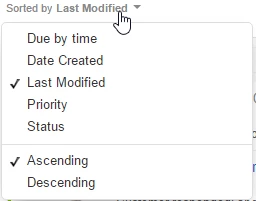
Thanks for the feedback Ben. As suggested by Ivan, you can change the sort parameter as well as order from the ticket list view, but I understand that you may want to customise this even further. If that is the case, please share the various ways in which you might want to customise the view and the end goal of doing this. Understanding your workflow will help us build a solution in the most optimal way. 


Thanks, 

Arvind. 


  • Author
  • Contributor
  • September 19, 2016

That's good, but I still want to see new tickets first when I order by last updated ascending. The priority is:


  1. New tickets - Oldest to Newest
  2. Open Tickets - Oldest to Newest

This is what Freshdesk can't do (I would be pleased if someone pointed out that I'm wrong).


Thanks for your response Ben. If you've chosen to sort the tickets in an ascending order of "last updated" time, then the implementation is straight forward - you will just see the oldest to newest tickets sorted based on their modification / updated time. Here "modification" includes adding responses (replies / notes), updating the ticket properties etc. 


Correct me if I'm wrong, but it seems like you are looking for a sub grouping / sorting within the sorted view? While you are right that we do not currently support such a function, will be great to know the reason you are trying to do this and the process you follow to resolve tickets to help us understand your requirements better. 


  • Author
  • Contributor
  • September 27, 2016

Thanks Arvind,


I'm not sure what else I could add that would further illuminate my workflow. I usually want to work on the most aged tickets first, in order of new then open.


I'm confused about why you would say that you don't currently support the function that I'm after when your default view for new and open tickets is exactly what I'm talking about, but it sorts tickets in descending order rather than ascending order.


Am I missing something or do you mean that aside from the default view Freshdesk doesn't currently support the function I'm after?


I probably did not understand you clearly the first time, Ben - my bad. Before I suggest a solution, let me just share our definition of views / sort orders and new tickets to ensure we're on the same page. Please bear with me if it proves to be redundant:


A view is a simply a combination of filters. The "New & My Open Tickets" default view, for instance, uses this combination:

  • Agents - [Me] or [Unassigned]
  • Created At - [Any time]
  • Status - [Open]

You can easily construct any custom view of your choice with the above combination of filters and you will find the behaviour to be the same as the default view we ship out of the box.


A sort order is specific to a view at the time of saving a custom view but can be modified by an agent later. The "New & My Open Tickets"  default view, for instance, has sort by created time in descending order (Newest to oldest ticket) as a default setting. However, any agent can choose to change this sort order which will be specific to the agent and stored at the browser level. Again, this is behaviour that is left to the agent's choice.


A new ticket (highlighted by bold text on the ticket list and a "new" icon) is any ticket that

  • has not been responded to even once 
  • is in an SLA ON status
  • Has still not breached the first response SLA due time
  • Has still not breached the resolution SLA due time
  • Has not been responded to by the customer after ticket creation

This implies that all open tickets that have not been responded to and meet the above criteria are new tickets. Your view, based on the filters you select, will be a collection of open tickets, some of which will be new. The listing order, however, is set by the sorting mechanism you choose.


So as explained above, the views and sort orders are completely open to customisation from your end. The definition of "new" tickets, however, is based on the criteria mentioned above so it is not really possible to look at "open" and "new" tickets as separate groups while sorting. When you have a view of tickets sorted by their modification time in ascending order, you will simply get the tickets listed in the order of modification from the oldest timestamp to the newest timestamp. If the tickets in the view have never been modified, their creation timestamp will be considered for this sort. 


I hope this helps you understand the implementation more clearly than before. If not, happy to elaborate on details that you find to be unclear.