New Idea

Delayed Responses

Related products:Freshservice
  • September 26, 2023
  • 4 replies
  • 87 views

Forum|alt.badge.img+7

I see there is an app created for Freshdesk, but nothing for Freshservice. It would be nice if we could have some sort of delayed response feature. For example, if I wanted to complete a ticket this evening, but not send a response until the next morning. This would be in an effort to temper expectations for requesters, or to notify them at a more convenient time that their ticket is complete. Is there anything like this and I am missing it?


4 replies

kpatterson
Top Contributor ⭐
Forum|alt.badge.img+8
  • Top Contributor ⭐
  • February 29, 2024

We work with a lot of access requests for SSO-based applications.  When we add the customer to the access group, we know there will be a sync-delay of anywhere from 1-24 hours depending on the tool/system.  Currently we have to write up all our responses to take that into account OR remember to go back after the sync would have completed to send our notice.

The ability to use a delayed notification would be hugely helpful here!


afautley
Top Contributor ⭐
Forum|alt.badge.img+11
  • Top Contributor ⭐
  • March 1, 2024

There is the Timer nodes in workflows that you wait a period of time before sending an email. 


or you can take advantage of the scheduled workflow if a sync is being run at a particular time, on the schedule you could pick up the requests based on the service item used maybe need the status option too depending on your processes. Then send an email at that time after the sync..


kpatterson
Top Contributor ⭐
Forum|alt.badge.img+8
  • Top Contributor ⭐
  • March 1, 2024

Thanks @afautley -it’s a good thought and one we did consider.  Unfortunately it doesn’t allow agents to dynamically adjust text in the response if needed.  Staff can request for themselves, someone else or even a group of people so, although we start from a canned response of “you are granted to”, they may need to manually adjust it to “Sam and Eric were granted” before sending.  

I believe emails sent from workflows also don’t physically show in tickets.  We have a few workflows that send off parts of work via email to other systems and can only see that they ran by viewing the Activity Log. While we should know what the content generally is in our messages, I prefer to see it written out in the ticket for audit/tracking purposes.


afautley
Top Contributor ⭐
Forum|alt.badge.img+11
  • Top Contributor ⭐
  • March 1, 2024

HI,

If you have the email notifications turned on for public comment, then you can add a public note to the ticket which will then tell the requester and log it in the ticket at the same time… if you don’t want to to send to the requester but send to someone else, then you can send it via the workflow and then add a private comment to the with the details..


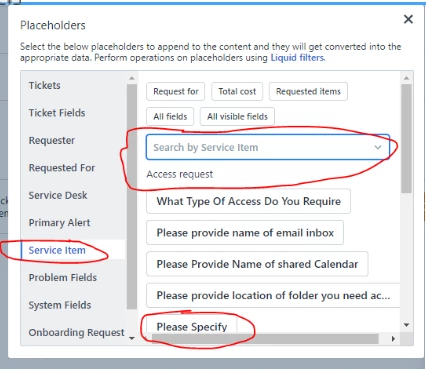
if the requester has the option in the form to choose who they need it for… then you can use a placeholder from that information in the workflow.. so if they say specify who needs access, you should be able to pick up those details.

you can then say something like, “we have provided access for (Placeholder)”

we do something similar and it works for us…