Closed for Voting

Distinguish between Firstname and Lastname; new placeholder Shortname

Related products:Freshdesk
  • December 8, 2016
  • 3 replies
  • 34 views

Distinguish between Firstname and Lastname


In the system we now enter 1 Full name


But over here we sometimes use only the Firstname, sometimes the last name: It can also differ per product ...... 


The system should have 2 fields, or at least a second field called "Shortname" so we can use this as a placeholder too



https://snag.gy/IbK82M.jpg


3 replies

aravind.sundararajan
Skilled Expert
Forum|alt.badge.img+12

Hello,


You can create a contact custom field and use the value as placeholders in the ticket response. This way, the full name field can still be used to track the actual name of the requester and the custom text field would give you the short names.


Cheers!


  • Community Debut
  • March 23, 2020

Hi Aravind,

The problem with the solution using contact fields is that you are requiring users to input their name TWICE at signup. Not to mention that the auto sync with Freshsales can be messy.


hemanth.ramya
Community Manager
Forum|alt.badge.img+9
  • Community Manager
  • April 21, 2020

Hello,


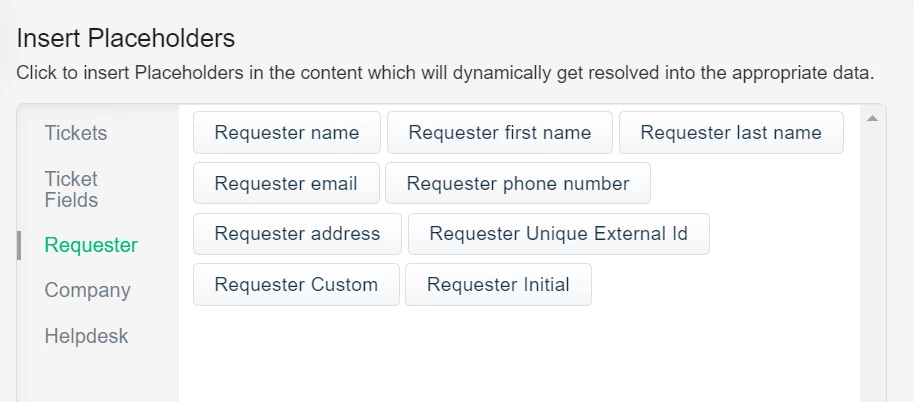
There is a simpler way to make use of customer's first name and last name in the reply templates/email notifications using the placeholders for the same. You can navigate to Admin > Email notifications > Specific notification > Insert placeholder > Requester section - Requester first name/ Requester last name.


However, if you wish to use another name for a user, a custom customer field would be the only option here and the user would have to input both the fields. For any further queries, you can write to support@freshdesk.com and we would be happy to help!


Cheers. :)