Closed for Voting

Easier to see if a ticket have been answered or not.

Related products:Freshdesk
  • January 13, 2012
  • 8 replies
  • 50 views

Can you make it easier to see if some other agent have already replyed to a customer?


At the moment most you from the ticket overview open the ticket before you can see if some other have replyed to the customer or not.


That's time consuming.

8 replies

  • Author
  • Apprentice
  • February 7, 2012

I get more and more mail through Freshdesk and this problem makes me to open mail that other person already have answered.


It's really annoying to not easy see who should answer to next, me or the customer.


Hopefully you implement this feature soon! =)


  • Contributor
  • February 7, 2012

Hi Andreas

You may notice that, we have a BLUE INDICATOR and BOLD SUBJECT line for the ticket - Whenever Ticket is NEW or REPLY from customers has been received.

I can understand the use case for a Preview option to see what the last reply was. We've actually planned for a Preview like option, that will show the entire conversation or the last update.

We will bring this out soon.


regards

Vijay 


  • Community Debut
  • April 4, 2012
I'm in favour of this - If there could be a definite colour change that would bring the ticket to your attention that it has been replied to or is in fact a brand new ticket.
I do see the blue indicator and bold title but when you look at multiple tickets all day, it would make it a lot easier to have a colour change eg instead of the row being white, make it a more noticeable colour,  something that catches the eye. 

Many Thanks!

Hi Nicole,

We will look into this and see How we can address this.

regards
Vijay

  • Contributor
  • April 22, 2012
My only concern with the blue dot and bold text is that most people are programmed to see the bold text as UNREAD which is a slightly different use case than what is now in place.
At the moment even if you have READ the ticket it still does not remove the bold as it is really showing that the ticket has not had a reply from someone at the helpdesk.
I am not sure of what should be implemented but a general light yellow colour usually indicates a change of status across the whole ticket line summary.

ALSO if you put the LAST REPLY with the Days or Hours ago and WHO sent the reply (Agent or Requester) when you hover over the ticket I think it will work a lot better.

Put a cutdown version of the reply at the top (a maximum number of characters and then the summary of the ticket description (with a max characters). If the agent can't get the gist of the ticket from 200 or 300 characters then they should click into the ticket anyway.


  • Contributor
  • August 23, 2012
ALSO if you put the LAST REPLY with the Days or Hours ago and WHO sent the reply (Agent or Requester) when you hover over the ticket I think it will work a lot better.

I would love to see this as well, but also with LAST NOTE if a (private/public) note was the last thing added to the ticket. It's currently very difficult to glance what the latest info on a ticket is. Preferably I would
love to see this in the new (which I love) ticket view, not on hover.

Maybe something like this:
<subject>
From: <client>, Created: X days ago
<status> for X days
Last: reply (linked to latest reply, preview on hover) / note (linked to latest ticket note, preview on hover)

Or an extra admin configuration option: show latest ticket replies/notes in ticket overview. 

aravind.sundararajan
Skilled Expert
Forum|alt.badge.img+12

Hello Folks,


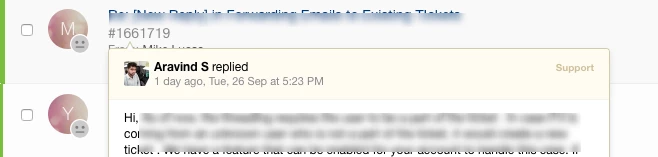
Though you might have already noticed this, you'll now be able to see the latest update on the ticket from the list view . All you have to do is just hover on the ticket subject and it would show the preview of the content along with the author of the reply/note.


Here's a snapshot of how it would look like on the helpdesk:


image


Cheers!


  • Community Debut
  • December 11, 2018

I sent an email to support on cex and wonder if i am going to get the assistance i requested