Closed for Voting

Editor Formatting Button Layout

Related products:Freshdesk
  • September 24, 2019
  • 6 replies
  • 24 views

It's been awhile since the formatting options have been buried under The "A" button at the bottom of the reply screen.
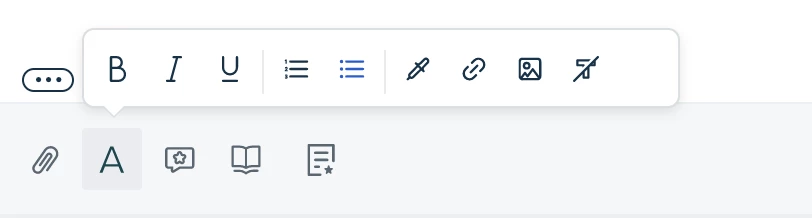

image


And I just can't seem to figure how this is helpful. I use those features a lot, more than the other buttons at the top level. Can they just please be inlined so I don't have to click to select them. 


Also, the floating popup often hides something I need to be seeing or editing so I have to click again to get it to go away or scroll or add blank lines to get the text to be above the popup.


It's just super inconvenient to access something that I believe is used frequently by many (assuming you have heat map studies?).


Here's what I believe it should look like:

image


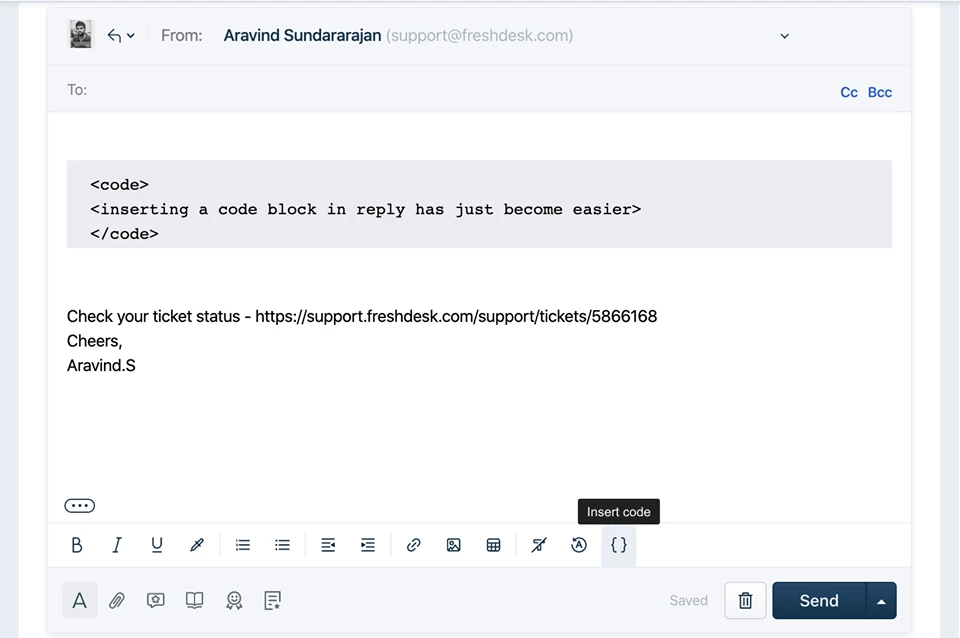
And don't miss that added feature at the end. Code Formatting, please!!!!


Thanks

Craig

6 replies

Forum|alt.badge.img+7
  • Community Manager
  • September 25, 2019

Hello Craig,


Thank you for the suggestion and the visualizations. We’ve received feedback from our users and we’re making a note of it to make your experience better when we revamp it.


While I can’t state an ETA about when it'll be available for you, I assure you that we’re working on it.


Also, could you please tell me about when you'll find code formatting useful for replying to your customer's tickets?


  • Author
  • Contributor
  • September 25, 2019

Thanks, looking forward to improvements in this area.


"...when you'll find code formatting useful for replying to your customer's tickets?"


Like almost every single ticket we handle. Our product IS code, for the most part. Developers seeking assistance with our SDKs.

There's a code format button in this community form. Why not in tickets?


It's discussed in this thread and reason for not doing it may be valid but I've had this in other support systems, long ago:

https://support.freshdesk.com/support/discussions/topics/1253/page/5?url_locale=


What about just being able to change the font to monospace so that it looks like code font?


Forum|alt.badge.img+7
  • Community Manager
  • September 27, 2019

Hello Craig,


Thank you for the update on why code formatting will be useful. As we discussed, we're revamping the ticket reply editor and will take your feedback to the team working on it.


Cheers.


aravind.sundararajan
Skilled Expert
Forum|alt.badge.img+12

Hello Craig,


We've recently updated the editor to show the formatting options upfront so that you don't need to click on the 'A' icon every time. Hope you've noticed this change already :) 


We've made the change in the reply editor and will soon extend this to all pages where you have the text editor embedded. We're working on a couple of enhancements (like insert tables) that should be available for you in a few weeks' time. I'll add more details on this when we're closer to the release date. We're also looking at adding the 'Code Formatting' option as part of the future enhancements planned for the editor.

Cheers!


  • Author
  • Contributor
  • November 13, 2019

Beautiful! I'm already enjoying the always there, not in the way menu options. Thanks for the efforts. Looking forward to the code formatting so I can lose the Markdown chrome plugin. Cheers!


hemanth.ramya
Community Manager
Forum|alt.badge.img+9
  • Community Manager
  • May 6, 2020

Hello Craig!


Happy to know your valuable feedback. Also, we have recently introduced the 'Insert Code' option in the reply editor which helps in code formatting (as shown below). Please try this out if you haven't yet! 


Hope this helps. Cheers! :)