

Closed for Voting

Enter customer name when creating ticket

Related products:Freshdesk
  • January 5, 2012
  • 4 replies
  • 32 views

If I enter a customer email address in the Requester field when creating a ticket, and no matching contact exists, Freshdesk automatically creates one. However, there is no way to specify the user's name, so Freshdesk just assigns the first part of their email address as their name.

That means that if I create a ticket for bob123@email.com, he would get emails that say "Dear bob123", which doesn't look very professional.

I've tried entering the Requester information like this, Bob Smith<bob123@email.com>, but in that case Freshdesk creates a new contact with the name "Bob" only, and drops the "Smith"

4 replies

  • Contributor
  • May 30, 2012
Oh this is a huge one in my book, would really love to see this implemented.

  • Contributor
  • October 8, 2012
Hi 

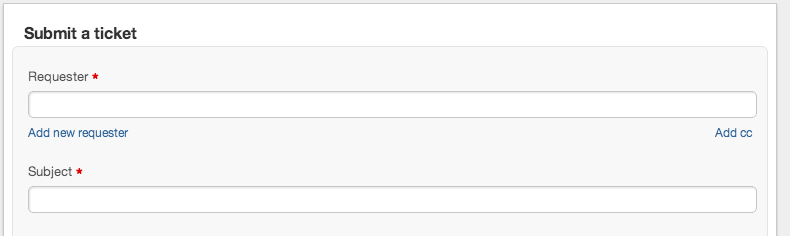
This has been implemented in last week's update. You will now be able to add a new Requestor if the Requestor is not already present in Freshdesk.

Screen Shot 2012-10-08 at 3.34.28 PM.png

Please let us know your feedback.

  • Community Debut
  • December 8, 2015

how about if i edit the requester field from an existing ticket..can you also have this feature there


aravind.sundararajan
Skilled Expert
Forum|alt.badge.img+12

It's easier to edit requester information from the ticket. You don't have to navigate to the user's profile anymore to make a simple name change. To know more about this, please read here


Cheers!



