Closed for Voting

enter time spent via email command

Related products:Freshdesk
  • June 17, 2014
  • 7 replies
  • 22 views

Is there a way to set or adjust the time spent on a case via an email command? Maybe when closing a ticket?

Any chance of adding this feature to the wishlist as a priority? It comes up when we want to use the time sheet auto-generation feature. Email commands are great for creating and closing tickets and my staff prefers to use that method. But then they can't use the time sheet generation feature unless they visit the Web interface for each and every ticket, negating the convenience of the email commands feature altogether.

7 replies

  • Community Debut
  • January 15, 2017
Completely agree. This feature would let me decide on Freshdesk instead of Spiceworks which has this feature (and its free). I am on the road often and don't want to open either the web interface or the app because I'm generally working in my mailbox.


aravind.sundararajan
Skilled Expert
Forum|alt.badge.img+12

Hello,


Sorry for not being able to update this thread earlier. Though a default option to update the time entry through email commands isn't available , we can workaround this using webhooks in Observer. 


The idea is to update a custom field with the time entry value ,which in turn, adds a time entry to the ticket via API. Let me know if you're interested in trying out this option.


Cheers!


  • Community Debut
  • January 16, 2017
Aravind, Absolutely I want to try this out immediately.


aravind.sundararajan
Skilled Expert
Forum|alt.badge.img+12

Hello Andy,


Here's how you can update the time entry using the email commands . Since this is not a default option, I'm sorry that you will have to pass multiple values in the email commands but rest assured, this still looks easy to setup.


Step 1 : Create a custom text field to track the time entry and a custom checkbox field to trigger the webhook 


Step 2 : Create an observer rule based on the changes made on the custom checkbox field :


For example, considering the checkbox field name is "Timer" , here's how you can setup the condition in the rule :


image


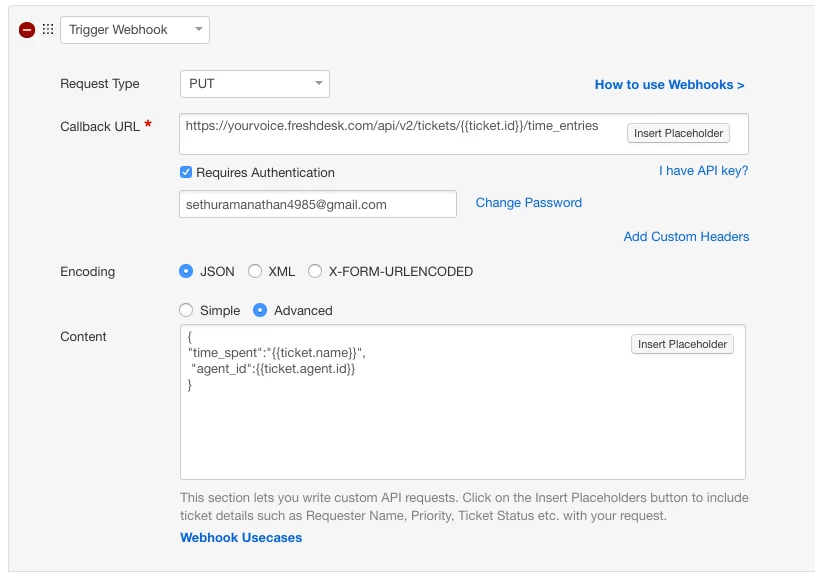
Based on this condition, we can trigger a webhook to add a time entry to the ticket based on the value entered in the custom text field . 


image


You will have to structure the webhook according to your helpdesk setup. Please replace the following :


1. Replace yourvoice.freshdesk.com with your domain address - yourcompany.freshdesk.com


2. Input the API key / email - password combination


3. Replace the placeholder {{ticket.name}} with the relevant placeholder of the custom text field created in your account


Step 3 : Now, the email commands can be used to update the ticket and also add the time entry. You will have to pass two additional values to create a time entry.


1. Pass the value of the custom checkbox field ( timer ) - This is done to trigger the observer rule


2. Pass the actual time entry value in the custom text field ( name ) - This is done to capture the timer information and to create a time entry using the webhook/api


Cheers!


  • Community Debut
  • January 16, 2017
Thanks for this. How do I "check/uncheck" the checkbox via email command?


  • Community Debut
  • January 16, 2017
Nevermind I figured it out: "Checkboxname":true. I have one more question. Is it possible that the API doesn't work for Trial accounts? I'm having a hard time making the PUT request happen. Tried with username/password and also with the API key....


  • Community Debut
  • January 19, 2017
For all interested, please use POST instead of PUT in the webhook above (screenshot above). This works to post time to a ticket via email command! Support was helpful in pointing this out.