New Idea

Grant More Options To Configure Business Rules On Date & Time Fields

Related products:Freshservice
  • December 13, 2024
  • 3 replies
  • 81 views

Forum|alt.badge.img+11

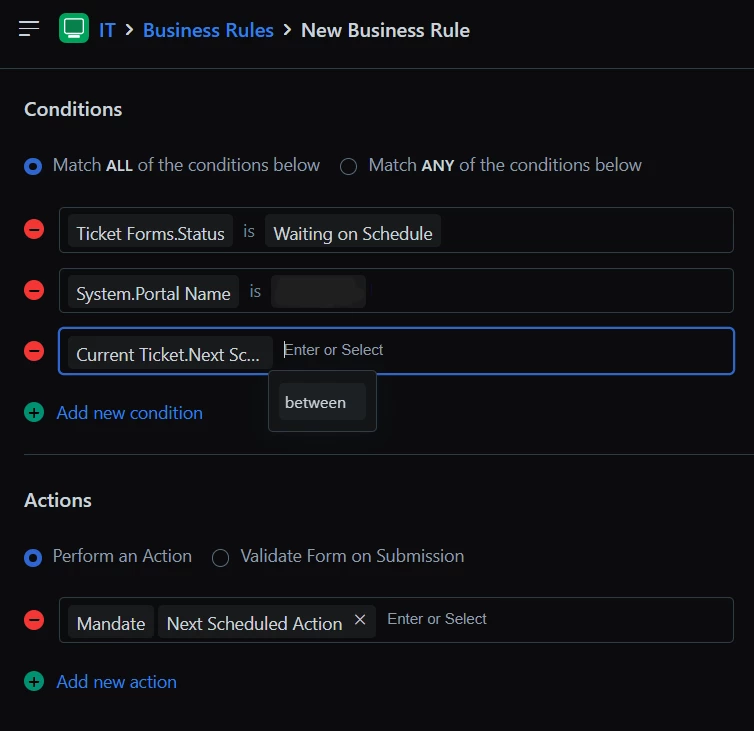
I’ve noticed, when configuring Business Rules, that the Conditional options available when the Field type is Date & Time are quite limited.

The sole option appears to be ‘between’ with no options like ‘is empty’ or ‘is not empty’ being presented: 

3 replies

Forum|alt.badge.img+11
  • Author
  • Skilled Expert
  • January 9, 2025

I can see my example image didn’t attach originally so popping that in here:

Example of what Business Rule options you have on Date & Time Fields

The intent is to hide fields conditionally and/or prevent a Ticket or Request of that type from being submitted until Date & Time fields are populated with information.

This would ensure that you do not have to make Date & Time fields Mandatory in Field Manager which can cause all sorts of upset elsewhere.


Forum|alt.badge.img+11
  • Author
  • Skilled Expert
  • January 10, 2025

I’m back for more!

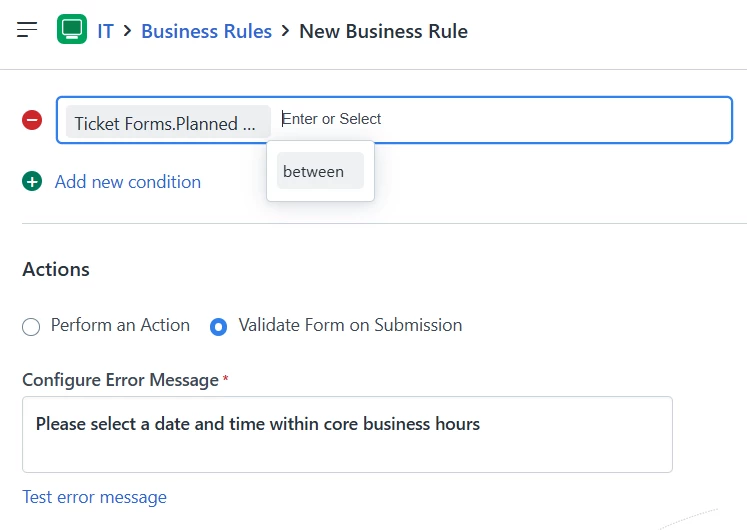
Other nice-to-haves would be the ability, via Business Rules, to enable Form Validation if someone:

  • selects a Date that falls on a Weekend
  • selects an hour that is inside or outside out of a scope of your choosing


Forum|alt.badge.img+5
  • Contributor
  • April 28, 2025

Actually, I’m encountering an issue with this one since the default time value is 00:00 therefore agents can leave the time as default and it would defeat the scope of having a date and time field!! We need this validation to ensure that time is not left as 00:00