Closed for Voting

Graphical element to identify a product in the ticket list

Related products:Freshdesk
  • November 1, 2012
  • 11 replies
  • 23 views

I would appreciate if there were a graphical element, for example a small logo image, to identify tickets related to different products in the ticket listing. It would help an agent to quickly figure out an overview what all the tickets may concern.


11 replies

Very useful, why not use label for this? 


Like helpscout desk.com and zendesk already do, you can delete customer image (not useful and not used!) for more space


  • Contributor
  • November 26, 2014

Or different colours for different products.


  • Community Debut
  • September 25, 2015

Agreed, different colours or showing the tags in the ticket list would be great.


Please add this!!


  • Community Debut
  • March 3, 2017
Would appreciate a product label or tag element in the ticket view aswell.


  • Contributor
  • October 11, 2017

Is something like this working allready?
We are using Freshdesk for 3 products. And I want to see in the ticket overview if a ticket belongs to product A, B or C. So the agent can prioritize which ticket to open or not.

Now he has to open every single ticket and only then he can see to which product this ticket is assigned to.


Please make a color, a label, a mini logo, whatever. Something to see.


aravind.sundararajan
Skilled Expert
Forum|alt.badge.img+12

Hi,


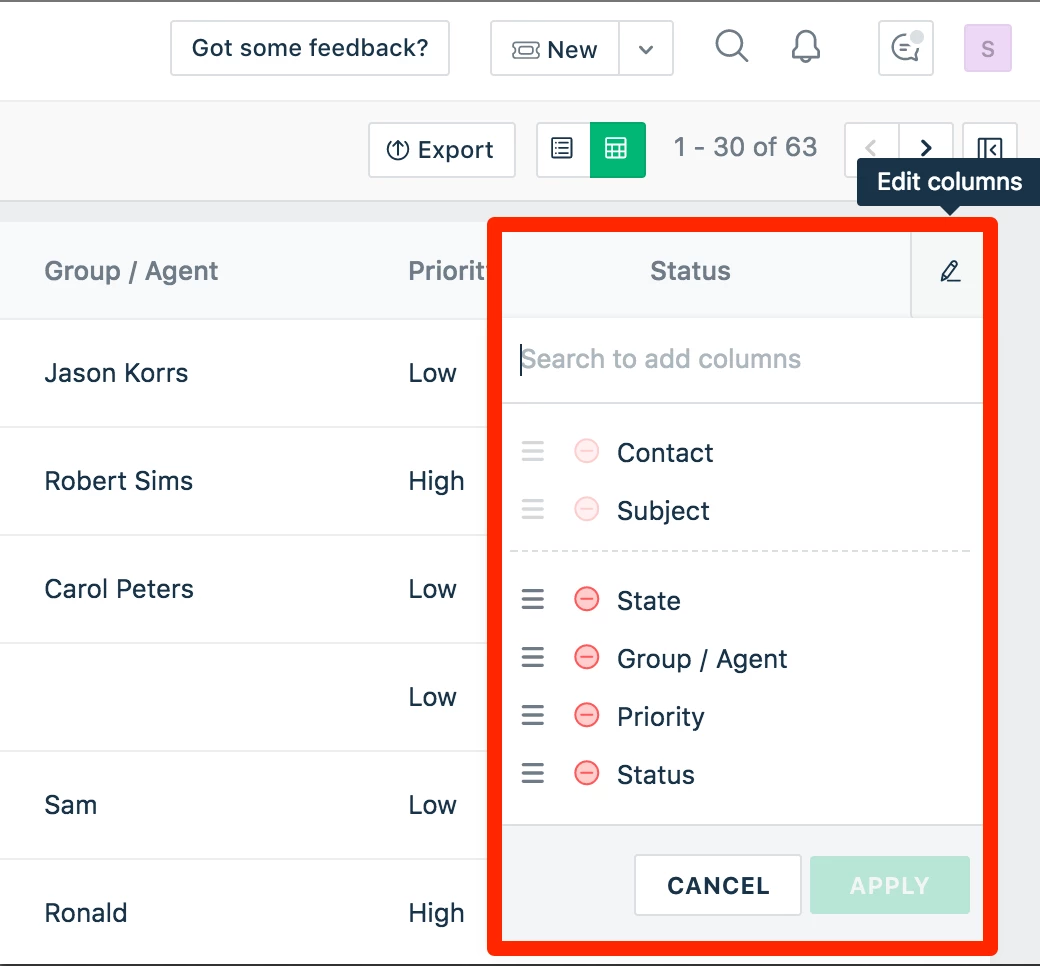
We're working on a feature that will enable you to customise the columns that would show up on the tickets page. This one is currently in works and will be available on the new *Mint* interface soon.


Cheers!


  • Contributor
  • October 11, 2017

That sounds great!
The new Mint interface?
Can you give a sneak preview? (hint hint)


aravind.sundararajan
Skilled Expert
Forum|alt.badge.img+12

@Dennis: I'll email you with more information on this * under wraps * ;)


Cheers!


aravind.sundararajan
Skilled Expert
Forum|alt.badge.img+12

Hello,


The Customised table view in Mint allows you to edit the columns and display relevant field information. A visual indicator of the ability to modify column values:


Cheers!