
Open : Open for Consideration

Hiding Close

Related products:Freshservice
  • January 6, 2020
  • 41 replies
  • 1233 views

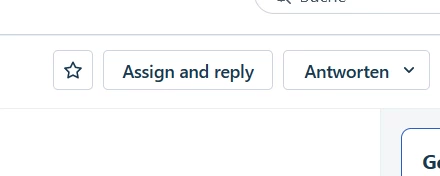
We would prefer to have the ability to hide the "Closed" status in the Status menu from agents as well as remove the "Close" button from the ticket template. We want all agents to set tickets to "Resolved" and not have the option to choose "Closed".


In addition, the "Close" button on a ticket's template can take on two meanings. It's current purpose is to close the ticket. As such it should state "Close Ticket".


However, for our purposes, we would want the choice to hide the button altogether from agents. If that can't be done, then completely remove it from the template. 



41 replies

afautley
Top Contributor ⭐
Forum|alt.badge.img+11
  • Top Contributor ⭐
  • October 27, 2022

Hi, This Idea has been archived but is exactly what we are looking for. please can this be “Unarchived” and reviewed as this is causing us issues. 


jemmad
Apprentice
Forum|alt.badge.img
  • Apprentice
  • October 28, 2022

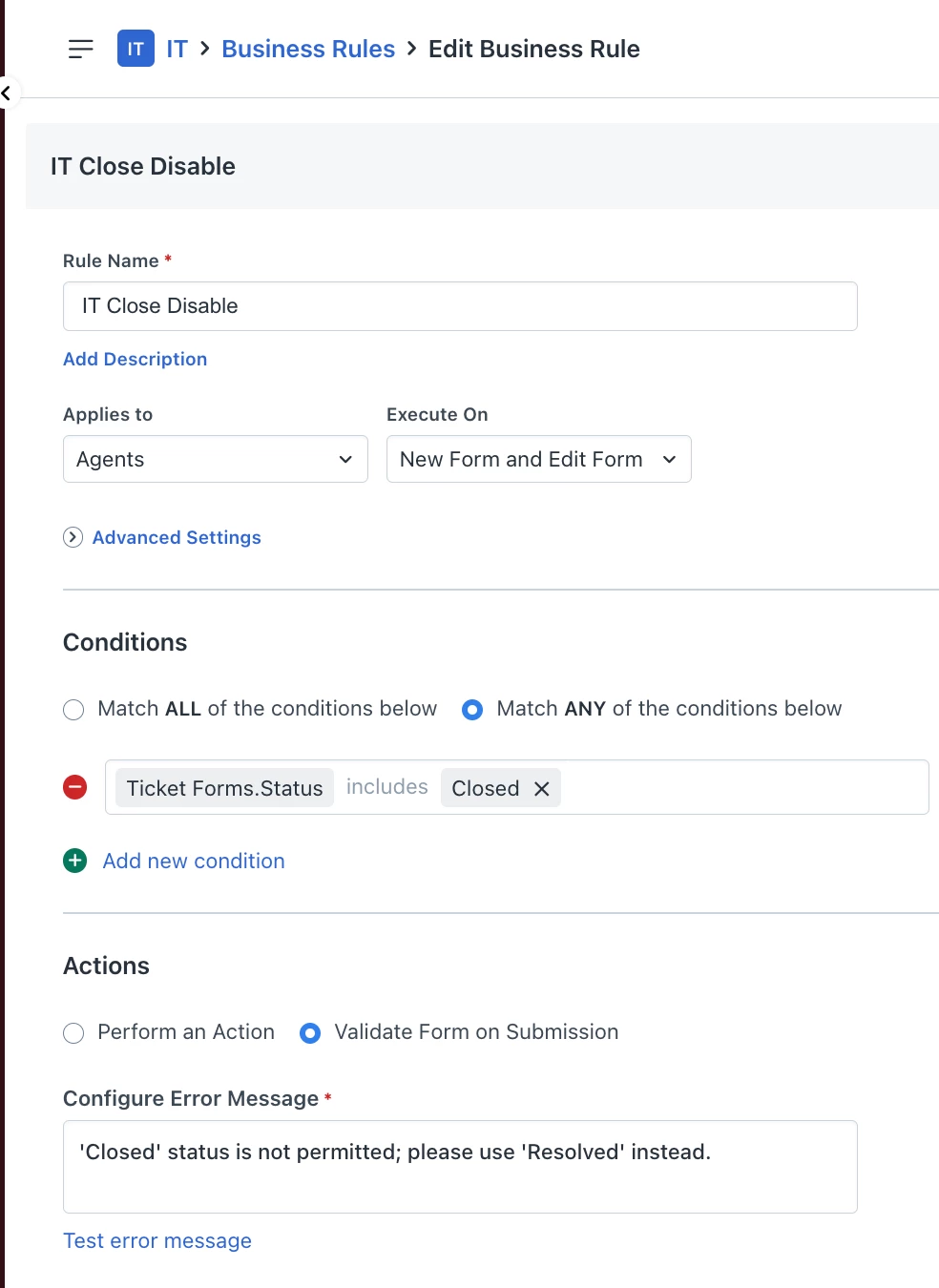
We also had this problem as a workaround we set up a business rule so that if an agent tries to close rather than resolve they get an error message. 


msconfig87
Top Contributor ⭐
Forum|alt.badge.img+10
  • Top Contributor ⭐
  • November 17, 2022

but the Close button MUST go! we need Resolved instead - now - not tomorrow


MARCEL01
Apprentice
Forum|alt.badge.img+1
  • Apprentice
  • July 28, 2023

I have the same problem here. 

Our logic is that agents should only Resolve tickets, not Close. It’s the system automation that converts the Resolved ticket to Closed ticket in 2 days. We set it up this way, so that customers are given 2 days to “reopen” Resolved tickets. If the ticket goes to Closed status after 2 days, that ticket remains permanently closed. Any reply to that closed ticket triggers a new ticket to be created instead.

However, the Resolved status is also our trigger to send customer surveys (through a webhook). So if an agent clicks the CLOSE button, they will essentially bypass the survey automation (which is considered manipulation). So we need the close button hidden.


BSJFW
Contributor
Forum|alt.badge.img+3
  • Contributor
  • August 13, 2023

Upvoting this. Please Unarchive. Give us the ability to show/hide the Close button or change it to Resolve. 


BSJFW
Contributor
Forum|alt.badge.img+3
  • Contributor
  • August 13, 2023

tagging @alyssia.correa for visibility. 


alyssia.correa
Skilled Expert
Forum|alt.badge.img+8

Heyy @BSJFW - thank you for notifying me. I will remove the archive for this. Just to let you know that the second phase of the revamp of Community 2.0 is to fix the experience on the Ideas section - I will share updates soon.


alyssia.correa
Skilled Expert
Forum|alt.badge.img+8
Closed for VotingOpen : Open for Consideration

afautley
Top Contributor ⭐
Forum|alt.badge.img+11
  • Top Contributor ⭐
  • November 7, 2023

What does open for consideration mean??


Forum|alt.badge.img+5
  • Top Contributor ⭐
  • November 8, 2023

This is very much needed. 


DanielRuff
Top Contributor ⭐
Forum|alt.badge.img+9
  • Top Contributor ⭐
  • November 15, 2023

Close button

Removing the close button is important. But we could think this a bit bigger:

Customizing the bar

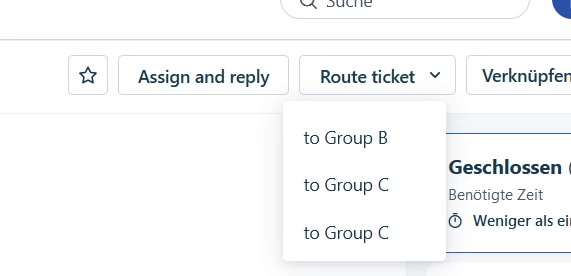
Give us the ability to change whats shown up there. Or even add an option for us to put some custom automations there that use bulk update or add other functionalities. Example:

The agent group “Group A” gets a few types of tickets and mainly has to answer questions or route to 3 different agent groups and change the priority for a ticket. classic 1st level. (btw. we have 150 agent groups)

  1. Use case 1:
    “Assign and reply” - I get set as assigned agent and the reply editor opens.
  2. Use case 2:
    I immediatly see I can not solve this and have to route this ticket to the 2nd level support. My agent group normally has 3 groups we forward the ticket to. So i could set a business rule that the agent group has an option to quickly forward this ticket (I know this could be done via scenarios).


View of properties:

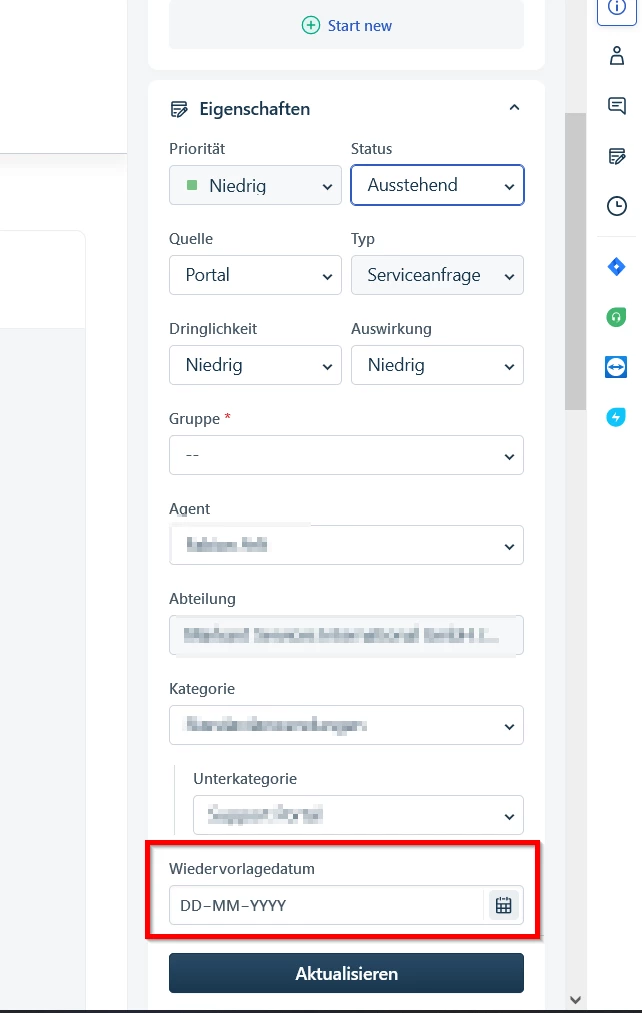
The main view for properties is not very flexible as well in regards of default fields. It’s impossible to put a field above priority without hiding all the default fields. Example use case would be the status “pending”. At the moment nothing happens when the ticket is set to “pending”. We implemented a scheduled workflow so the ticket doesnt stay in “pending” for ever and wanted to give the ability to set a date that the ticket gets reopened. Resubmit date is at the very top of the fields in the settings. Without hiding default fields this is the “highest” position I get the field in:


Maybe you could offer the default fields as well in the field settings (disabled state) so that we can at least change the order in which they are shown.


Forum|alt.badge.img+7
  • Top Contributor ⭐
  • January 30, 2024

The above customisation is something that we would love to see, it would make the agent experience so much better.


Medic1334
Top Contributor ⭐
Forum|alt.badge.img+9
  • Top Contributor ⭐
  • February 7, 2024

We also had this problem as a workaround we set up a business rule so that if an agent tries to close rather than resolve they get an error message. 

Late to the party but we are on board with all these comments. Business rules only work inside the ticket view. If a user wants to go around your business rule, they can still move the ticket to closed from the ticket list view. It would be good if there was an option for business rules were applied at the list view in addition to inside the ticket view. 


We have the closed option hidden, but that causes the value to not be visible even when a ticket is closed which can cause concerns from our auditors when they see a ticket that should be closed, but it’s showing open (because closed isnt in the list).


Magnus Reinel
Top Contributor ⭐
Forum|alt.badge.img+4
  • Top Contributor ⭐
  • February 8, 2024

This would be nice, and the suggestion by @danielruff is something that we’ve also raised with our customer contact at Fresh.

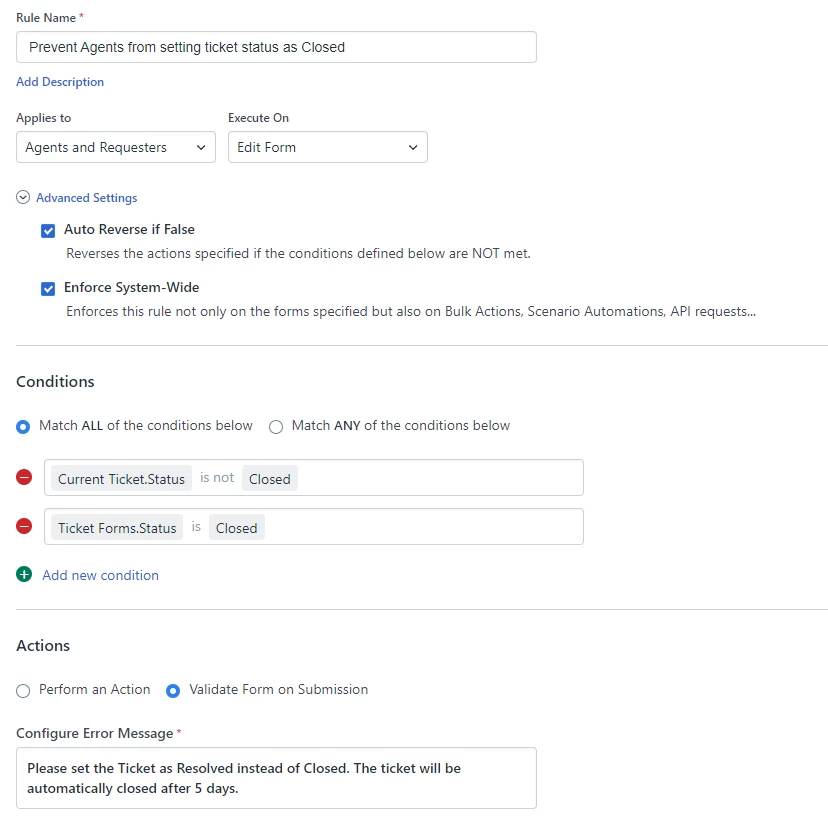
What we’ve done is to create a business rule that disables the possibility to set a ticket as closed via button or via status change.

However, this does not hide the button or the the status Closed.

This is the business rule, and using the “Enforce system wide”-checkbox under advanced settings is what “disables” the functionality of the close-button.


Medic1334
Top Contributor ⭐
Forum|alt.badge.img+9
  • Top Contributor ⭐
  • February 8, 2024

@Magnus Reinel this could work, but it also prevents updating closed ticket properties from having any values modified after going into closed (I dont think this should happen, but I’m sure there’s some fringe cases where it may be necessary).  


Magnus Reinel
Top Contributor ⭐
Forum|alt.badge.img+4
  • Top Contributor ⭐
  • February 8, 2024

@Magnus Reinel this could work, but it also prevents updating closed ticket properties from having any values modified after going into closed (I dont think this should happen, but I’m sure there’s some fringe cases where it may be necessary).  

It works for us. I.e. agents cannot close tickets, they have to use Resolve.
We also have a supervisor rule (don’t know if it’s out-of-the-box or adapted), that makes sure that tickets are Closed after 5 days (without response. 
And we have workflows that will reopen tickets in resolved-status if the requester replies - the same workflow will also generate an auto-reply if someone responds to a closed ticket (basically saying that they have to open a new ticket).

But I guess there might be some special cases that will be affected, but so far we’ve not had any issues.

But I would rather have a system-option to be able to configure this behaviour as well as change the layout and hide/display buttons etc. :-)


Vanderdecken
Top Contributor ⭐
Forum|alt.badge.img+7
  • Top Contributor ⭐
  • April 12, 2024

Any thoughts on how to make this work in Freshservice? I find that is is just ignoring the rule.


Forum|alt.badge.img+2
  • Contributor
  • April 12, 2024

The April update will fix it for us. 😊


Vanderdecken
Top Contributor ⭐
Forum|alt.badge.img+7
  • Top Contributor ⭐
  • April 12, 2024

Sorry if this is a stupid question, but where do I disable “Close” for the user once the fix is in? Will it be a new addition to roles?


Vanderdecken
Top Contributor ⭐
Forum|alt.badge.img+7
  • Top Contributor ⭐
  • April 15, 2024

I have the disabled “Close” now working with this rule within the ticket form. I was testing it wrong.

Any updates on the April update to disable the “Close” button?


acn084
Skilled Expert
Forum|alt.badge.img+3
  • Skilled Expert
  • May 7, 2024

removing comment. I was in freshdesk not freshservice


Forum|alt.badge.img+4
  • Skilled Expert
  • May 8, 2024

Can we not replace the Close button in the top bar with the Resolve option? The process is long-winded having to scroll down the Properties panel and Resolving from here.


viswanatha.mehta
Community Debut
Forum|alt.badge.img+4

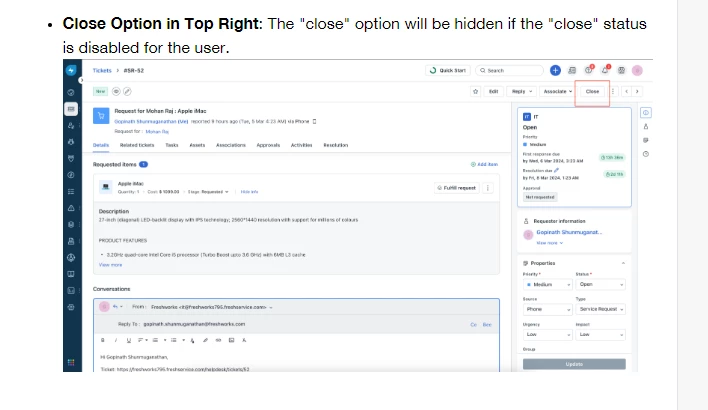
Hey All - With our April Product release, our Business rules module supports the Close button, and you can hide it based on conditions you have setup. 


Vish 
Outbound Product Manager, Freshservice


Forum|alt.badge.img+4
  • Skilled Expert
  • May 14, 2024

Hey All - With our April Product release, our Business rules module supports the Close button, and you can hide it based on conditions you have setup. 


Vish 
Outbound Product Manager, Freshservice

Hi Vish,

Thanks for this. Can I ask why we don’t simply have a “Resolve” button at the top instead of Close? That would make more sense!

Kind Regards,


Ollie​​​​​​​


Forum|alt.badge.img+4
  • Skilled Expert
  • May 15, 2024

Found another issue with all this - You can still close a ticket despite having the Close button disabled if you know the keyboard shortcut for closing a ticket (the ~ key)!

Really needs to be disabled… Doesn’t actually seem like all the possible scenarios for closing a ticket have been fully tested by the application dev team...