
Open : Open for Consideration

Hiding Close

Related products:Freshservice
  • January 6, 2020
  • 41 replies
  • 1233 views

Show first post

41 replies

You also can still close from the main ticket screen using the status drop down. It does not hide it there. 


Forum|alt.badge.img+6
  • Skilled Expert
  • June 12, 2024

Its disappointing this is only applying to Freshservice - what about Freshdesk?? We have the same requirement!


mbutler
Top Contributor ⭐
Forum|alt.badge.img+10
  • Top Contributor ⭐
  • June 12, 2024

You also can still close from the main ticket screen using the status drop down. It does not hide it there. 

Thank you for testing that.


juul0s
Skilled Expert
Forum|alt.badge.img+5
  • Skilled Expert
  • March 28, 2025

You can make business rule for that and define which status should be visible for agent/group.


MichaelJM
Top Contributor ⭐
Forum|alt.badge.img+6
  • Top Contributor ⭐
  • March 28, 2025

I tried using a Business Rule to Hide Options from the Status field, but it had a terrible result.

When a ticket was in ‘Closed’ status and the agent would look back at it, the status would show as “Open” because it actually took AWAY the Closed status entirely - even the visibility of it.


Forum|alt.badge.img+5
  • Skilled Expert
  • April 7, 2025

I tried using a Business Rule to Hide Options from the Status field, but it had a terrible result.

When a ticket was in ‘Closed’ status and the agent would look back at it, the status would show as “Open” because it actually took AWAY the Closed status entirely - even the visibility of it.


Thus opening the ticket again if changes are made to the ticket after it is closed. (Like changing the category if a support engineer resolved the ticket and didn't correct the category if it was set to something wrong)


Trevor Cooper
Top Contributor ⭐
Forum|alt.badge.img+7
  • Top Contributor ⭐
  • August 29, 2025

I tried using a Business Rule to Hide Options from the Status field, but it had a terrible result.

When a ticket was in ‘Closed’ status and the agent would look back at it, the status would show as “Open” because it actually took AWAY the Closed status entirely - even the visibility of it.


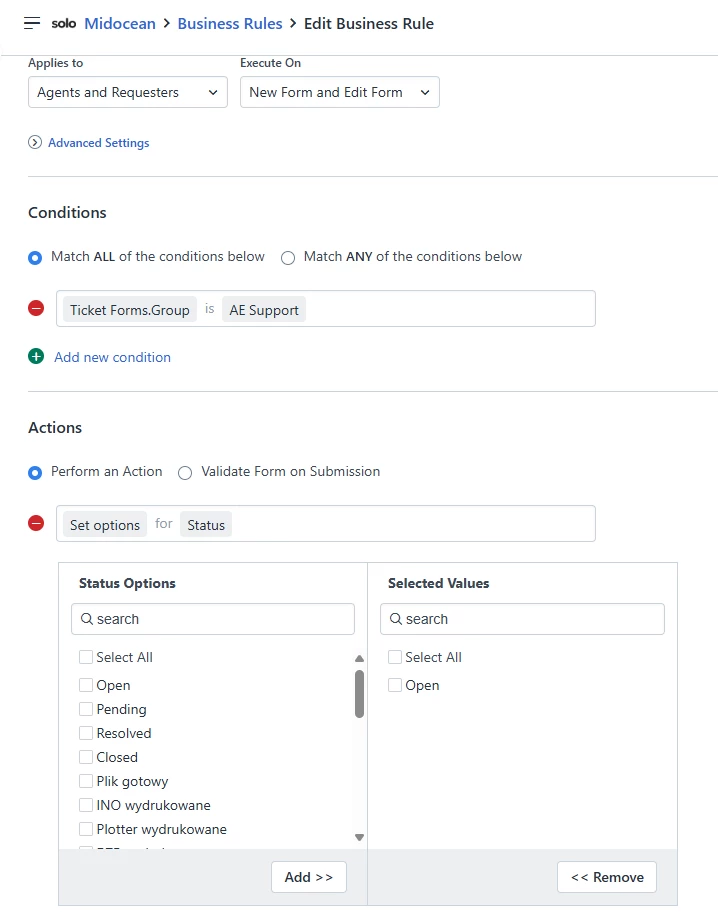
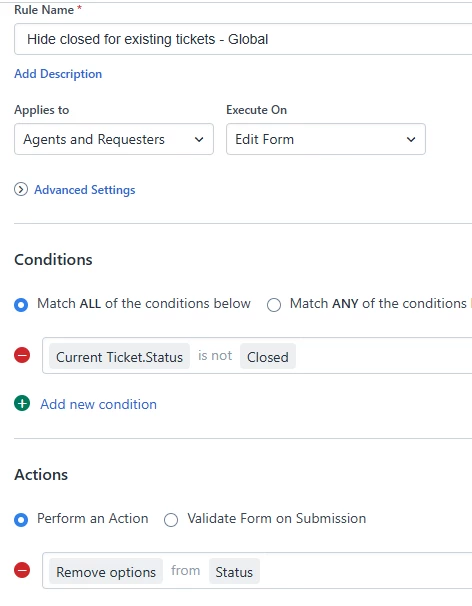
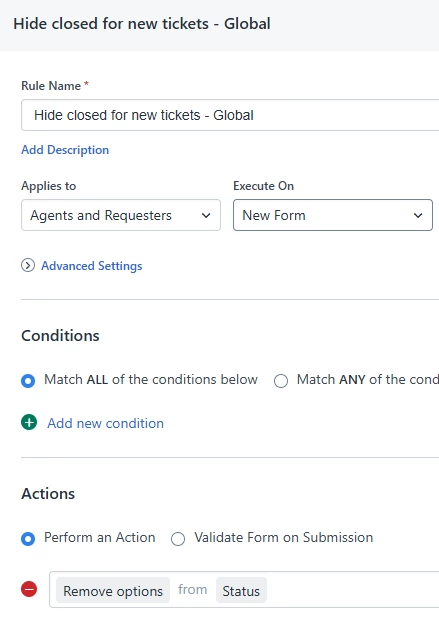
You can fix this using conditions. Set it so it hides closed if the status is not closed, when editing the form.  However you will need a second rule for a new form, as the status doesn’t exist therefore the condition isn’t met.


The issue of being able to set the status via the dropdown is valid though and needs to be looked at.  I have some old groups that are no longer used and are hidden.  I can’t delete them as that would unassign the tickets.  People can therefore still allocate tickets to them via the dropdown or assign to button.


Forum|alt.badge.img+4
  • Skilled Expert
  • August 29, 2025

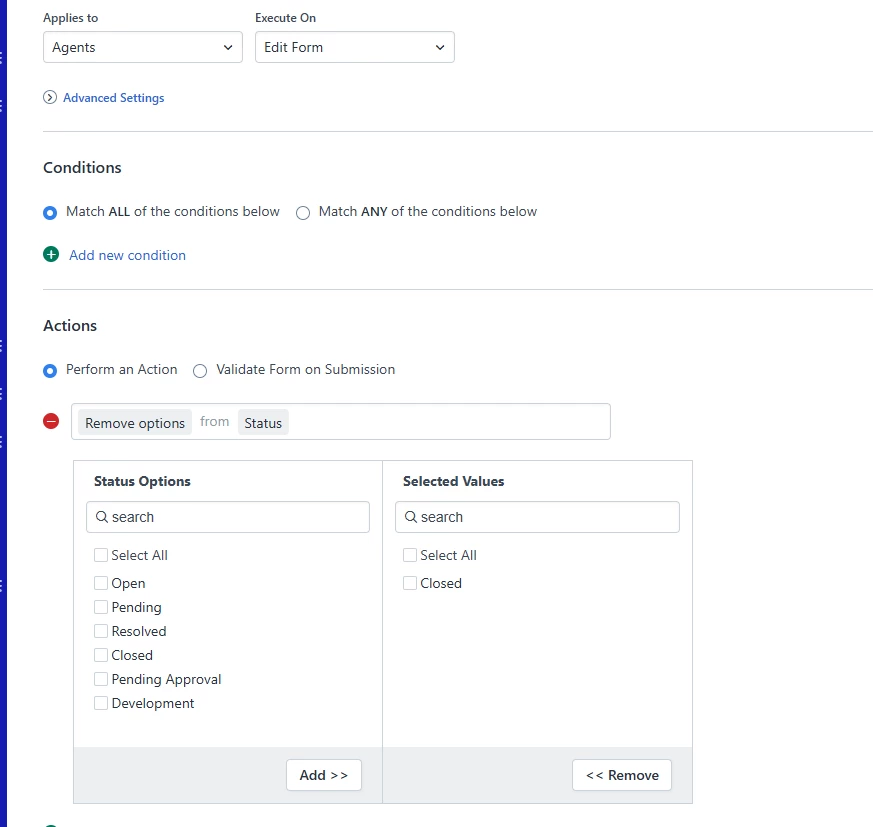
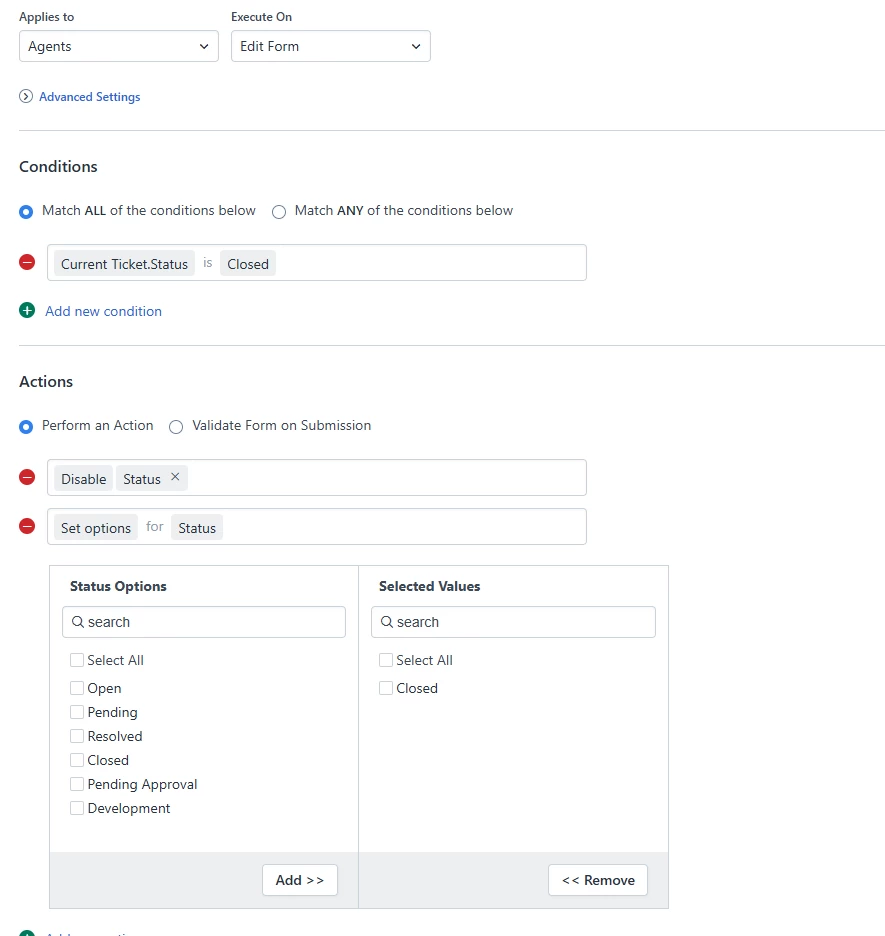
I had to set up 2 different rules to ensure that the quick close button and the status were hidden from the agent side. The first rule hides the close status and quick close button: 


The second rule once the ticket has been move to the closed status via the supervisor rule marks the ticket closed and disables it from being updated: 

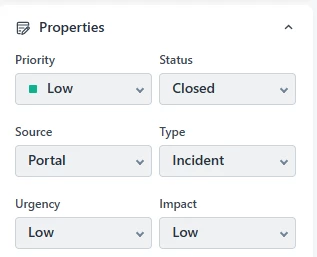
Producing the below result on all closed tickets: 

Hope this helps. 


Trevor Cooper
Top Contributor ⭐
Forum|alt.badge.img+7
  • Top Contributor ⭐
  • September 1, 2025

I had to set up 2 different rules to ensure that the quick close button and the status were hidden from the agent side. The first rule hides the close status and quick close button: 


The second rule once the ticket has been move to the closed status via the supervisor rule marks the ticket closed and disables it from being updated: 

Producing the below result on all closed tickets: 

Hope this helps. 

Those both make sense, if you don’t want anyone to be able to change the status once closed.  However I am curious, wouldn’t just disable status work?


Forum|alt.badge.img+4
  • Skilled Expert
  • September 2, 2025

I had to set up 2 different rules to ensure that the quick close button and the status were hidden from the agent side. The first rule hides the close status and quick close button: 


The second rule once the ticket has been move to the closed status via the supervisor rule marks the ticket closed and disables it from being updated: 

Producing the below result on all closed tickets: 

Hope this helps. 

Those both make sense, if you don’t want anyone to be able to change the status once closed.  However I am curious, wouldn’t just disable status work?

I tried it with just the status and it won’t work because it removes the status all together without the second rule the ticket will show in an Open status, if you need the agent to be able to reopen a closed ticket then the second rule needs to be adjusted, we don't allow agents to re-open tickets from a closed status so this works fine for us. 


Forum|alt.badge.img+3
  • Contributor
  • November 4, 2025

Agree… to add, not allow the Requester to use the “Mark ticket as Closed” button OR switch it to being resolved status instead with a note of why the Requester did that. So it is noted on the ticket. Don’t like Agents or Requesters being able to set automatically to “Closed” Status. 


Trevor Cooper
Top Contributor ⭐
Forum|alt.badge.img+7
  • Top Contributor ⭐
  • November 5, 2025

Agree… to add, not allow the Requester to use the “Mark ticket as Closed” button OR switch it to being resolved status instead with a note of why the Requester did that. So it is noted on the ticket. Don’t like Agents or Requesters being able to set automatically to “Closed” Status. 

We removed the mark ticket as closed button from our portal when we set it up 4+ years ago ;)


                        <!--<a href="{{ ticket.close_ticket_url }}" data-method="post" class="btn btn-small mark_ticket_closed">
                            <span class="hide-in-mobile">{% translate portal.tickets.mark_closed %}</span>
                            <i class="icon-close-ticket show-in-mobile"></i>
                        </a>-->


Forum|alt.badge.img+3
  • Contributor
  • November 5, 2025

Agree… to add, not allow the Requester to use the “Mark ticket as Closed” button OR switch it to being resolved status instead with a note of why the Requester did that. So it is noted on the ticket. Don’t like Agents or Requesters being able to set automatically to “Closed” Status. 

We removed the mark ticket as closed button from our portal when we set it up 4+ years ago ;)


                        <!--<a href="{{ ticket.close_ticket_url }}" data-method="post" class="btn btn-small mark_ticket_closed">
                            <span class="hide-in-mobile">{% translate portal.tickets.mark_closed %}</span>
                            <i class="icon-close-ticket show-in-mobile"></i>
                        </a>-->


NICE!!! To make sure I do this right, did you place this in the Footer? Or Ticket Details? Or different location? 


Trevor Cooper
Top Contributor ⭐
Forum|alt.badge.img+7
  • Top Contributor ⭐
  • November 5, 2025

Agree… to add, not allow the Requester to use the “Mark ticket as Closed” button OR switch it to being resolved status instead with a note of why the Requester did that. So it is noted on the ticket. Don’t like Agents or Requesters being able to set automatically to “Closed” Status. 

We removed the mark ticket as closed button from our portal when we set it up 4+ years ago ;)


                        <!--<a href="{{ ticket.close_ticket_url }}" data-method="post" class="btn btn-small mark_ticket_closed">
                            <span class="hide-in-mobile">{% translate portal.tickets.mark_closed %}</span>
                            <i class="icon-close-ticket show-in-mobile"></i>
                        </a>-->


NICE!!! To make sure I do this right, did you place this in the Footer? Or Ticket Details? Or different location? 

It's an edit to layout and pages > portal pages > ticket details.  Just adding <!--    --> around the section to include the button. 


MichaelJM
Top Contributor ⭐
Forum|alt.badge.img+6
  • Top Contributor ⭐
  • November 14, 2025

I ended up just turning back on Closed status for Agents and hope they don’t use it, but it has been useful in certain cases to ‘bypass’ closure rules when needing to ‘cancel’ a ticket.

Among my biggest annoyance with Freshservice is there is not a ‘timer’ option for Close status, like in every other ticket system I’ve used. And that a reply to Close doesn’t create a new ticket.

e.g. “after 3 days on Resolved, move to Closed. If reply received within 5 business days after Close, move to Open. If after 3 business days, reply creates new ticket”

--we have people opening tickets from 8 months ago for different issues and I’ve been unable to train our agent base to ‘Split’ those into a new ticket right away, which creates a lot of mess.


Trevor Cooper
Top Contributor ⭐
Forum|alt.badge.img+7
  • Top Contributor ⭐
  • November 14, 2025

I ended up just turning back on Closed status for Agents and hope they don’t use it, but it has been useful in certain cases to ‘bypass’ closure rules when needing to ‘cancel’ a ticket.

Among my biggest annoyance with Freshservice is there is not a ‘timer’ option for Close status, like in every other ticket system I’ve used. And that a reply to Close doesn’t create a new ticket.

e.g. “after 3 days on Resolved, move to Closed. If reply received within 5 business days after Close, move to Open. If after 3 business days, reply creates new ticket”

--we have people opening tickets from 8 months ago for different issues and I’ve been unable to train our agent base to ‘Split’ those into a new ticket right away, which creates a lot of mess.

e.g. “after 3 days on Resolved, move to Closed. If reply received within 5 business days after Close, move to Open. I’m not sure how you would do this bit, personally I would say to set closed after 8 days therefore.

If after 3 business days, reply creates new ticket” Can you not do this via a workflow?  Note added is of type Any or Reply or Forward is sent, Status is closed, JSON Parse to get the current ticket details, API command to create new ticket using the same details, but replace the description with a line referring to the previous ticket then the content of the last public comment?