

Closed for Voting

iFrame results in non-clickable area around widget button

Related products:Freshdesk
  • December 4, 2019
  • 1 reply
  • 20 views

I've included the Freshdesk widget and realized there is a non-clickable area around the it due to the iFrame. Integration tests showed that there are cases where this overlays other elements (see screenshot). 


I see two possibilities here:

1. Overwrite the CSS styles, reducing the dead area to a minimum

2. Write a custom button component that calls the Widget APIs show/hide methods


Any suggestions?
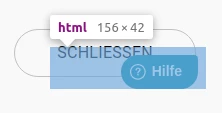
screenshotfrom2019-12-0413-14-14_45247.png

1 reply

Hello there,


Are you still facing this issue? If yes, please write to support(at)freshdesk.com and one of our support folks will assist you further on this.  


Please note that I was able to access the area around the Helpwidget now. 


Cheers!
