


New Idea

Insert Placeholder for Timer Node

Related products:Freshservice
  • December 5, 2022
  • 3 replies
  • 79 views

afautley
Top Contributor ⭐
Forum|alt.badge.img+11

 Hi,

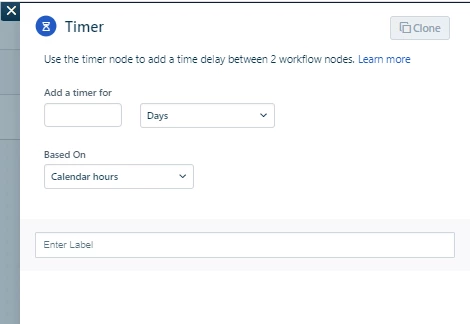
Please can you add the ability to add a placeholder to a timer node.

One example.

As part of our leaver notification we which to wait X number of days until the leave date then to action disabling the account. Currently it is only a manual entry into the “add a timer for” box. if you have the ability to add a timer node we can workout the number of days we need through the expression app. 
 

3 replies

Alefre
Skilled Expert
Forum|alt.badge.img+3
  • Skilled Expert
  • September 8, 2023

Seconded on this! Really useful feature for maximizing the usage and unlocking possibilities!

I ran into a use-case a few days ago to load balance API rate limits by setting a random value to the timer node - this way failed web requests due to HTTP 429 could be re-run at different times to reduce the risk of getting stuck again.


Forum|alt.badge.img+5
  • Skilled Expert
  • February 4, 2025

Hi,

We work around this by having an additional Scheduled Workflow that runs every day - one of the first nodes is conditional to check if the offboarding date is today. If it’s not then the flow doesn’t continue, if it is then the other steps kick in.
Downside of this is that it’s only once a day but it works for us.


Medic1334
Top Contributor ⭐
Forum|alt.badge.img+9
  • Top Contributor ⭐
  • February 4, 2025

@user8472 has the right idea here. Generally people leave at the end of their workday so you could have a couple of automations that run at different times that just look for your offboarding tickets and if the date/time to offboard is before today but less than 24 hours (or 12 or whatever your daily run interval is) then it kicks off.

Using a timer function delays any further automations from running and could result in issues if your ordering isnt correct.