Open : Open for Consideration

Join workflow modules together

Related products:Freshservice
  • February 6, 2023
  • 24 replies
  • 310 views

Forum|alt.badge.img+1

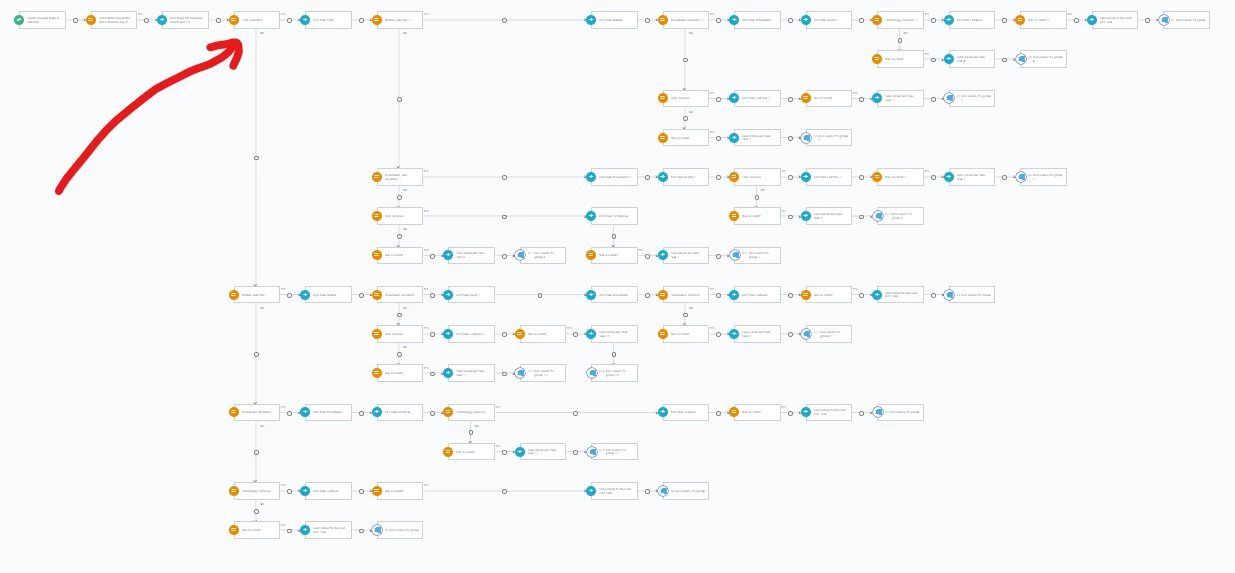
Within a workflow I may want to take different actions based on a condition however later actions may be common regardless of result of that condition.

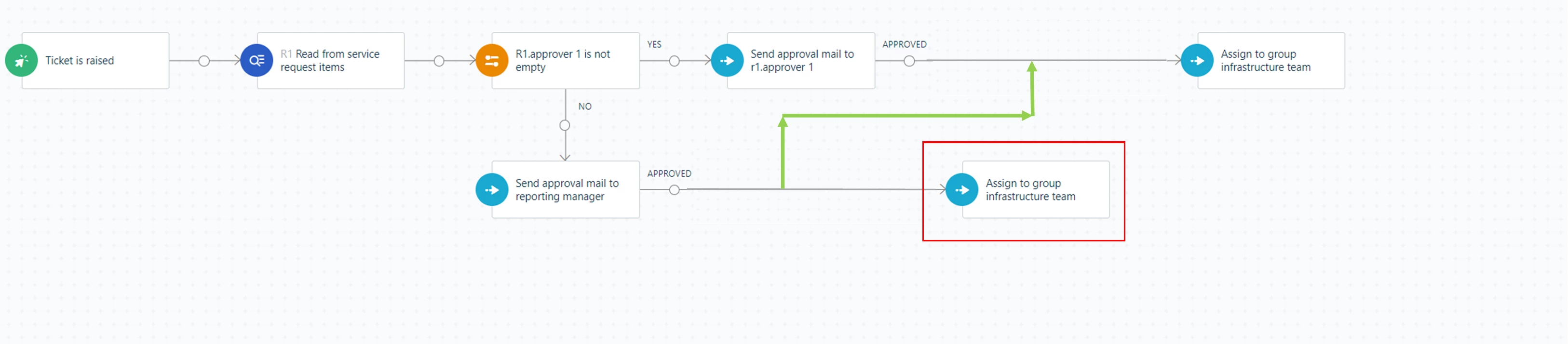
My idea is functionality be added to allow modules (action/condition etc) within a workflow to be joined together with connectors manually.

Image below demonstrates a simple example. Were I able to add the green ling the action within the red box could be deleted as it’s a duplicate of the line above.

 

24 replies

afautley
Top Contributor ⭐
Forum|alt.badge.img+11
  • Top Contributor ⭐
  • February 6, 2023

This is an absolute must!!!

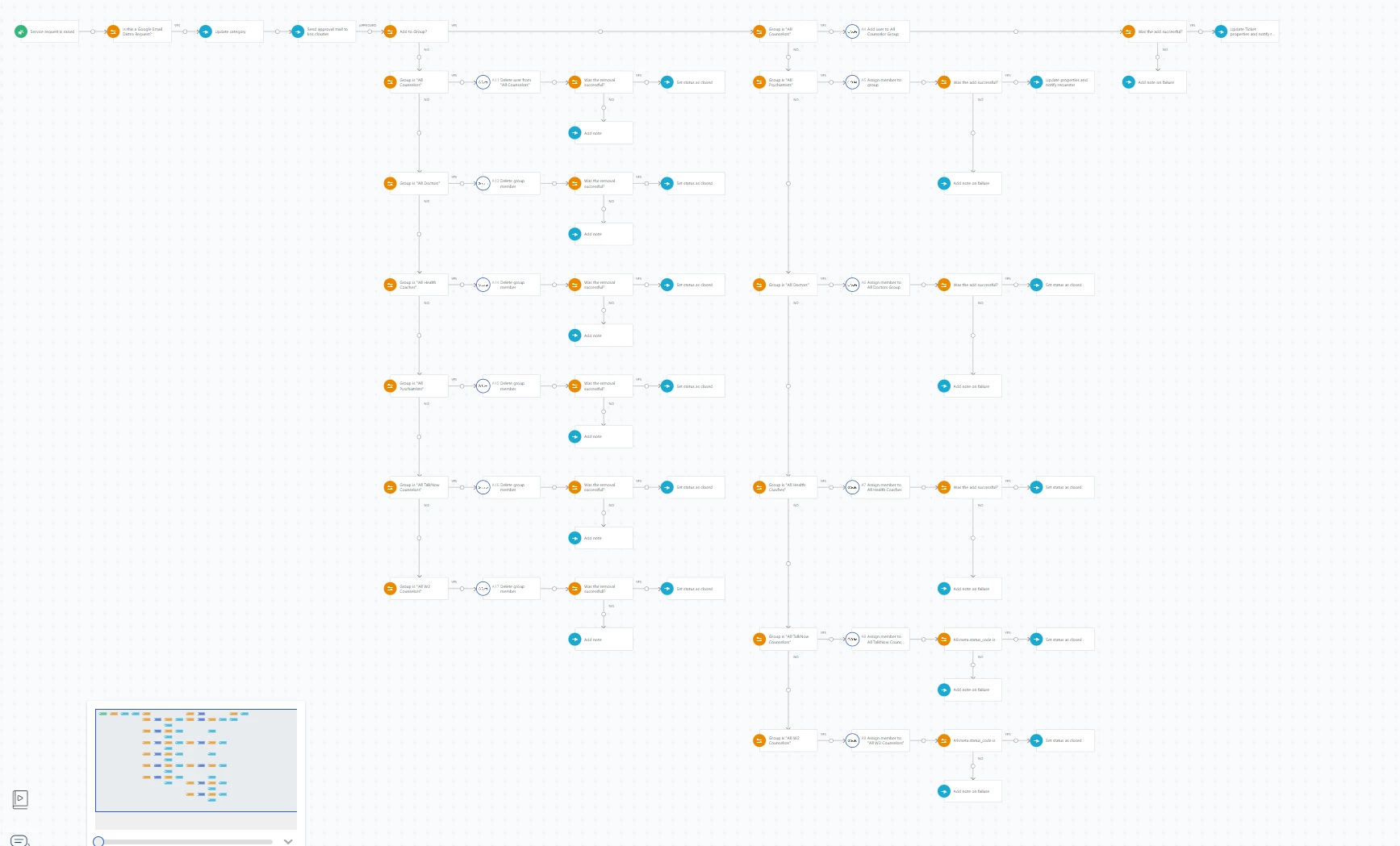
we have been working with Freshservice for about 9 months now and workflows are getting more complex because you are having to repeat and duplicate yourself over and over again. 

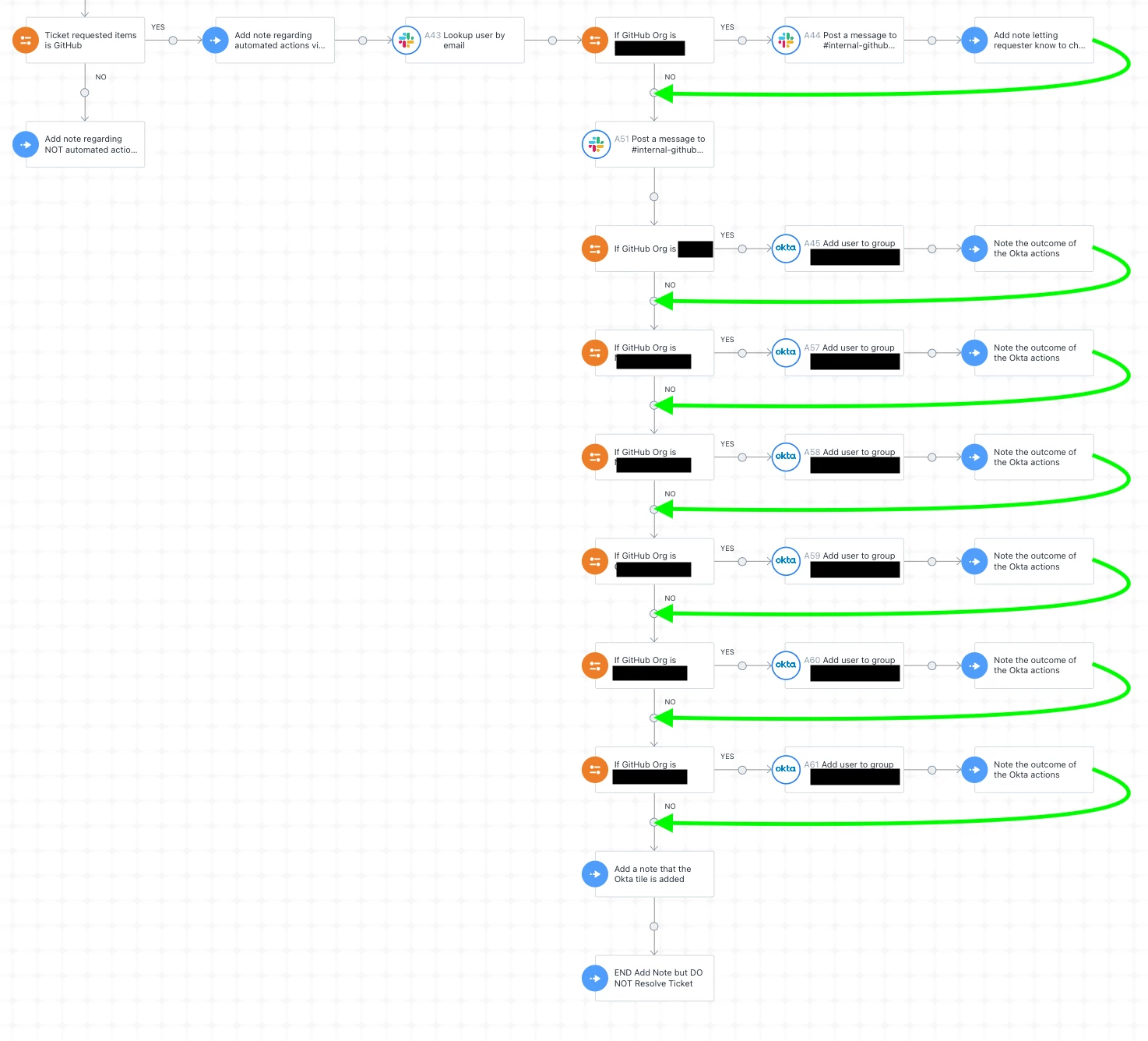
Below are examples of a simple workflow that has just got complicated at the arrow. something like this suggestion would allow us to minimise our work as if i want to make a small change i might now have to make it in 30 places!


3 separate conditions


5 separate conditions


afautley
Top Contributor ⭐
Forum|alt.badge.img+11
  • Top Contributor ⭐
  • February 6, 2023

@manns @BrynCYDEF @zachary.king @JTAVOLARO @raymondcanilao @PatrickMurphy @KrisC @eeha0120 @msconfig87 @je.aag @Chris S. 

Thoughts and assistance to help raise awareness of this would be fantastic. Please re-share for support. 


JTAVOLARO
Top Contributor ⭐
Forum|alt.badge.img+9
  • Top Contributor ⭐
  • February 6, 2023

Go-To and Loops are absolutely essential for a workflow.  Behind this 100%


PatrickMurphy
Skilled Expert
Forum|alt.badge.img+9
  • Skilled Expert
  • February 6, 2023

I think this has been identified as a short coming of freshservice and raised before. It absolutely over complicates the simplest of workflows because there is no process loop or call outs to separate workflows.


KrisC
Skilled Expert
Forum|alt.badge.img+7
  • Skilled Expert
  • February 6, 2023

Definitely a must for automation 


Forum|alt.badge.img+11
  • Skilled Expert
  • February 6, 2023

I support this 100%!  I thought my WF were getting complicated but @afautley looks like something Nick Cage would be following! LOL

@support @rashmi.nag 


KrisC
Skilled Expert
Forum|alt.badge.img+7
  • Skilled Expert
  • February 6, 2023

I think this has been identified as a short coming of freshservice and raised before. It absolutely over complicates the simplest of workflows because there is no process loop or call outs to separate workflows.

This, a simple solution would be to be able to call other workflows from inside one workflow. This would get around about 80% of duplicating steps. Also still would need the ability to direct the next action step by changing its path like the op posted. 


KrisC
Skilled Expert
Forum|alt.badge.img+7
  • Skilled Expert
  • February 6, 2023


This could turn into one line with the addition of loops, callouts or being able to choose the next step path. 

Off topic but would be awesome to also be able to assign custom values to dropdowns that are different than the label of the value. Example would be item showing in dropdown labeled “Example” but its value is “example@example.com”


afautley
Top Contributor ⭐
Forum|alt.badge.img+11
  • Top Contributor ⭐
  • February 6, 2023

@mmccoy @zach.schmidt @jens.hartmann @jonscruggs @lynne.scofield @keefe.andrews @dbaras 
Any thoughts? would like to get this up the order, can you vote and give thoughts?


Forum|alt.badge.img+5

Definitely, voted.


eeha0120
Top Contributor ⭐
Forum|alt.badge.img+12
  • Top Contributor ⭐
  • February 6, 2023

Totally a Must.

The idea behind using Custom Objects may help in some of the workflows shown here in the screenshots; however, the need of call one WorkFlow from within another, or using other programming structures (like the loops mentioned) would indeed help a lot.

Upvoted!


zach.schmidt
Skilled Expert
Forum|alt.badge.img+3
  • Skilled Expert
  • February 6, 2023

DEF NEEDED! YES


christian.mentor
Skilled Expert
Forum|alt.badge.img+6

5 separate conditions


Holy mackerel! 😱


kevin.beattie
Contributor
Forum|alt.badge.img

We also would like to see something like this. Especially when we are trying to handle muliple-item field types where more than one condition needs to be evaluated.


kevin.beattie
Contributor
Forum|alt.badge.img

I forgot to mention, this is similar to the issue I posted about yesterday: 


Daniel Söderlund
Top Contributor ⭐
Forum|alt.badge.img+14

There are looping and calling other workflows on the road map, not sure about Goto function. We can hop for that as well. 


alyssia.correa
Skilled Expert
Forum|alt.badge.img+8
New IdeaOpen : Open for Consideration

Forum|alt.badge.img+1
  • Author
  • Apprentice
  • March 27, 2024

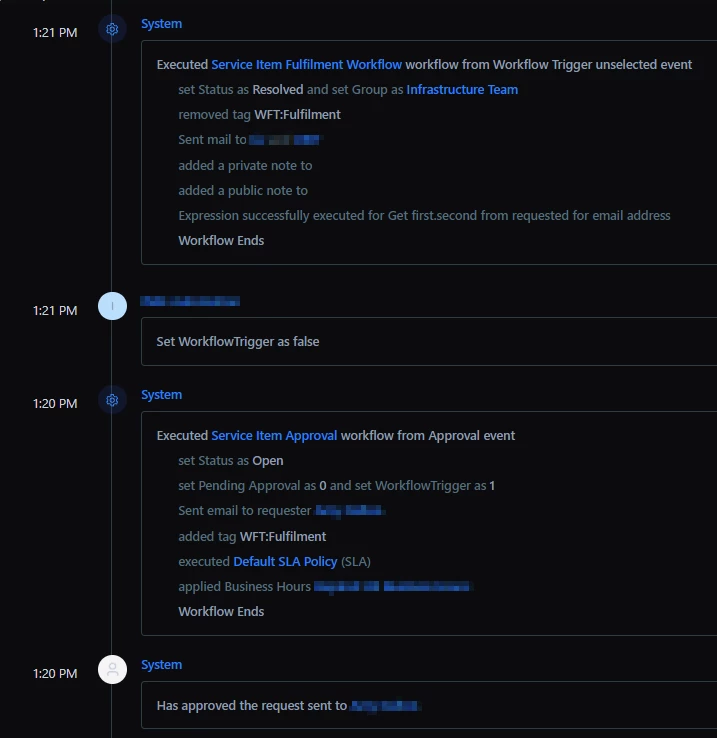
For anyone still battling this limitation I came up with a solution.

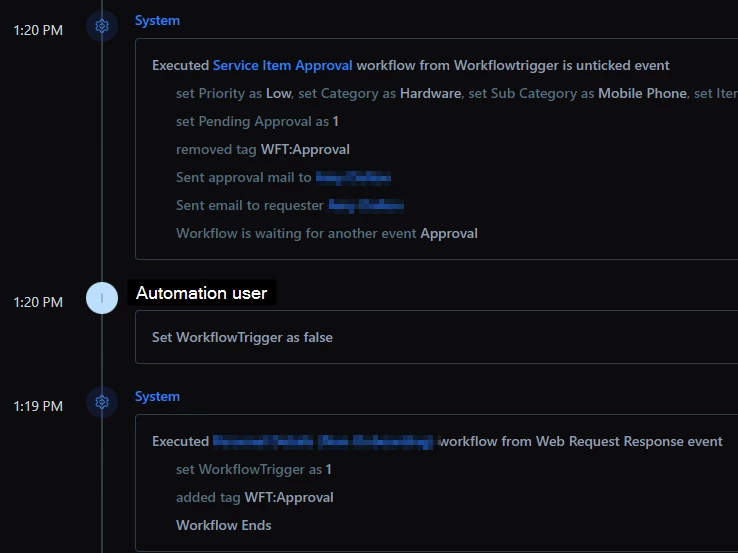
I have a ticket field checkbox: ‘WorkflowTrigger’ and various tags: WFT:Approval, WFT:Fulfillment

Where I want 1 workflow to hand over to another I end the first workflow with an action to tick the checkbox and add a tag for the workflow I want to run next. eg WFT:Approval.

I then have a powershell script running as a scheduled task on a server in our estate that runs every 60 seconds. It gets tickets that have workflow trigger checkbox ticked and sends a PUT call to untick the box.

The starting event on my workflows is then when WorkflowTrigger is unchecked, with an initial condition of has tag X.

This has worked brilliantly and allows us to have no duplication of workflows across our service catalogue.


alyssia.correa
Skilled Expert
Forum|alt.badge.img+8

For anyone still battling this limitation I came up with a solution.

I have a ticket field checkbox: ‘WorkflowTrigger’ and various tags: WFT:Approval, WFT:Fulfillment

Where I want 1 workflow to hand over to another I end the first workflow with an action to tick the checkbox and add a tag for the workflow I want to run next. eg WFT:Approval.

I then have a powershell script running as a scheduled task on a server in our estate that runs every 60 seconds. It gets tickets that have workflow trigger checkbox ticked and sends a PUT call to untick the box.

The starting event on my workflows is then when WorkflowTrigger is unchecked, with an initial condition of has tag X.

This has worked brilliantly and allows us to have no duplication of workflows across our service catalogue.


Thank you for sharing @DavidFurniss - I’m sure our other members will benefit from this! 

Folks, please do try this and let us know how you get along! 


zachary.king
Top Contributor ⭐
Forum|alt.badge.img+16
  • Top Contributor ⭐
  • March 28, 2024

I will admit...the limitations around looping and inability to add business logic has caused us to look at other solutions for automation outside of Freshservice. We now use freshservice as the initiator utilizing the web request node to make an API call that runs automatons we have in another tool. We created a custom field on our ticket form that agents can use to select an automation they want to run on a ticket. This will trigger a freshservice workflow that grabs information from the ticket and sends it in the request to another third party automation tool where we are able to use python scripts with looping and business logic, then write back to the ticket with those updates. This has worked well for us while we wait for Freshservice’s WFA functionality to catch up. Fingers crossed, that the new features mentioned get added sooner rather than later.


JoshuaGessaro
Community Debut
Forum|alt.badge.img
  • Community Debut
  • June 19, 2024

I agree with everyone here.
I have several seemingly simple workflows that quickly get unmanageably complex due to the limitations of logic in the FreshWorks WFA feature.


Just a simple “elseif” option on the Condition would solve a ton of issues.


Thank you.


claytonsaid
Top Contributor ⭐
Forum|alt.badge.img+5
  • Top Contributor ⭐
  • September 9, 2025

This would be a welcome development as some workflows have become practically unmanageable for simple updates.  +1 from me


ITMike
Top Contributor ⭐
Forum|alt.badge.img+9
  • Top Contributor ⭐
  • September 9, 2025

@zachary.king may I ask what third party system you are using?


Forum|alt.badge.img+4
  • Skilled Expert
  • April 29, 2026

Any updates on this??