Closed for Voting

Keyboard AutoText Shortcuts

Related products:Freshdesk
  • January 16, 2013
  • 7 replies
  • 49 views

Forum|alt.badge.img+4

In our previous system, it was possible to define autotext shortcuts, so-called "snippets". Entering the shortcut in a ticket description and then pressing the tilde key (right above the tab key) would automatically insert the associated text, making it really easy and fast to write sophisticated messages.

For example, if I entered "q`" it would automatically expand to "Please let me know if you have any questions. ". These snippets could be defined for a user or system-wide. It would be great if you could implement this in Freshdesk :-)

7 replies

  • Community Debut
  • November 14, 2014

This feature is really great. I recommend implementing it in Freshdesk.


I was using it heavily in Thunderbird having the add-on Quicktext. It is really simple. You create the templates and the shortcuts, e.g. "ty" for "thank you". If you then enter ty and hit the tab key when writing the response, the template "thank you" appears.


This saves a lot of time, when the answers are complex. Moreover, it is much more convenient than the current solution in Freshdesk by clicking the INSERT button and choosing a CANNED RESPONSE from the drop-down list, even for simplest answers.


You can check all the features of the Quicktext Add-on for Thunderbird over here
https://addons.mozilla.org/de/thunderbird/addon/quicktext/


Dear Freshdesk, implement it in your system, and your customers will love you even more!


  • Community Debut
  • August 4, 2017

Much needed. Are we going to have this feature soon on freshdesk? Cheers!


aravind.sundararajan
Skilled Expert
Forum|alt.badge.img+12

Hello,


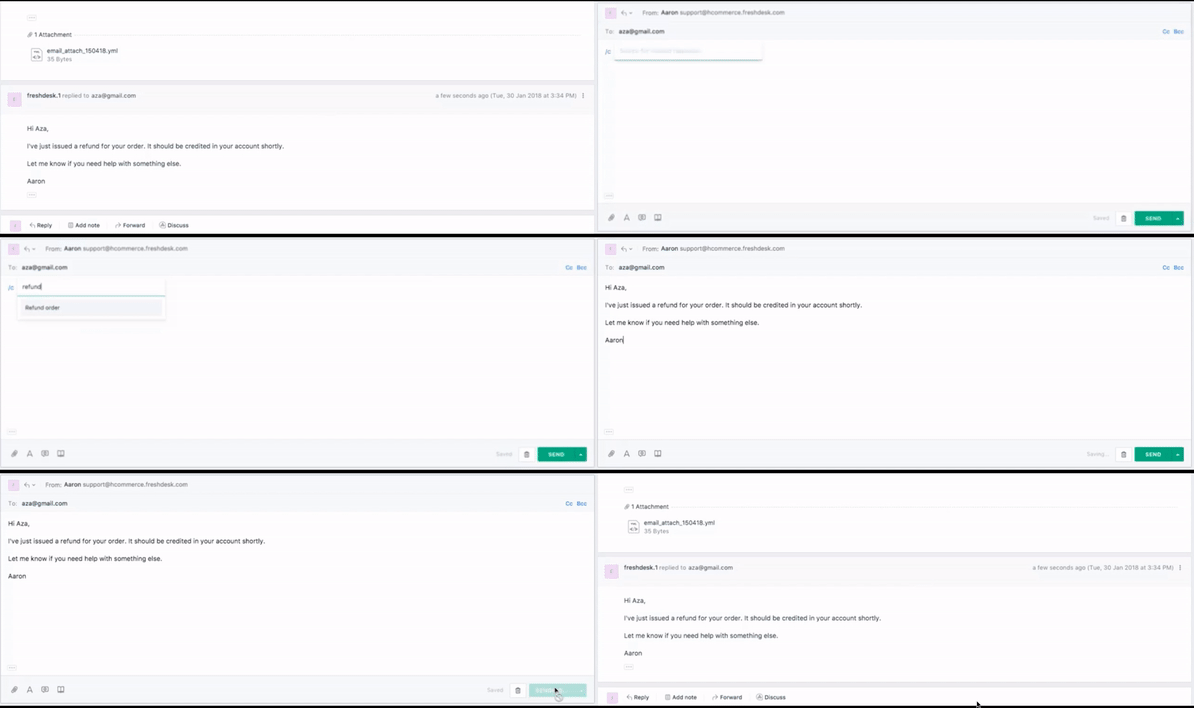
We've launched the quick actions on ticket reply - This allows you to quickly select a canned response with a keyboard shortcut.Typing in /c will help you to search the canned responses whereas /s lets you to choose from your kbase articles.


Here's a quick GIF on how this feature representation works : 


Note : This is a MINT only feature. For more details on MINT, read What's changed in Freshdesk MINT


Cheers!


  • Contributor
  • April 21, 2018

@Aravind -- that's super helpful! I couldn't find any documentation about it so I recommend adding some (or making it pop up in search better)...


aravind.sundararajan
Skilled Expert
Forum|alt.badge.img+12

@Chris: Here's the article about the quick actions in ticket replies - Quick actions. Hope this helps!


Cheers!


  • Community Debut
  • August 29, 2019

@Aravind - we love the quick replies /c command, really helpful! However, it's only available to use on Tickets. When writing a 'New Email' the command doesn't work - is there a reason for this, could it be changed?


Cheers!


Si


aravind.sundararajan
Skilled Expert
Forum|alt.badge.img+12

@Si Short, Glad you're liking the quick actions :) We need to enable them on other pages along with few other options like adding a canned form as an enhancement. If you have suggestions on how we can make this better, please share it on the discussion thread here.


Cheers!