Closed for Voting

LiveChat Customer Location

Related products:Freshdesk
  • July 1, 2015
  • 2 replies
  • 15 views

Currently when a new LiveChat comes onto the site it gives us a great insight into the page that they are looking at.


If they don't accept it at that point and the end user continues to navigate around your page it keeps you updated as to what page they are looking at.


As soon as you accept the chat it locks it to the page that the end user opened the chat on.

2 replies

Hey James -  this is definitely a useful ask and we have this on our to-do list. Unfortunately, we can't get to this now, as keeping the webpage information dynamic while a chat is continuing is a bit tricky on our backend. Its actually going to take a lot more effort that just continuing the experience before a chat begins. So we have tabled this for now, and can hopefully take it up when we have some bandwidth to address it. 


I realise that's not what you want to hear, but I hope you can bear with us.


aravind.sundararajan
Skilled Expert
Forum|alt.badge.img+12

Hello,


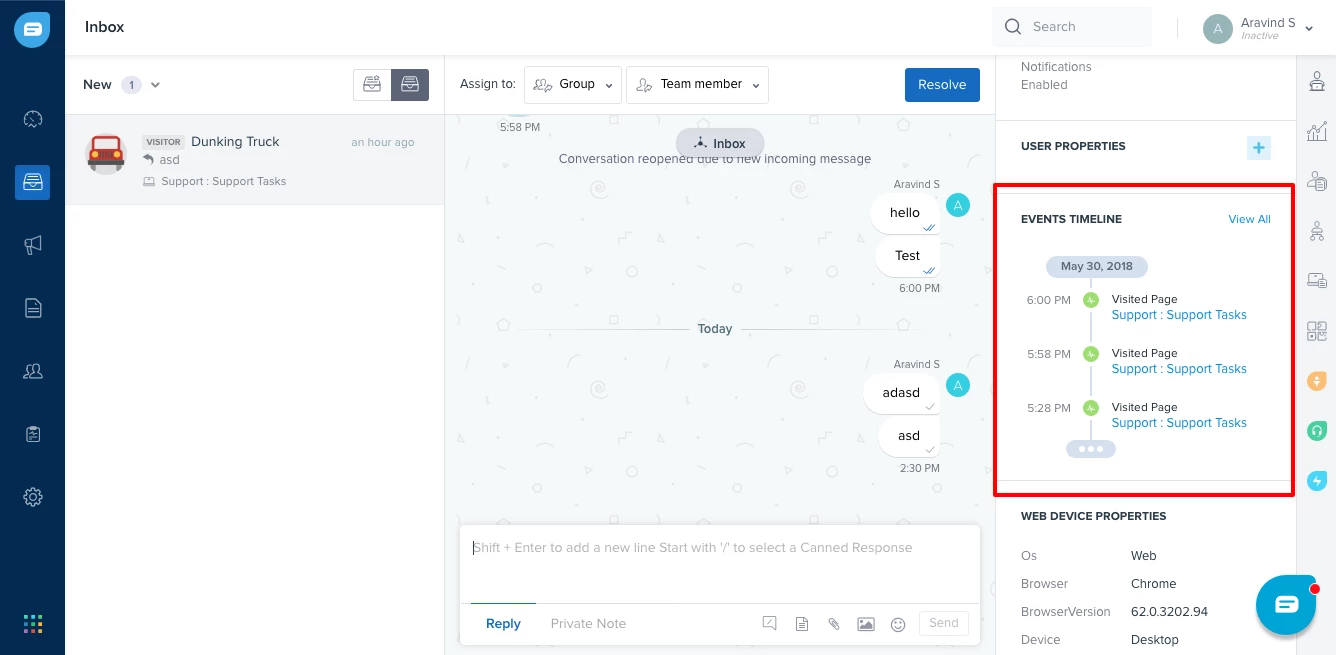
Freshchat has truly replaced the traditional chat channel in Freshdesk as a more powerful alternative packed with a lot of messaging features and a slick User Interface. In Freshchat, you'll be able to look at the various pages visited by the user during the conversation.


The Events timeline on the context pane highlights the various touch points for the user during the chat conversation. For more information on the integration with Freshdesk, please refer to this article.


Cheers!